EasyManua.ls Logo

Philips FR 731 - Remote Control Functions by Source

Philips FR 731
17 pages
Print Icon
To Next Page IconTo Next Page
To Previous Page IconTo Previous Page
Loading...
English
FUNCTIONAL
OVERVIEW
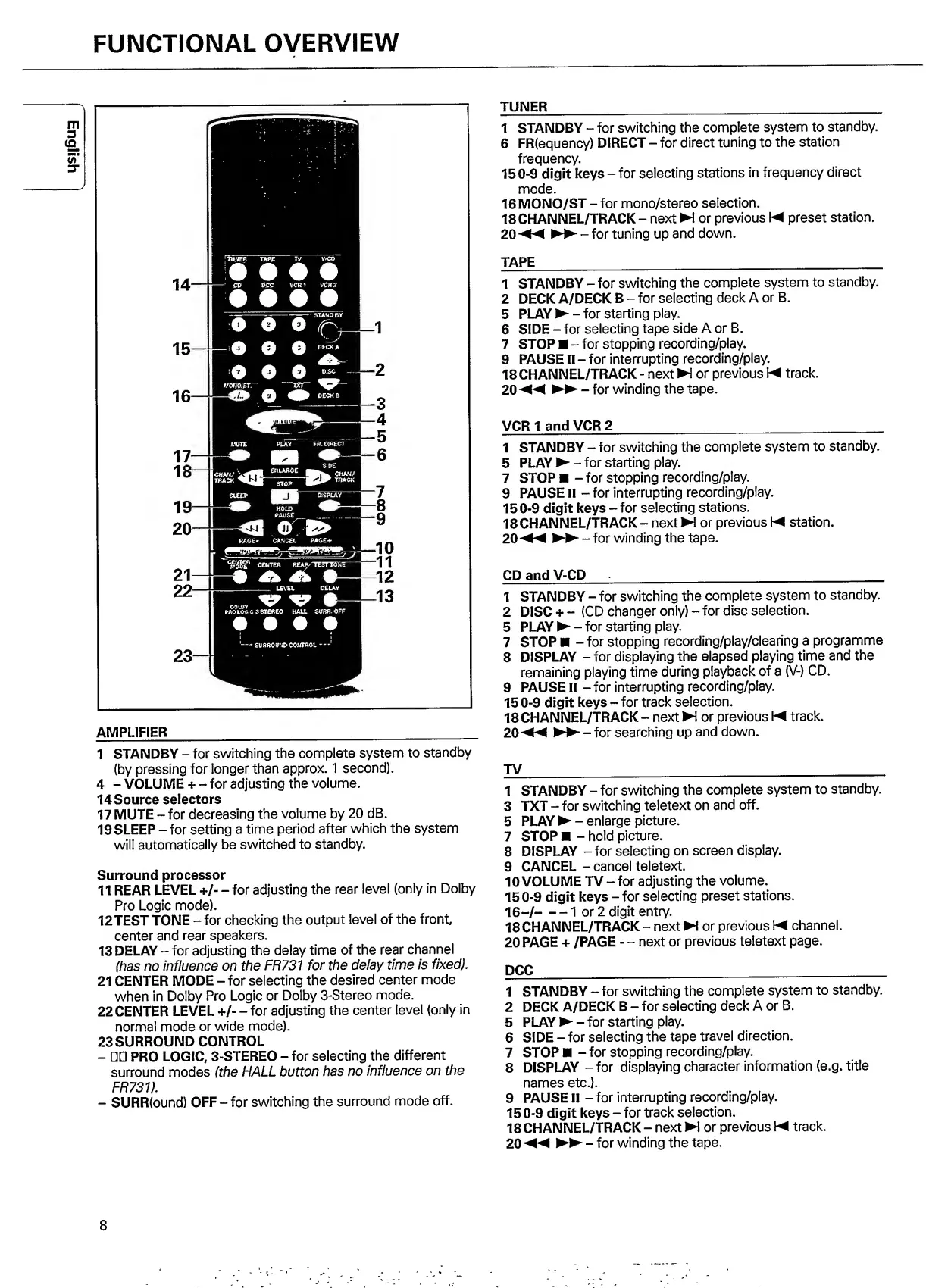
AMPLIFIER
__
I
STANDBY
-
for
switching
the
complete
system
to
standby
(by
pressing
for
longer
than
approx.
1
second).
4
-
VOLUME
+
-
for
adjusting
the
volume.
14Source
selectors
17
MUTE
-
for
decreasing
the
volume
by
20
dB.
19
SLEEP
-
for
setting
a
time
period
after
which
the
system
will
automatically
be
switched
to
standby.
Surround
processor
II
REAR
LEVEL
+/-
-
for
adjusting
the
rear
level
(only
in
Dolby
Pro
Logic
mode).
12TEST
TONE
-
for
checking
the
output
level
of
the
front,
center
and
rear
speakers.
13
DELAY
-
for
adjusting
the
delay
time
of
the
rear
channel
(has
no
influence
on
the
FH731
for
the
delay
time
is
fixed).
21
CENTER
MODE
-
for
selecting
the
desired
center
mode
when
in
Dolby
Pro
Logic
or
Dolby
3-Stereo
mode.
22
CENTER
LEVEL
+/-
-
for
adjusting
the
center
level
(only
in
normal
mode
or
wide
mode).
23
SURROUND
CONTROL
-
□□
PRO
LOGIC,
3-STEREO
-
for
selecting
the
different
surround
modes
(the
HALL
button
has
no
influence
on
the
FR731).
-
SURR(ound)
OFF
-
for
switching
the
surround
mode
off.
TUNER
_
1
STANDBY
-
for
switching
the
complete
system
to
standby.
6
F
R(equency)
DIRECT
-
for
direct
tuning
to
the
station
frequency.
150-9
digit
keys
-
for
selecting
stations
in
frequency
direct
mode.
16
MONO/ST
-for
mono/stereo
selection.
18CHANNEL/TRACK
-
next
!
or
previous
\M
preset
station.
20
◄◄
-
for
tuning
up
and
down.
TAPE
_
1
STANDBY
-
for
switching
the
complete
system
to
standby.
2
DECK
A/DECK
B
-
for
selecting
deck
A
or
B.
5
PLAY
-
f
or
starting
play.
6
SIDE
-
for
selecting
tape
side
A
or
B.
7
STOP
-
for
stopping
recording/play.
9
PAUSE
II
-
for
interrupting
recording/play.
18
CHANNEL/TRACK
-
next
N
or
previous
K
track.
20
MM
-
for
winding
the
tape.
VCR
1
and
VCR
2
_
1
STANDBY
-
for
switching
the
complete
system
to
standby.
5
PLAY
-
for
starting
play.
7
S
TOP*
-
forstopping
recording/play.
9
PAUSE
II
-
for
interrupting
recording/play.
150-9
digit
keys
-
for
selecting
stations.
18
CHANNEL/TRACK
-
next
H
or
previous
\M
station,
20
-
f
or
winding
the
tape.
CD
and
V-CD
__
1
STANDBY
-
for
switching
the
complete
system
to
standby.
2
DISC
+
--
(CD
changer
only)
-
for
disc
selection.
5
P
L
AY
-
for
starting
play.
7
STOP
-
for
stopping
recording/play/clearing
a
programme
8
DISPLAY
-
for
displaying
the
elapsed
playing
time
and
the
remaining
playing
time
during
playback
of
a
(V-)
CD.
9
PAUSE
II
-
for
interrupting
recording/play.
150-9
digit
keys
-
for
track
selection.
18
CHANNEL/TRACK
-
next
H
or
previous
\M
track.
20M<
-
for
searching
up
and
down.
TV
_
1
STANDBY
-
for
switching
the
complete
system
to
standby.
3
TXT
-
for
switching
teletext
on
and
off.
5
PLAY
-
enlarge
picture.
7
STOP
-
hold
picture.
8
DISPLAY
-for
selecting
on
screen
display.
9
CANCEL
-
cancel
teletext.
10
VOLUME
TV
-
for
adjusting
the
volume.
150-9
digit
keys
-
for
selecting
preset
stations.
16
-
/-1
or
2
digit
entry.
18CHANNEL/TRACK-nextH
or
previous
\M
channel.
20
PAGE
+
/PAGE
-
-
next
or
previous
teletext
page.
DCC
_
1
STANDBY
-
for
switching
the
complete
system
to
standby.
2
DECK
A/DECK
B
-
for
selecting
deck
A
or
B.
5
PLAY
-
for
starting
play.
6
SIDE
-
for
selecting
the
tape
travel
direction.
7
STOP
-
for
stopping
recording/play.
8
DISPLAY
-
for
displaying
character
information
(e.g.
title
names
etc.).
9
PAUSE
II
-
for
interrupting
recording/play.
150-9
digit
keys
-
for
track
selection.
18
CHANNEL/TRACK
-
next
H
or
previous
\M
track.
20
►►
-
for
winding
the
tape.
8

Other manuals for Philips FR 731

Related product manuals