EasyManua.ls Logo

Philips FR 731 - Display Indicators; Remote Control Operation

Philips FR 731
17 pages
Print Icon
To Next Page IconTo Next Page
To Previous Page IconTo Previous Page
Loading...
FUNCTIONAL
OVERVIEW
DIS
PLAY
%
IM
M
lu/t
IM
todt
ay
@3
m
my
km
i
SEW:
VOTE
SLEEP
CH
VIDE012
f.ft
VVI
□□
DOLBY
PRO
LOGIC,
DOLBY
3-STEREO
Indicates
the
selected
surround
mode.
FM,
AM
Indicates
the
selected
waveband.
The
frequency
of
the
tuned
station
is
indicated
in
MHz
(for
FM)
or
in
kHz
(for
AM).
n
o
O
o
O
u
u
>j
u
O
Indicates
the
station
frequency.
VOL.
Show
volume,
bass,
treble
and
balance
settings.
AUTO
Lights
up
when
operating
auto
tuning
or
auto
presetting.
MUTE
Lights
up
when
the
MUTE
button
on
the
remote
control
is
pressed.
MEMO
Flashes
when
the
memory
has
been
opened
to
store
a
preferred
station.
STEREO
Lights
up
when
an
FM
stereo
transmission
is
received.
MONO
Lights
up
when
the
MONO/ST(ereo)
button
on
the
remote
control
has
been
pressed
to
receive
a
mono
signal.
VIDEO
1/VIDEO
2
Lights
up
when
the
corresponding
source
is
selected.
o
o
u
u
Indicates
the
selected
channel
number,
sleep
time
{in
minutes),
bass
or
treble
level.
SLEEP
Lights
up
when
the
sleep
timer
is
active.
CH(annel)
Shows
the
selected
channel.
NR(normal),
Wlfwide
band),
PH(phantom)
Indicates
the
selected
center
mode
in
Dolby
Pro
Logic
or
Dolby
3-Stereo
mode.
TEST
Lights
up
when
Test
Tone
mode
is
activated.
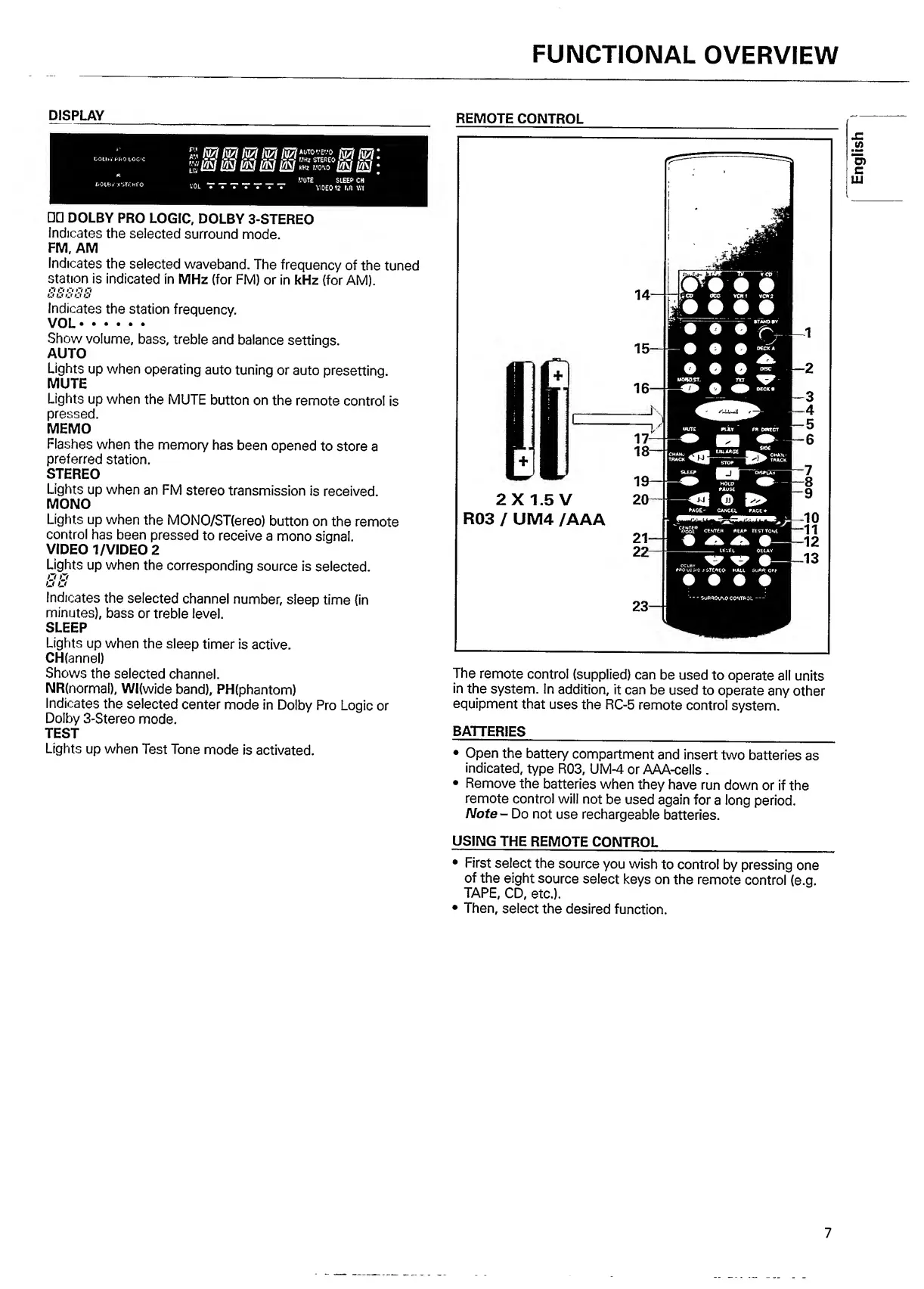
REMOTE
CONTROL
The
remote
control
(supplied)
can
be
used
to
operate
all
units
in
the
system.
In
addition,
it
can
be
used
to
operate
any
other
equipment
that
uses
the
RC-5
remote
control
system.
BATTERIES
_
_
Open
the
battery
compartment
and
insert
two
batteries
as
indicated,
type
R03,
UM-4
or
AAA-cells
.
Remove
the
batteries
when
they
have
run
down
or
if
the
remote
control
will
not
be
used
again
for
a
long
period.
Note
-
Do
not
use
rechargeable
batteries.
USING
THE
REMOTE
CONTROL
_
First
select
the
source
you
wish
to
control
by
pressing
one
of
the
eight
source
select
keys
on
the
remote
control
(e.g.
TAPE,
CD,
etc.).
Then,
select
the
desired
function.
7
English

Other manuals for Philips FR 731

Related product manuals