6 EN
g Volume dial
• Rotate clockwise to increase volume;
rotate counterclockwise to decrease
volume.
h USB 1 PLAY/USB 2 PLAY/REC
• Jack for a USB mass storage device.
• Record to USB.
i ALBUM/PRESET+/-
• Skip to the previous/next album.
• Select a preset radio station.
j PLAY USB 1/PLAY USB 2
• Play audio from USB source.
k USB DELETE
• Delete audio les stored on a USB
device.
l DBB
• Turn on or off dynamic bass
enhancement.
m DSC sound effects keys
• Select a preset sound equalizer setting.
n MIC 1 VOL/MIC 2 VOL
• Adjust microphone volume.
o MIC 1/2 (Microphone port)
• Jack for a microphone.
p AUDIO IN
• Audio input jack (3.5mm) for an
external audio device.
q PC IN
• Connect to an external device.
r MAX SOUND
• Turn on or off instant power boost for
sound.
s USB 2 RECORD
• Record to a USB device.
t
• Start or pause play.
u DYNAMIC LIGHT
• Turn on or off the lighting effect.
v Bluetooth indicator
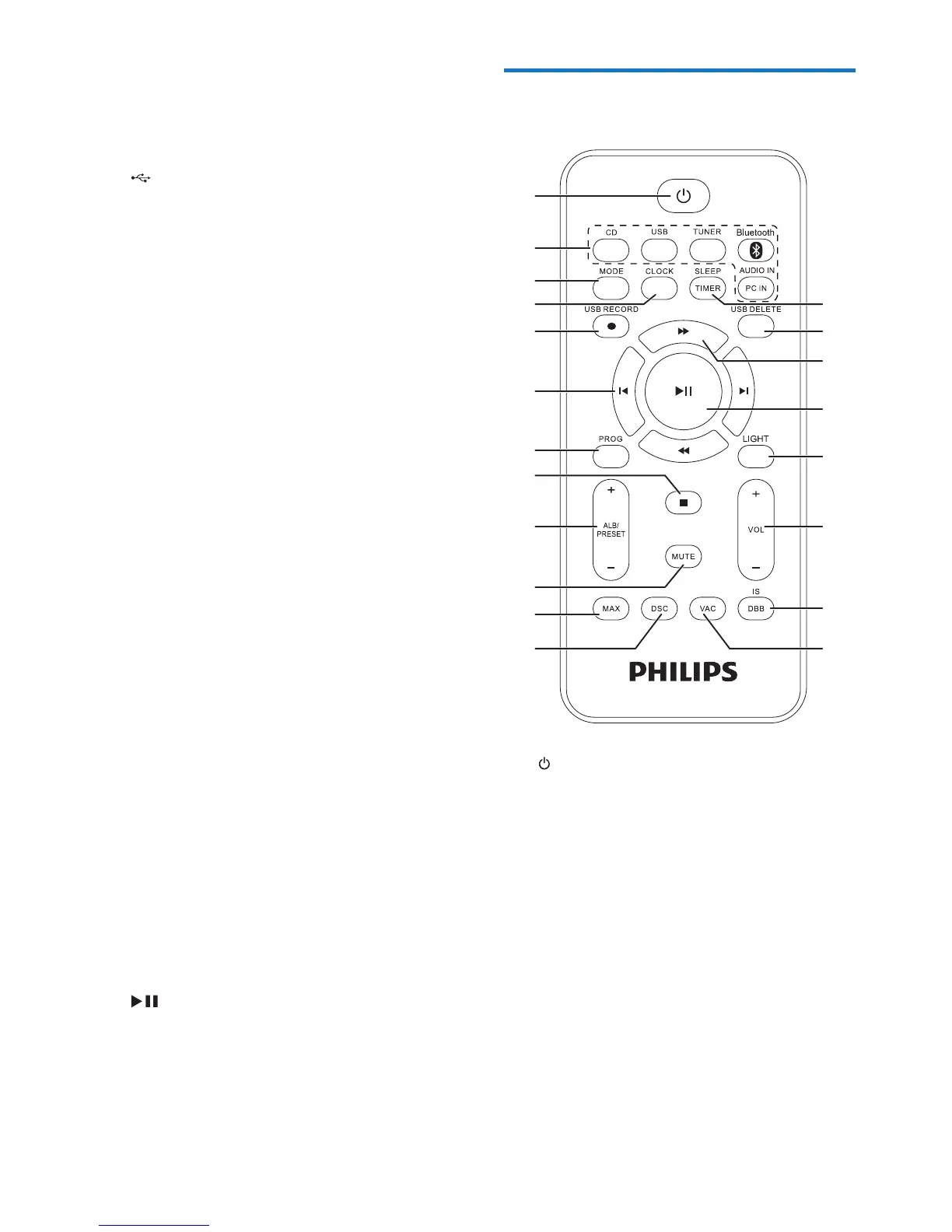
Overview of the remote
control
a
• Turn on the unit or switch to standby
mode.
b Source selection keys
• Select a source.
c MODE
• In Disc/USB mode, select repeat play
or random play.
d CLOCK
• Set the clock.
• View the clock during play.
e USB RECORD
• Record to a USB device.
a
b
c
d
e
f
g
h
i
j
k
l
t
s
r
q
p
o
n
m


 To Next Page