
 Need help?
Do you have a question about the Philips GoGear SA2VBE04 and is the answer not in the manual?
Instructions for product care, operating temperatures, and cleaning agents to avoid.
Guidelines for listening at moderate volumes and for reasonable periods of time to prevent hearing loss.
Users must respect copyright laws when copying or distributing content, whether from the internet or other sources.
Information on data logging for product improvement and details about audio decoders.
Warning about battery removal, disposal instructions, and compliance notices for Canada and USA.
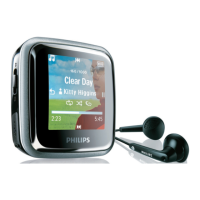
List of items included in the product package: Player, Earphones, and Quick start guide.
Diagram and description of the VIBE player's controls and connection ports.
Instructions on how to set a volume limit to protect hearing and re-enable maximum volume.
Table detailing menu modes, functions, and corresponding actions for the VIBE player.
Steps to connect the VIBE player to a computer using a USB cable for charging and data transfer.
Instructions for installing the Philips Songbird software on a computer for the first time.
Procedure to reinstall Philips Songbird software from VIBE if it was deleted after the first installation.
Explanation of battery status indicators and details about preloaded software like Songbird.
List of files preloaded on the VIBE player, including User Manual and FAQ.
Step-by-step guide to check for and install firmware updates using Philips Songbird.
Explanation of how to turn the player on/off and the automatic shut-down feature for battery saving.
Instructions on how to lock and unlock the player's buttons to prevent accidental operation.
Details on Philips Songbird's capabilities for purchasing, managing, and playing media.
Guide to creating a media library by importing files from directories or iTunes.
Steps to configure CD ripping options and install necessary add-ons within Songbird.
Instructions for exporting Songbird library to iTunes and importing recordings from VIBE.
Information on purchasing content online and importing recorded audio files into the library.
Explanation of the Songbird media library structure and how to enable automatic media management.
Steps to remove media from the library and delete files using Songbird or Windows Explorer.
Guide to setting up folder monitoring and fetching album artwork for music tracks.
Information on playlist functionality, including creating, adding to, and removing from playlists.
Detailed steps for creating new playlists and adding or removing music titles.
How to find and install new themes or 'feathers' to customize the Songbird library's look.
Procedure to format the VIBE player using Philips Songbird, erasing all files.
Instructions to restore the VIBE player to its factory settings using the Philips Songbird repair feature.
Steps to navigate music mode, play tracks, and control playback within a music track.
Guide to playing music from filtered selections and finding music by various criteria.
Procedure to delete the currently playing music track on the VIBE player.
Methods for deleting multiple music tracks using Philips Songbird or Windows Explorer.
Steps to access video mode, play videos, and control playback within a video file.
Methods for deleting the currently playing video or multiple video files.
Instructions for transferring pictures to VIBE and viewing them on the player.
How to start a slideshow and delete displayed or multiple picture files.
Steps to access radio mode, use earphones as an antenna, and tips for radio playback.
Guide to manually tuning stations, auto-tuning presets, and playing preset radio stations.
Steps to record audio using the built-in microphone and listen back to recordings.
Methods to transfer recorded audio files from VIBE to a computer using Songbird or Windows Explorer.
Procedure to delete the currently playing recording on the VIBE player.
Methods for deleting multiple recorded audio files using Windows Explorer.
Instructions on using the VIBE player to store and transfer data files between a computer and the player.
Options for setting playback modes, equalizer, and volume limit for personalized audio.
Settings for customizing the player's display theme, screen off timer, and sleep timer.
Options for selecting player language and viewing device information like capacity and firmware version.
Option to restore the VIBE player to its original factory settings, noting that files are not affected.
Specifications for power supply, battery life, software, and connection interfaces like USB and headphone jack.
Details on supported audio and video formats, bit rates, sample rates, and playback capabilities.
Specifications for the display, storage media capacity, and minimum system requirements for computer connection.
Definitions of compression, bit rate, and other audio data-related terms.
Definitions for decibel, frequency response, FullSound, LCD, and lossless compression.
Definitions for FM modulation and MP3 file format.
Definitions for MSC, MTP, Rhapsody, and ripping process.
Explanation of ripping audio from CDs and the SuperScroll navigation feature.
 General
| Backlight | Yes |
|---|---|
| Display diagonal | 1.5 \ |
| Display resolution | 128 x 128 pixels |
| MP3 bit rates | 8 - 320 Kbit/s |
| WMA bit rates | 5 - 320 Kbit/s |
| Equalizer modes | Classic, Funk, Hip hop, Jazz, Rock, Techno |
| Frequency range | 80 - 18000 Hz |
| RMS rated power | 2 W |
| MP3 sample rates | 8 - 22.050 kHz |
| WMA sample rates | 8 - 48 kHz |
| Channel separation | 45 dB |
| Built-in speaker(s) | - |
| Equalizer bands quantity | 6 |
| Signal-to-Noise Ratio (SNR) | 84 dB |
| Supported radio bands | FM |
| Preset stations quantity | 20 |
| Battery capacity | 240 mAh |
| Battery recharge time | 4 h |
| Continuous audio playback time | 24 h |
| Package type | D-box |
| Package depth | 30 mm |
| Package width | 110 mm |
| Package height | 120 mm |
| Output power | 2.4 mW |
| Display diagonal (metric) | 3.81 cm |
| Sound enhancement technology | FullSound |
| Type | MP4 player |
| Player media type | Flash memory |
| Video memory capacity | - h |
| Total storage capacity | 4 GB |
| Music memory capacity (songs) | 900 |
| Cables included | USB |
| Product color | Silver |
| Audio formats supported | APE, FLAC, MP3, WAV, WMA |
| Image formats supported | BMP, JPG |
| Video formats supported | MP4 |
| Headphone connectivity | 3.5 mm |
| Interface | USB 2.0 |
 Weight and Dimensions
| Depth | 11.5 mm |
|---|---|
| Width | 66.8 mm |
| Height | 44 mm |
| Weight | 38 g |







 To Next Page
