
 Need help?
Do you have a question about the Philips GoGear SA2VBE and is the answer not in the manual?
Provides guidance on the proper care and upkeep of the device to prevent damage or malfunction.
Advises on safe listening practices to prevent hearing damage from high volume or prolonged exposure.
Lists the items included in the product packaging, such as the player, earphones, and quick start guide.
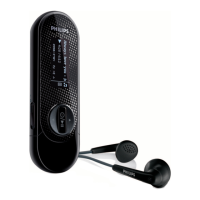
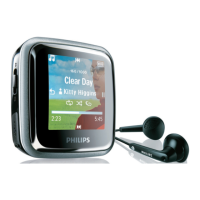
Details the device's buttons, ports, and their functions, including navigation and connection points.
Describes the structure and options available in the device's main menu for navigation and functionality.
Provides instructions on how to reinstall the Philips Songbird software if the installer file was deleted.
Explains how to set a maximum volume level to protect hearing and provides steps to re-enable maximum volume.
Provides step-by-step instructions on how to connect the VIBE device to a computer via USB for charging and data transfer.
Guides users through the initial installation process of the Philips Songbird software on their PC.
Details the process of checking for and installing firmware updates for the VIBE using the Philips Songbird software.
Explains how to let Songbird manage media files by setting options for organizing the library.
Provides instructions on how to navigate to the music mode and play audio tracks on the VIBE device.
Explains how to skip forward/backward within a music track and access more music options.
Details the different ways to find music on the VIBE, including by song, artist, album, or playlist.
Guides users on how to select and play video files on the VIBE device.
Explains how to skip forward/backward within a video and access more video options.
Guides users on selecting and viewing picture files, including full-screen mode and rotation options.
Guides users on how to access the FM radio mode, noting that earphones act as the antenna.
Explains how to manually search for stronger radio signals and fine-tune frequencies.
Details the auto-tune feature that finds and saves radio stations to presets.
Details how to record audio directly from the FM radio, noting feature availability depends on the VIBE version.
Guides users on how to use the built-in microphone to record audio or voice memos.
Explains how to use the VIBE as a portable storage device to transfer and carry data files.
Details how to customize VIBE settings including Play mode, Sound settings, Display settings, and Sleep timer.
Specifies power details including the battery type, capacity, and play time for music and video.
Lists the built-in memory capacities for different VIBE models (e.g., 4GB, 8GB, 16GB NAND Flash).
Details supported audio formats like MP3, WMA, WAV, FLAC, and APE, including bit rates and sample rates.
 General
| Brand | Philips |
|---|---|
| Model | GoGear SA2VBE |
| Category | MP3 Player |
| Storage Capacity | 2 GB |
| Display Type | LCD |
| Screen Size | 1.5 inches |
| Audio Formats Supported | MP3, WMA |
| Connectivity | USB 2.0 |
| Battery Life (Audio) | Up to 20 hours |
| FM Radio | Yes |
| Voice Recording | Yes |
| Headphone Jack | 3.5 mm |








 To Next Page