26
13 Settings
This is how you customize VIBE:
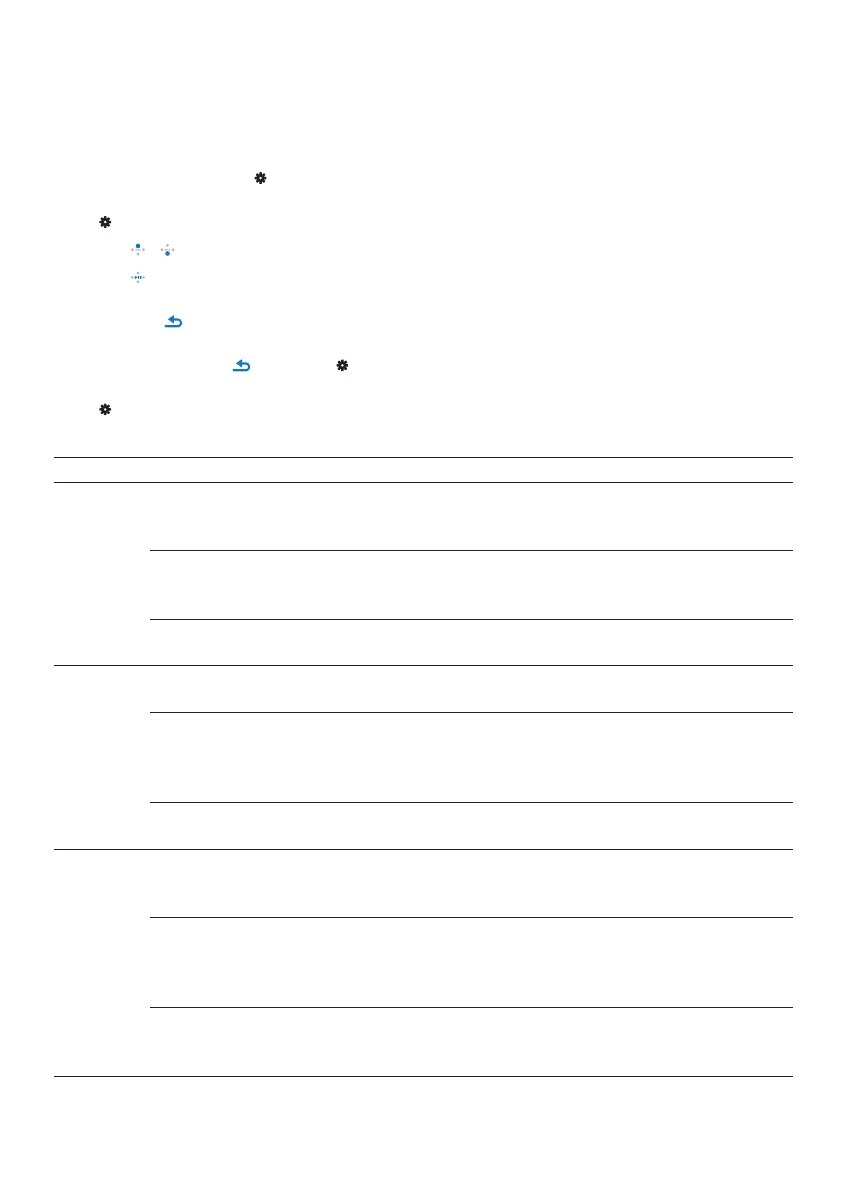
From the main menu, select to enter settings
mode.
In the menu, navigate as follows:
1 Press / to select an option.
2 Press to conrm a selection and go to
the next level (when available).
Press • to return to the previous
level.
Press and hold • to exit the
menu.
In the menu, the following options are
available:
Settings Options menu Sub-options menu
Play mode Play music from... All songs•
...this album•
...this artist•
Repeat Repeat off (default)•
Repeat 1•
Repeat all•
Shufe Shufe off (default)•
Shufe all•
Sound
settings
FullSound Off (default)•
On*•
Equalizer Off (default) •
Rock•
Funk•
Hip hop•
Jazz•
Classical•
Techno•
Custom•
Volume limit Off (default)•
Set•
Display
settings
Theme Black (default)•
Blue•
Red•
Screen off timer 15 sec. (default)•
30 sec.•
45 sec.•
Always on•
Sleep timer Time left: [x] minutes•
Off (default)•
Set•
EN




 To Next Page