7
3 Getting started
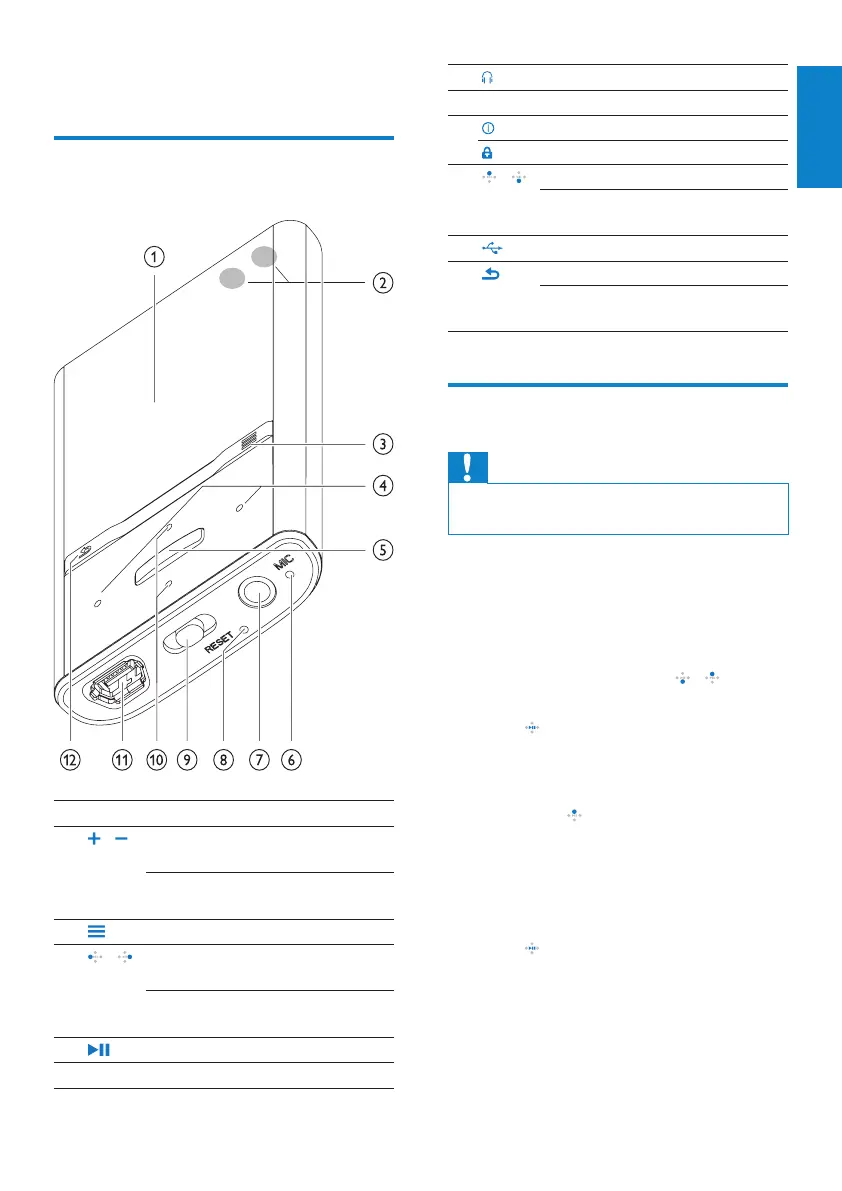
Overview of the controls and
connections
a
display
b
/ press: increase/decrease the
volume
press and hold: increase/
decrease the volume quickly
c
show options menu
d
/ press and hold: skip to next/
previous quickly
in play screen, press and hold to
scan through current track
e
press: play/pause/conrm
f
MIC microphone
English
EN
g
headphone jack
h
RESET press: reset VIBE
i
slide and hold: turn VIBE on/off
slide: lock/unlock all buttons
j
/ in list, press: scroll up/down
in list, press and hold: scroll up/
down quickly
k
USB connector plug
l
press: back one level
press and hold: return to root
menu
Limit the volume
Caution
Listening to loud sounds for longer than a •
moment can be harmful to the listener.
You can set the volume level of VIBE to limit the
maximum volume output.
1 From the main menu, select
[Settings]>[Sound settings] > [Volume
limit].
2 Press the volume controls / to adjust
the level.
3 Press to conrm.
When you set a volume limit, VIBE can »
no longer exceed the set volume, even
if you press the button to increase the
volume .
To enable maximum volume again:
1 Select [Settings] > [Sound settings]
>[Volume limit].
2 Set the volume limit to maximum.
3 Press to conrm.









 To Next Page