regulating range, refer to Chapter
‘Functions Overview‘.
1
Follow the steps in “Preparations
before cooking”.
2
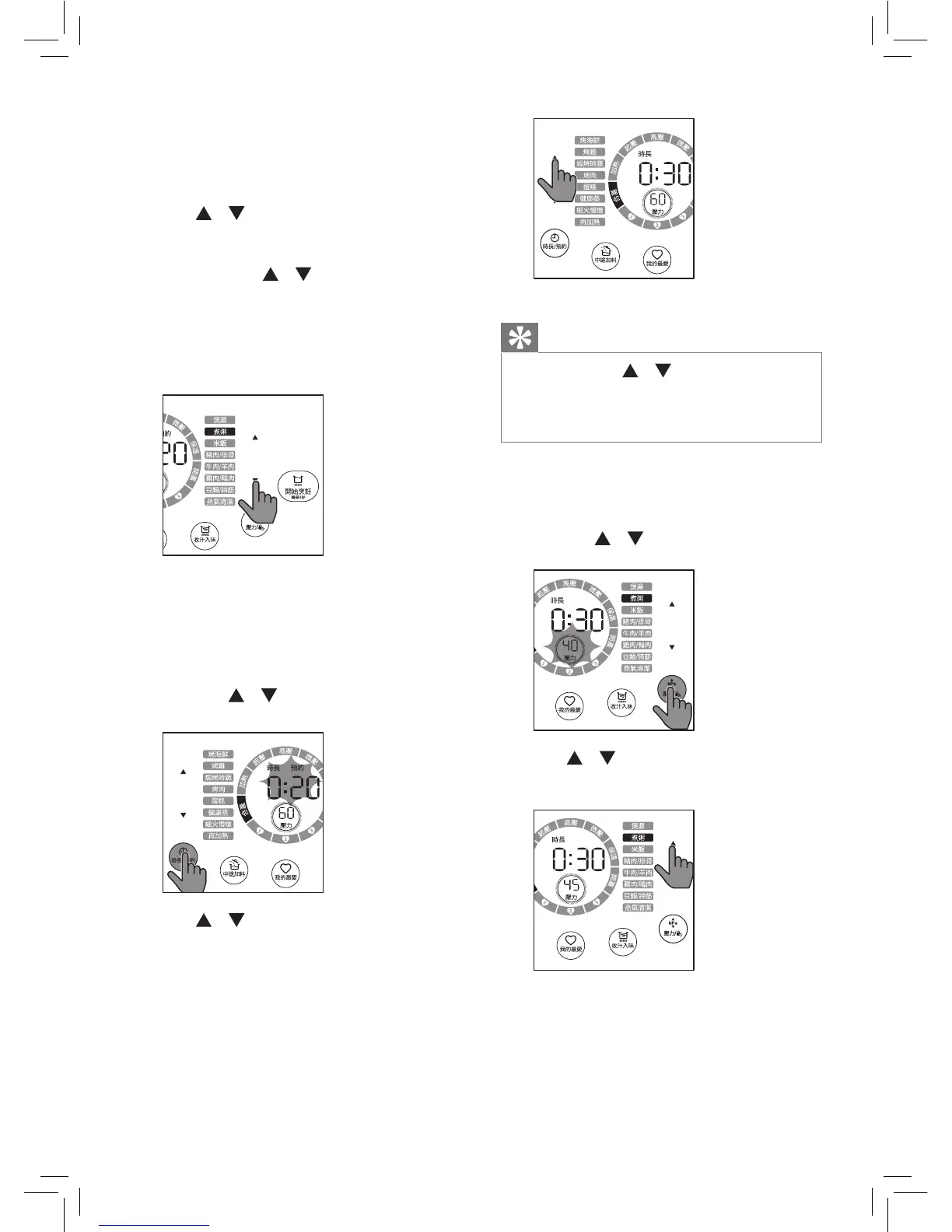
Tap / on the right to choose
one of the pressure cooking
functions ( if you want to choose
’ 健康蒸’, tap / on the left).
» The chosen cooking function
lights up, the default pressure
keeping time and pressure are
displayed on the screen.
3
To set a dierent pressure keeping
time, tap 時長/預約, Cooking time
lights up.
» The pressure keeping time
blinks.
» The / on the left is on.
4
Tap / on the left to set the
cooking time. For the cooking time
adjustable range, refer to Chapter
‘Functions Overview’.
Tip
•
Tap and hold / to fast forward or
fast backward time.
•
The cooking time is not adjustable for
米飯.
5
To set a dierent cooking pressure,
tap 壓力
button.
» The pressure blinks on the screen.
» The / on the right is on.
6
Tap / to choose the pressure
you need.


 To Next Page