Tip
•
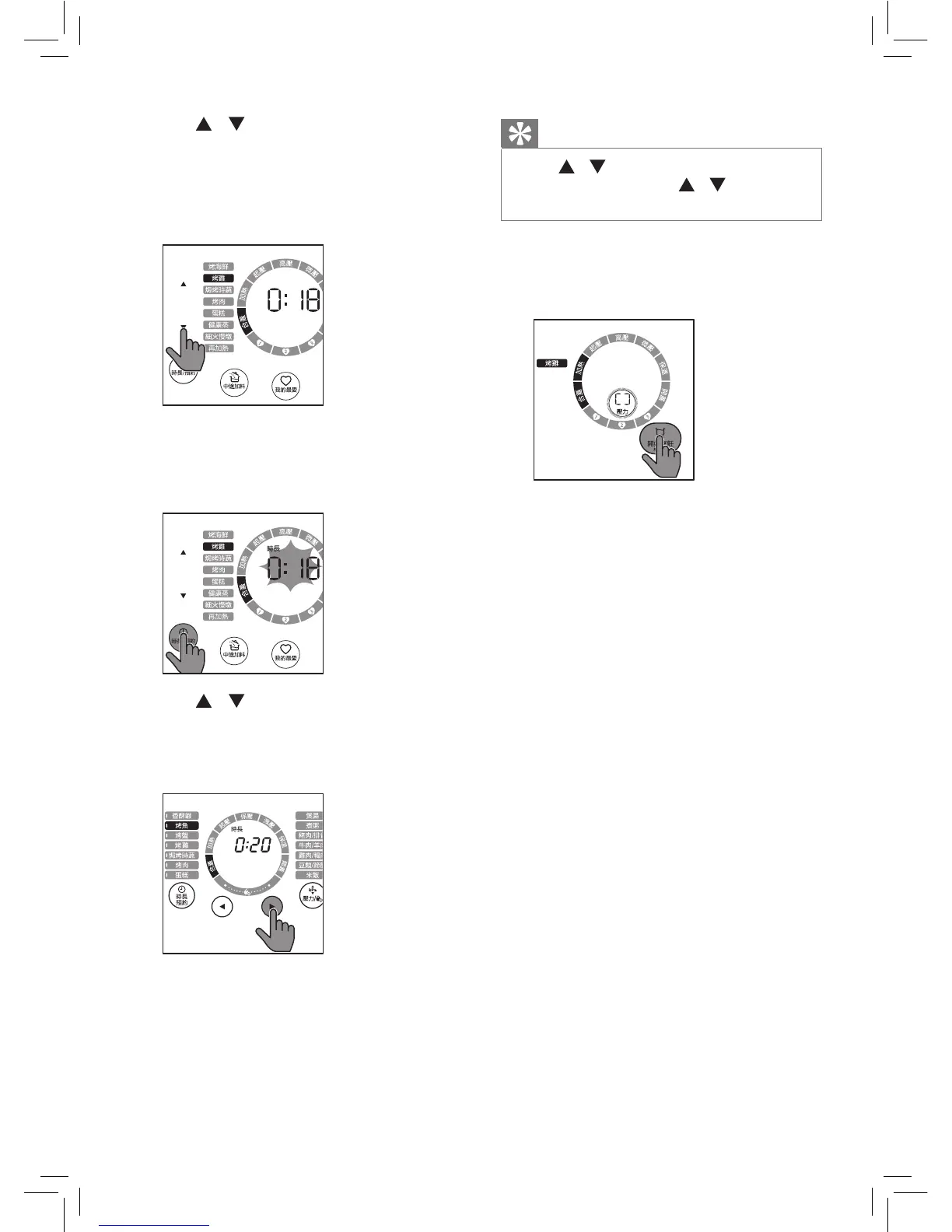
Tap / to adjust time by one
minute. Tap and hold / to fast
forward or fast backward time.
5
Tap and hold 開始烹飪 for 3
seconds, the All-in-One cooker
starts working in the selected mode.
6
The All-in-One cooker reaches the
preset temperature, the countdown
starts. Put the ingredients into the
inner pot.
7
DO lock the lid if you want to close
it. If the ingredients has more
moisture, the All-in-One cooker will
release pressure automatically. You
can open the lid after the pressure
is released suciently.
8
When the cooking process is
nished, the All-in-One cooker
automatically switches to keep
warm mode.
» The 保溫 indicator on the status
ring is on.
2
Tap / on the left to choose a
function you need.
» The chosen cooking function
lights up, the default cooking
time is displayed on the screen.
3
To set a dierent pressure keeping
time, tap 時長/預約, 時長
lights up.
» The cooking time blinks.
4
Tap / on the left to set the
cooking time. For the cooking time
adjustable range, refer to Chapter
‘Functions Overview‘.


 To Next Page