6
4
✁✂✄ ✁ ☎✁☎✄✆ ✝✞✟✄✆ ✠✟✡☎✄ ☛☞✌ ✍✆ ✎✍✏ ✌✑ ✁✎✒ ✓✍✞✒
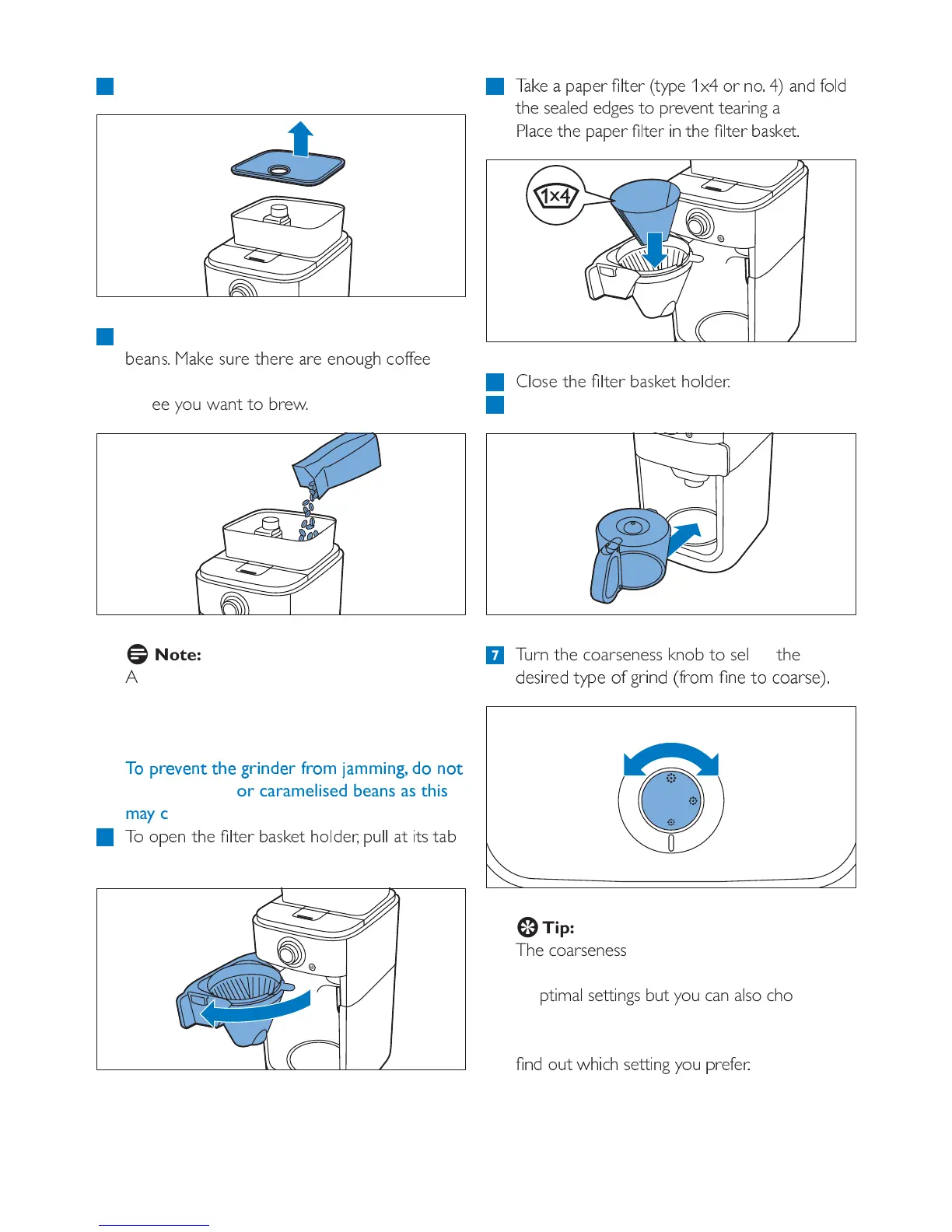
the sealed edges to prevent tearing and folding.
✔✞✁✕✄ ✟✖✄ ☎✁☎✄✆ ✝✞✟✄✆ ✗✎ ✟✖✄ ✝✞✟✄✆ ✘✁✙✂✄✟✏
5
✚✞✍✙✄ ✟ ✖✄ ✝✞✟✄✆ ✘✁✙✂✄✟ ✖✍✞✒✄✆✏
6 Put the jug in the appliance.
7 Turn the coarseness knob to select the
✒✄✙✗✆✄✒ ✟✡☎✄ ✍✓ ✛✆ ✗✎✒ ✠✓✆✍✜ ✝✎✄ ✟✍ ✕✍✁✆ ✙✄✑✏
E
Tip:
The coarseness knob allows you to choose
between nine different settings. We preselected
3 optimal settings but you can also choose any
setting in between the icons. We advise you to
experiment with the different grind settings to
✝✎✒ ✍✢✟ ✣✖✗✕✖ ✙✄✟✟✗✎✛ ✡✍✢ ☎✆✄✓✄✆✏
1 Remove the coffee bean container lid.
2 Fill the coffee bean container with coffee
✘✄✁✎✙✏ ✤✁✂✄ ✙✢✆✄ ✟✖✄✆✄ ✁✆✄ ✄✎✍✢✛✖ ✕✍✓✓✄✄
beans in the container for the amount of
coffee you want to brew.
D
Note:
Always make sure the coffee bean container is
at least half full.
B
Warning:
✥✦ ✧★✩✪✩✫✬ ✬✭ ✩ ✮★ ✯✫✰✩★ ✱★✦✲ ✳ ✴✲✲✯✫✮✵ ✰✦ ✫✦✬
use unroasted or caramelised beans as this
may cause damage.
3
✍ ✍☎✄✎ ✟ ✖✄ ✝✞✟✄ ✆ ✘ ✁✙✂✄✟ ✖✍✞✒✄✆✶ ☎✢✞✞ ✁✟ ✗✟✙ ✟✁✘
on the right side of the coffeemaker.





 To Next Page