1.0 TECHNICAL SPECIFICATION and SERVICE HINTS
General
Dimensions (WxHxD) : 53.7 X 86.0 X 16.3 mm
(2.11 x 3.39 x 0.64 inch)
Weight : 87 g
Output power : 2 x 5 mW (16 Ohm)
Frequency response : 20 – 16 000 Hs
Equalizer : 5-bands
Hard disk :
Capacity : 4GB – 6GB
Display : 128 x 128 pixels, 65K color
Backlight : White
Battery : 630 mAh Li-Ion
rechargeable battery
Battery life time: >16hrs
File transfer rate using
USB2.0 :
>4Mbyte
Battery charging current 450mA
Maximum charging time :
4hr
Battery cutoff voltage: 3.7V
Connections: Headphone Line Out Jack
Power Connector
Battery level detection
Detection Level Typ.
4-step to 3-step voltage 3.6 – 3.7V
3-step to 2-step voltage 3.53 – 3.6V
2-step to 1-step voltage 3.48 – 3.53V
Force Power Off voltage <3.5V
Current consumption
DC-IN SUPPLY (4.5V)
Battery Charging Current 450mA
BATT. SUPPLY (3.7V)
Power Off 300uA
Idle 30mA
Playback without HDD reading 30mA
Playback with HDD reading 345mA
File transfer using USB2.0 350mA
Headphone out (headphone output load 2x16 ohm)
Maximum output power :
10 mW
Frequency response :
45Hz – 16kHz (16Ω load)
20Hz – 16kHz (15kΩ load)
SNR (A-wght) :
85dB
THD (1kHz) :
0.1%
Left-Right Channel
Separation :
45dB typ. (1k Hz)
40dB typ. (20Hz – 16kHz)
Left-Right Channel
Balance :
<1.0dB (1k Hz)
<2.0dB (20Hz – 16kHz)
Supported playback format
MP3 :
8 - 320 Kbps and VBR
WMA :
32 - 192 Kbps
Sample rates :
8, 11.025, 16, 22.050
32, 44.1, 48
ID3-tag support :
Yes
PC Connectivity :
USB
File Transfer
via Windows Media Player 10 for music and picture
playback or Windows Explorer for general data (music
playback disabled)
Firmware and software upgrades
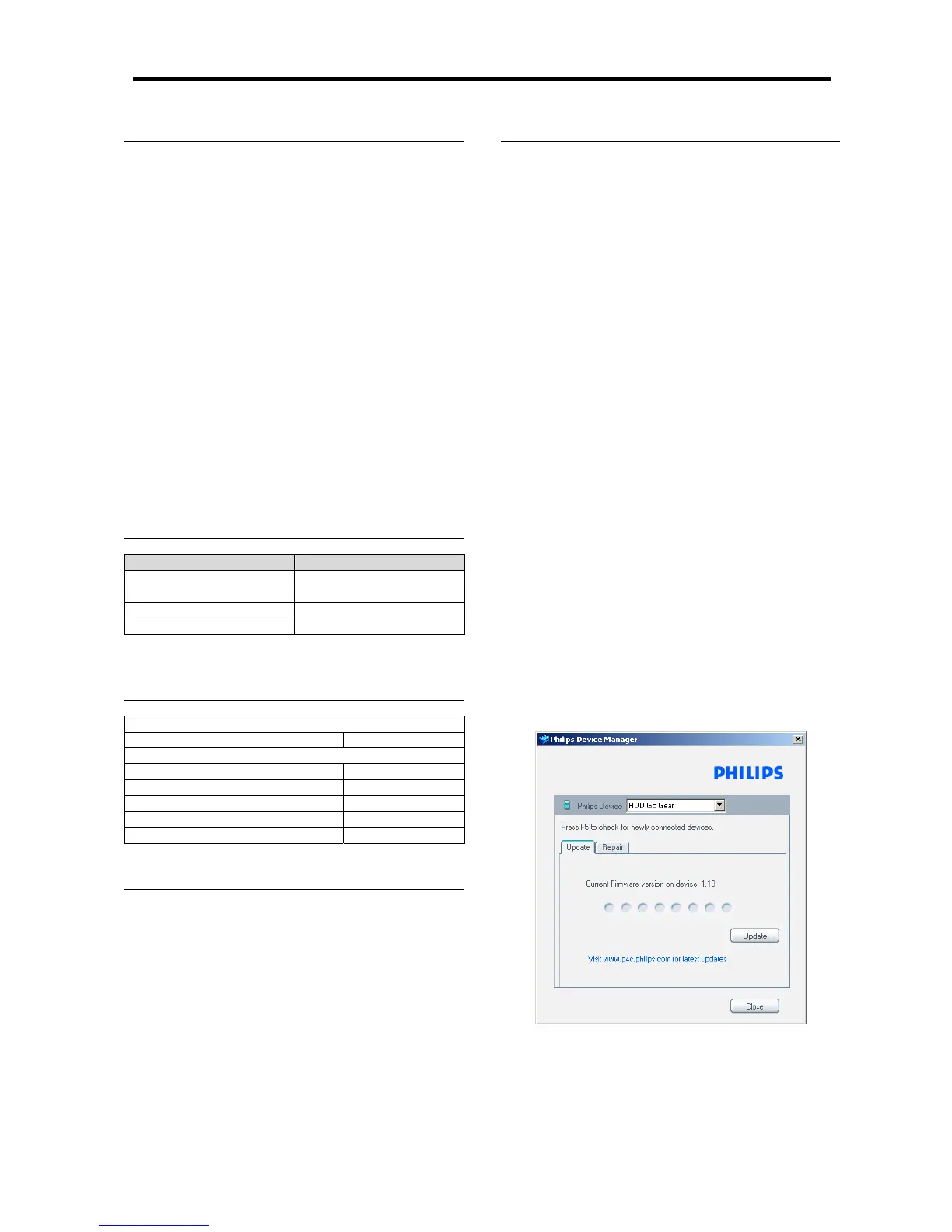
1. If you have not already installed the Device Manager
download the latest version of the Device Manager
from http://www.philips.com/support. You may need to
enter your language preference and the model number
e.g.HDD1630, to access the Device/Firmware Manager
upgrade file.
2. Download the zip file into a temp folder in your
computer. Unzip the file and then double click the
Setup.exe file to start the installation of the Device
Manager.
3. Once the installation is complete, connect the GoGear
to the power supply with the AC/DC adapter.
4. Make sure all other applications such as Philips Device
plug-in, Windows Media Player or Windows Explorer
that accessing the device are closed or else Device
Manager will not recognize the device. Launch the
Philips Device Manager at Start->Programs-
>Philips Device Manager->Philips Device Manager
on your PC.
5. Click Update in the dialogue box
the Philips Device Manager will detect the connection
of your GoGear and the application will automatically
check on the server to see if an update is available and
prompt user to download the updated firmware. Click
YES to start the downloading.







 To Next Page