PHILIPS MEDICAL SYSTEMS
C-1
C
C GLOSSARY OF SYMBOLS/CONTROLS
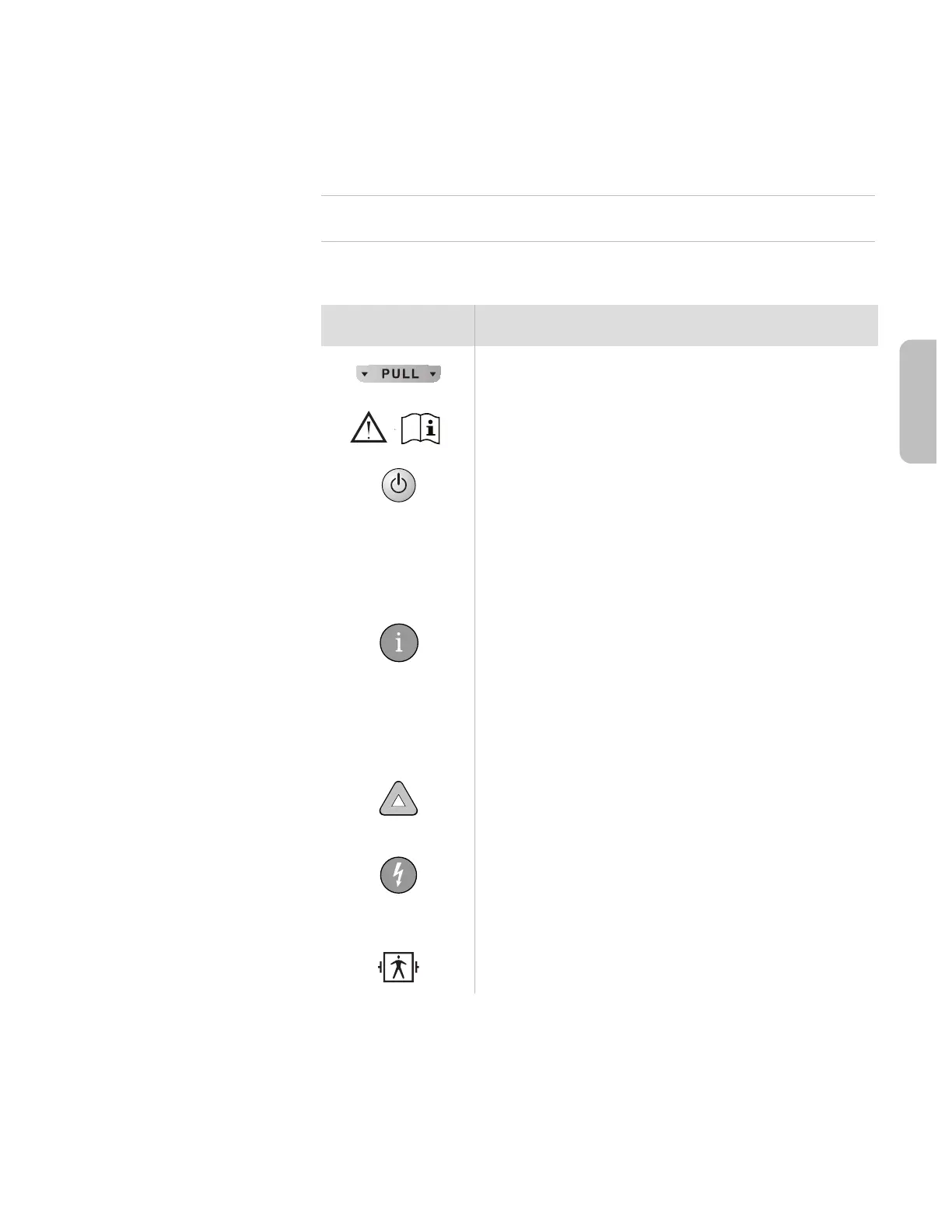
symbol description
Pads cartridge handle. Green. Pulling the handle turns
on the OnSite and opens pads cartridge for use.
Refer to operating instructions.
On/Off button. Green. Pressing the On/Off button
when the OnSite is in standby mode turns the OnSite
on; pressing and holding the On/Off button for one
second when the OnSite is on turns the OnSite off and
disarms the defibrillator. In addition, pressing the On/
Off button stops the battery insertion self-test that
automatically runs when a battery is inserted.
Information button (i-button). Pressing the i-button
while it is flashing during a patient care pause provides
CPR Coaching; pressing it while it is flashing and the
OnSite is chirping provides troubleshooting guidance.
Pressing it until it beeps at other times provides sum-
mary information about the OnSite’s last clinical use
and device status.
Caution light. Flashes during rhythm analysis, and is on
but not flashing when a shock is advised, as a reminder
not to touch the patient.
Shock button. Orange. Flashes when the OnSite is
charged. If a shock is needed, the OnSite directs the
user to press the Shock button to deliver a shock to
the patient.
Defibrillation protection. Defibrillation protected, type
BF patient connection.







 To Next Page