36
Mount the main unit and speakers
Caution
To fi nd a suitable mounting location, make the •
necessary physical and wireless connections.
Mount the main unit and speakers to a solid concrete
•
wall or plaster board wall only!
You can use the supplied bracket to mount the
main unit and speakers to the wall.
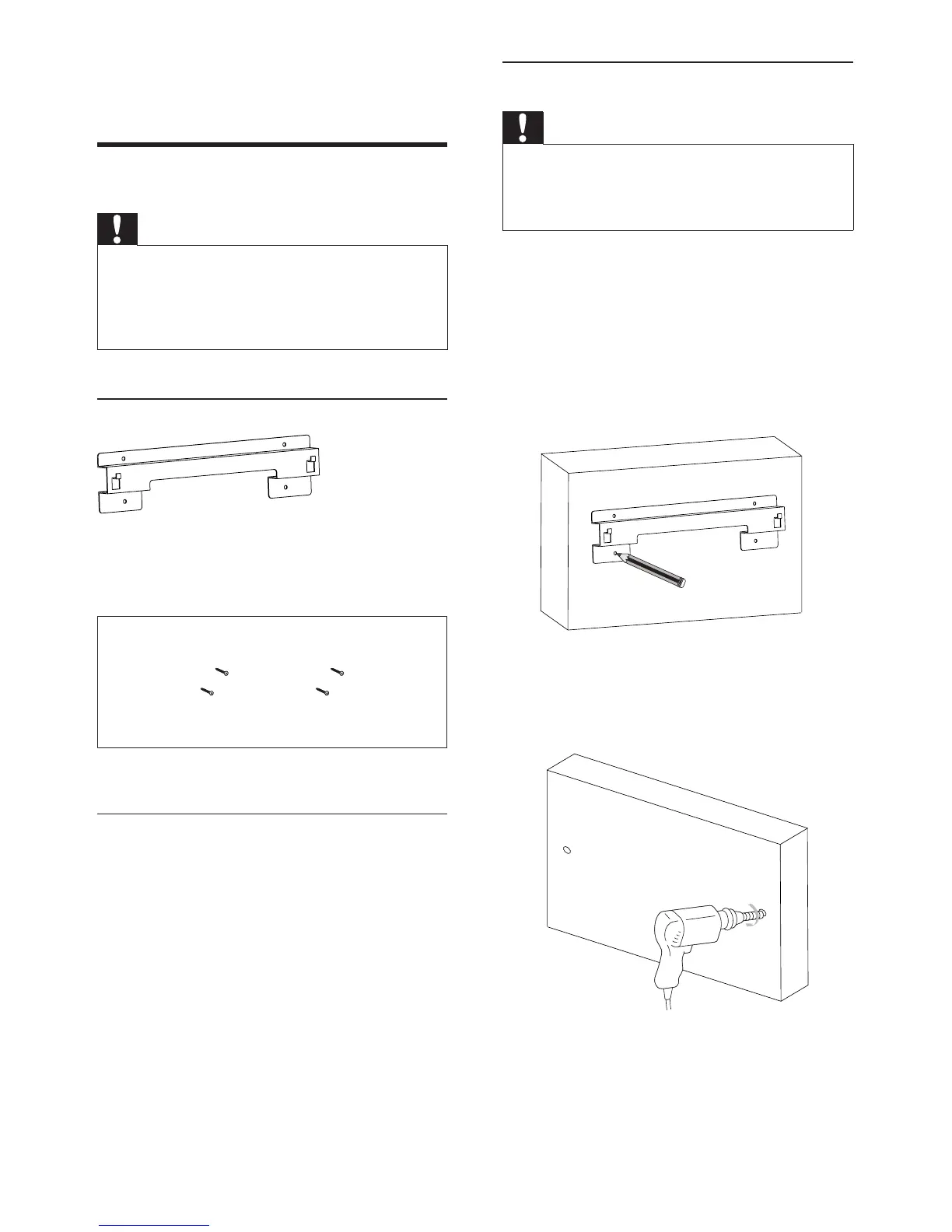
1 Align the bracket in the chosen location
on a wall. Use a pencil to mark the drilling
positions.
2 Drill holes as marked.
3 Secure the wall mount bracket onto the
wall with 4 supplied screws.
12 Appendix
Mount to a wall
Caution
Risk of product damage! Always consult professional •
personnel to safely mount the product to a wall.
Risk of injury! Ensure that no supply ducts such as gas,
•
water or electricity are harmed when you drill the
holes.
What’s in the supplied mounting kit
1 x wall mount bracket for the main unit and
speakers
4 x screws
What else you’ll need
Electric drill•
Screwdriver•
Pencil•
EN


 To Next Page