18 EN
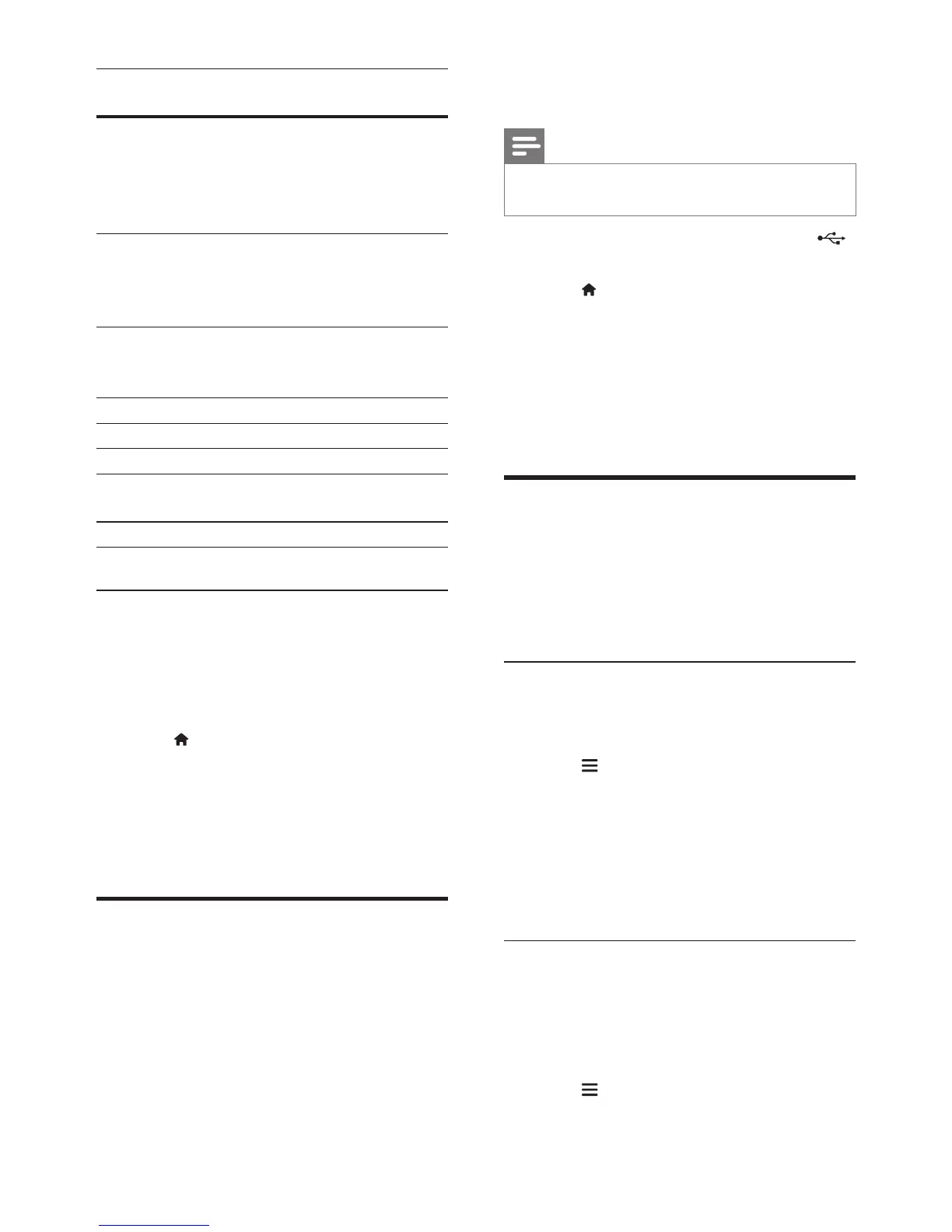
Character
Set
Language
[Standard] English, Albanian, Danish,
Dutch, Finnish, French, Gaelic,
German, Italian, Kurdish (Latin),
Norwegian, Portuguese, Spanish,
Swedish and Turkish
[Central
Europe]
Albanian, Croat, Czech, Dutch,
English, German, Hungarian, Irish,
Polish, Romanian, Slovak, Slovene
and Serbian
[Cyrillic] Bulgarian, Belorussian, English,
Macedonian, Moldavian, Russian,
Serbian and Ukrainian
[Greek] Greek
[Baltic] Estonian, Latvian and Lithuanian
[Chinese] Simplied Chinese
[Chinese-
Traditional]
Traditional Chinese
[Korean] English and Korean
VOD code for DivX
Before you purchase DivX videos and play
them on your home theater, register the home
theater on www.divx.com using the DivX VOD
code.
1 Press (Home).
2 Select [Setup], and then press OK.
3 Select [Advanced] > [DivX
®
VOD Code].
» The DivX VOD registration code for
your home theater is displayed.
USB storage devices
Enjoy pictures, audio, and video stored on a
USB storage device such as an MP4 player or
digital camera.
What you need
• A USB storage device that is formatted for
FAT or NTFS le systems, and complies
with the Mass Storage Class.
• A media le in one of the supported le
formats (see 'File formats' on page 31).
Note
• If you use a USB extension cable, USB HUB, or USB multi-
reader, the USB storage device may not be recognized.
1 Connect a USB storage device to the
(USB) connector on your home theater.
2 Press (Home).
3 Select [Browse USB], and then press OK.
» A content browser is displayed.
4 Select a le, and then press OK.
5 Press the play buttons to control play (see
'Play buttons' on page 15).
Audio, video, and picture
options
Use advanced features when you play pictures,
audio and video les from a disc or a USB
storage device.
Audio options
While playing audio, repeat an audio track, a
disc, or a folder.
1 Press repeatedly to cycle through the
following functions:
• Repeat the current track or le.
• Repeat all the tracks on the disc or the
folder.
• Turn off the repeat mode.
• Repeat the tracks randomly.
Video options
While watching video, select options such
as subtitles, audio language, time search, and
picture settings. Depending on the video source,
some options are not available.
1 Press .
» The video options menu is displayed.




 To Next Page