9 EN
d (Play/Pause)
Start, pause or resume play.
e (Stop)
• Stop play.
• In radio mode, press and hold to erase
the current preset radio stations.
f (Open/Close)
Open or close the disc compartment.
g Display panel
h Disc compartment
Connectors
This section includes an overview of the
connectors available on your home theater.
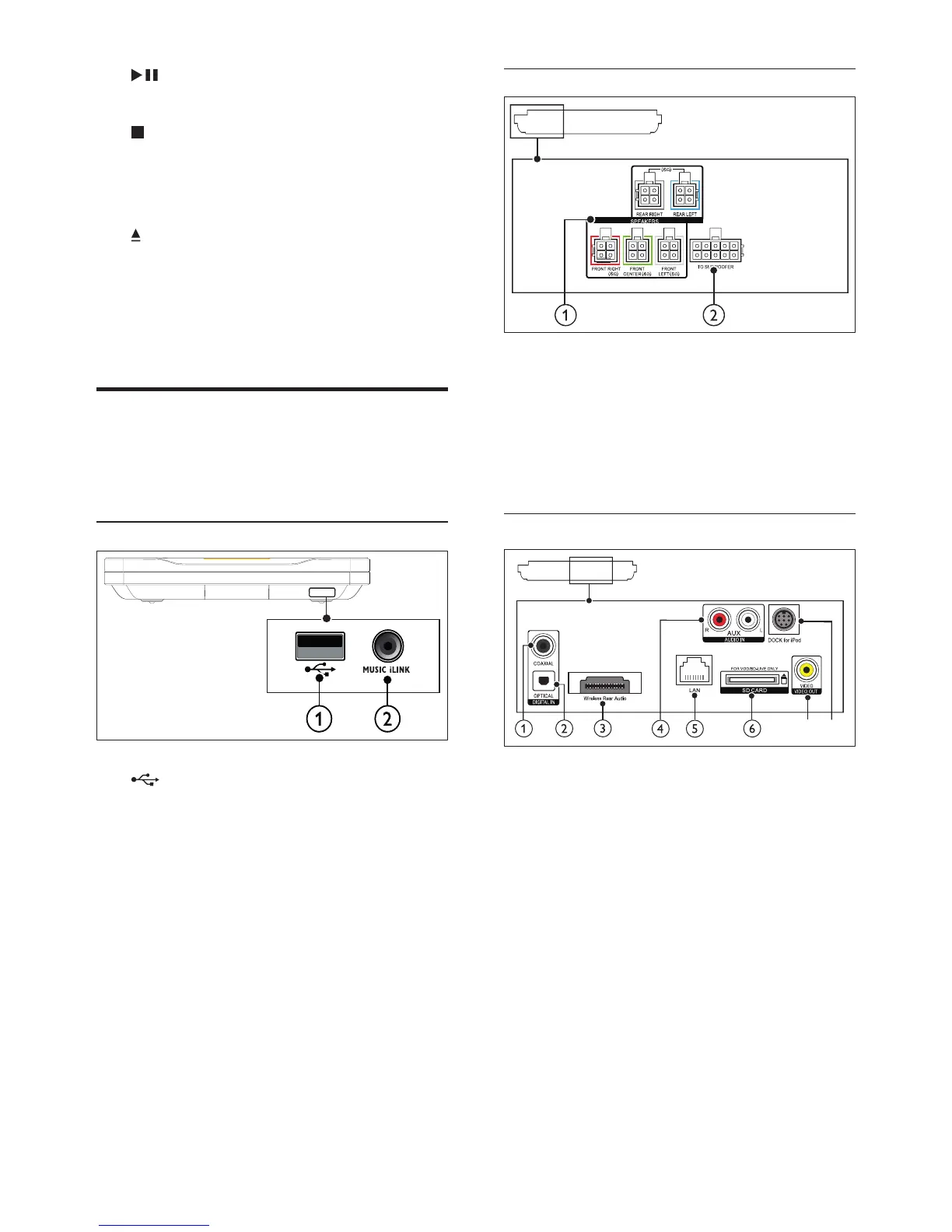
Front connectors
a (USB)
Audio, video or picture input from a USB
storage device.
b MUSIC iLINK
• Audio input from an MP3 player with
3.5mm jack.
• Connect to auto calibration
microphone.
Rear left
a SPEAKERS
Connect to the supplied speakers.
b TO SUBWOOFER
Connect to the supplied subwoofer.
Rear center
a DIGITAL IN-COAXIAL
Connect to a coaxial audio output on the
TV or a digital device.
b DIGITAL IN-OPTICAL
Connect to an optical audio output on the
TV or a digital device.
c Wireless Rear Audio
Connect to a Philips wireless module.
(Model: Philips RWSS9512, sold separately)
d AUDIO IN-AUX
Connect to an analog audio output on the
TV or an analog device.
g
h











 To Next Page