5 EN
2 Your SoundBar
Congratulations on your purchase, and
welcometoPhilips!Tofullybenetfrom
the support that Philips offers, register your
SoundBar at www.philips.com/welcome.
Assemble your Soundbar
Assemble your SoundBar as described in the
quick start guide (Step 1).
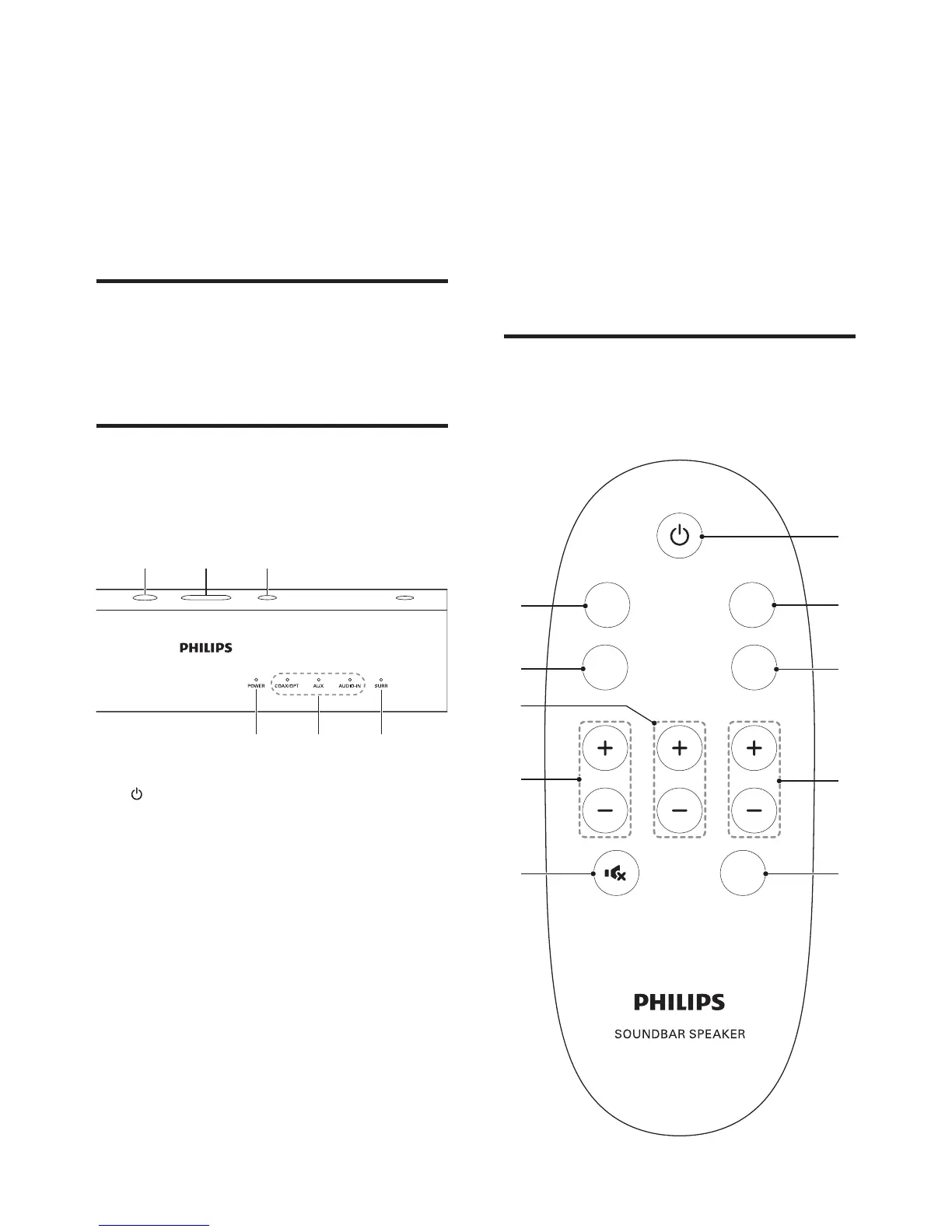
Main unit
This section includes an overview of the main
unit.
a
Switch the SoundBar on or to standby.
b VOLUME +-
Increase or decrease volume.
c SOURCE
Select an audio source for the SoundBar.
d Power
Lights up when you switch on the
SoundBar.
e Source indicators
Source indicator lights up when a source
is selected.
abc
fed
• COAX/OPT: Lights up when you
switch to coaxial input or optical input
source.
• AUX: Lights up when you switch to
analog input source.
• AUDIO-IN: Lights up when you switch
to audio input source.
f SURR
Lights up when you select Virtual Surround
sound.
Remote control
This section includes an overview of the
remote control.


 To Next Page