7 EN
3 Connect
This section helps you connect your SoundBar
to a TV and other devices.
For information about the basic connections of
your SoundBar and accessories, see the quick
start guide.
Note
• Foridenticationandsupplyratings,refertothetype
plate at the back or bottom of the product.
• Before you make or change any connections, make sure
that all devices are disconnected from the power outlet.
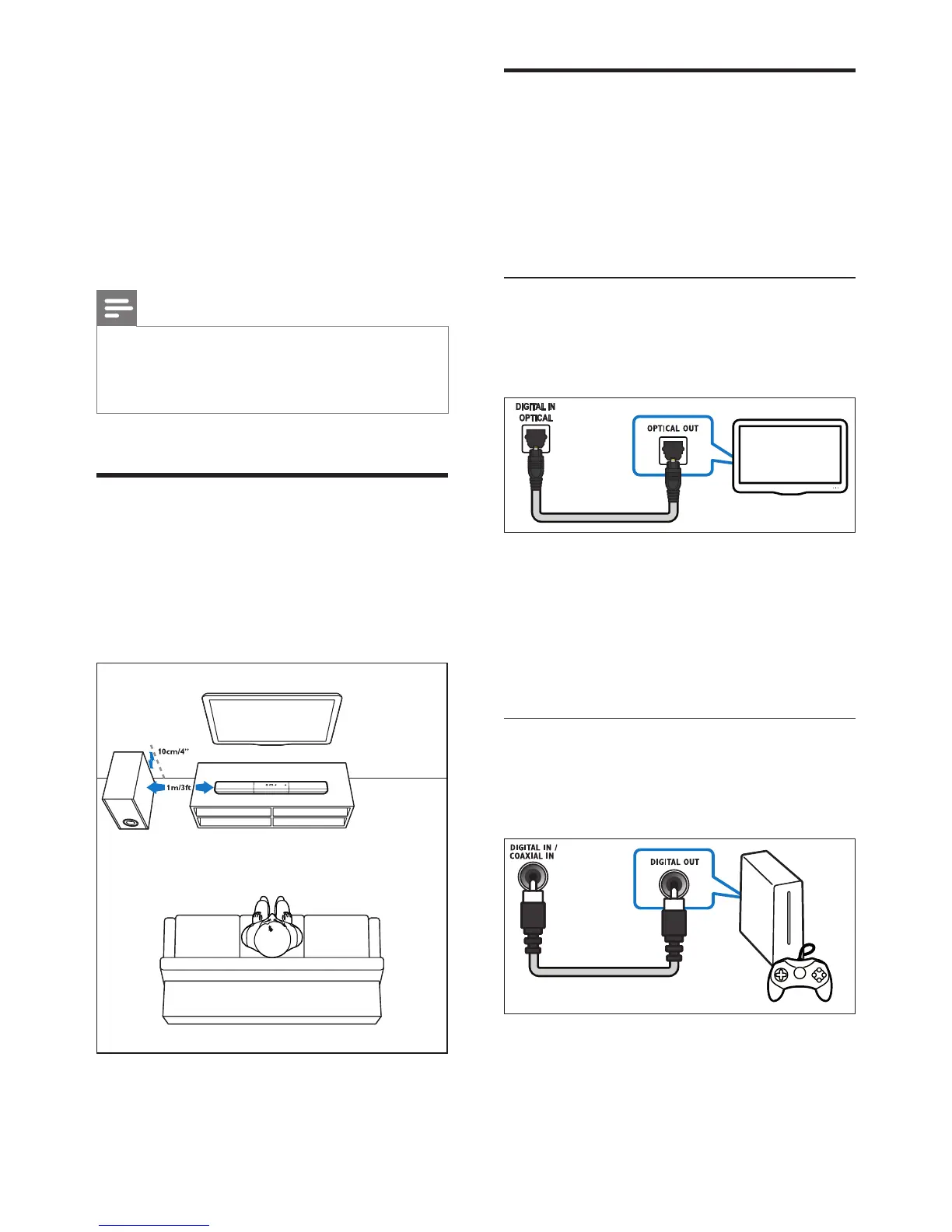
Placement
Place the subwoofer at least 1 meter (3 feet)
away from your SoundBar, and ten centimeters
away from the wall.
For best results, place your subwoofer as shown
below.
Connect audio from TV and
other devices
Play audio from TV or other devices through
your Soundbar speakers.
Use the best quality connection available on
your TV, Soundbar, and other devices.
Option 1: Connect audio through a
digital optical cable
Best quality audio
1 Using an optical cable, connect the
OPTICAL connector on your SoundBar to
the OPTICAL OUT connector on the TV
or other device.
• The digital optical connector might be
labeled SPDIF or SPDIF OUT.
Option 2: Connect audio through a
digital coaxial cable
Good quality audio
1 Using a coaxial cable, connect the
COAXIAL connector on your SoundBar
to the COAXIAL/DIGITAL OUT
connector on the TV or other device.
TV


 To Next Page