11
EN
1 Using an optical cable, connect the
OPTICAL connector on your SoundBar to
the OPTICAL OUT connector on the TV
or other device.
• The digital optical connector might be
labeled SPDIF or SPDIF OUT.
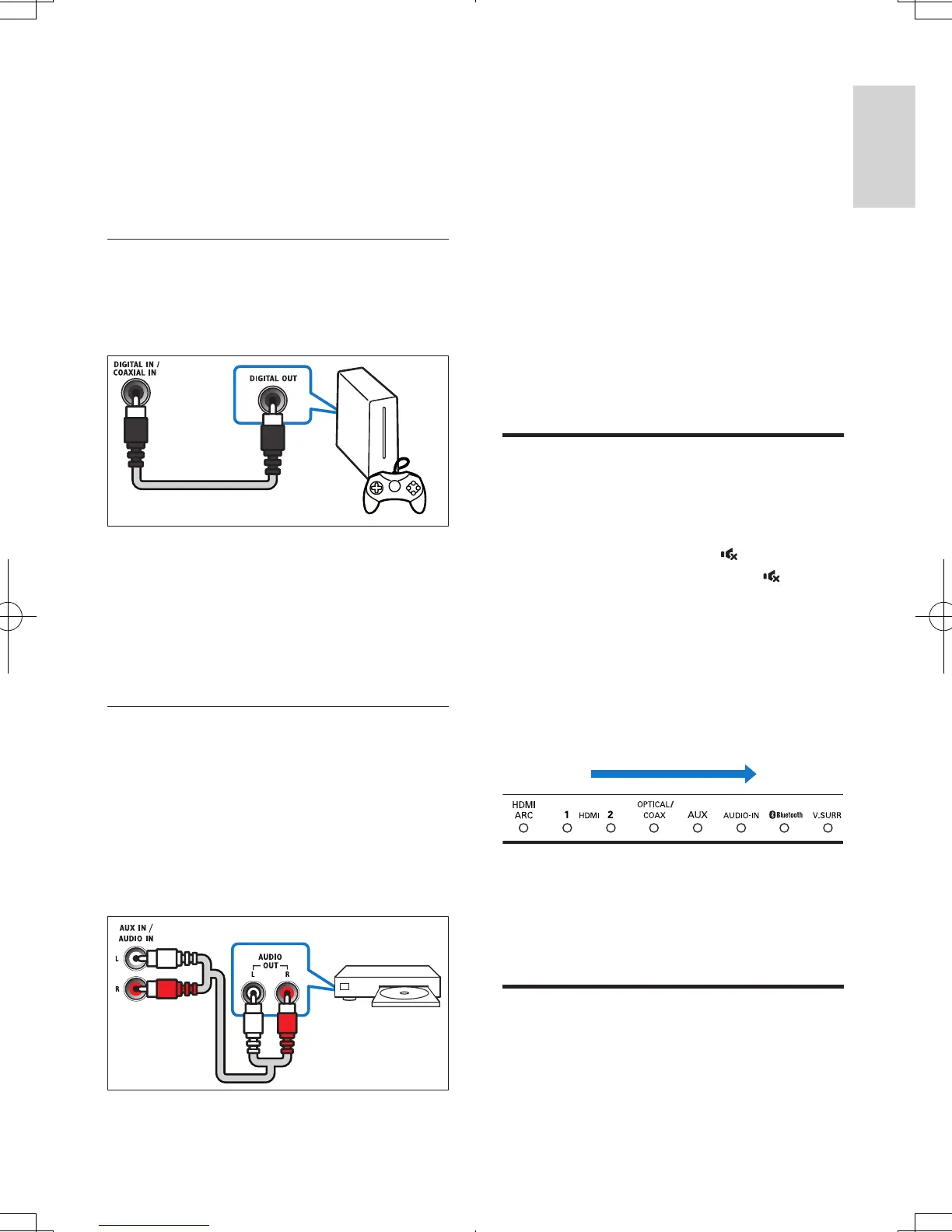
Option 2: Connect audio through a
digital coaxial cable
Good quality audio
1 Using a coaxial cable, connect the
COAXIAL connector on your SoundBar
to the COAXIAL/DIGITAL OUT
connector on the TV or other device.
• The digital coaxial connector might be
labeled DIGITAL AUDIO OUT.
Option 3: Connect audio through
analog audio cables
Basic quality audio
1 Using an analog cable, connect the AUX
connectors on your SoundBar to the
AUDIO OUT connectors on the TV or
other device.
DVD
4 Use your
SoundBar
This section helps you use the SoundBar to play
audio from connected devices.
Before you start
• Make the necessary connections described
in the quick start guide and the user
manual.
• Switch the SoundBar to the correct source
for other devices.
Adjust the volume
1 Press +/- (Volume) to increase or decrease
a volume level.
• To mute sound, press (Mute).
• To restore the sound, press (Mute)
again or press +/- (Volume).
Volume indicator
• When you change volume, one or multiple
Volume indicator (up to 8 indicators) on
the main unit light up to indicate a volume
level. The more indicators light up, the
higher the volume level is.
• If you do not press the volume key for ve
seconds, the volume indicators light off, and
the current source indicator and the sound
mode indicator light up.
Choose your sound
This section helps you choose the ideal sound
for your video or music.
5
HTL7180_F7_UM_V1.1.indb 11 2013/5/14 14:50:01


 To Next Page