15
English
AUDIO INSPEAKERS
VIDEO OUT
AUX
Pr
Pb
SCART
Y
L
R
AM/
MW
VIDEO OUT
Pr
Pb
Y
Basic Connections (continued)
Option 2: Connecting to a
Progressive Scan TV or component
video input
The progressive scan video quality is
only available when using Y Pb Pr
connection and a progressive scan TV is
required. It provides superior picture
quality when watching DVD movies.
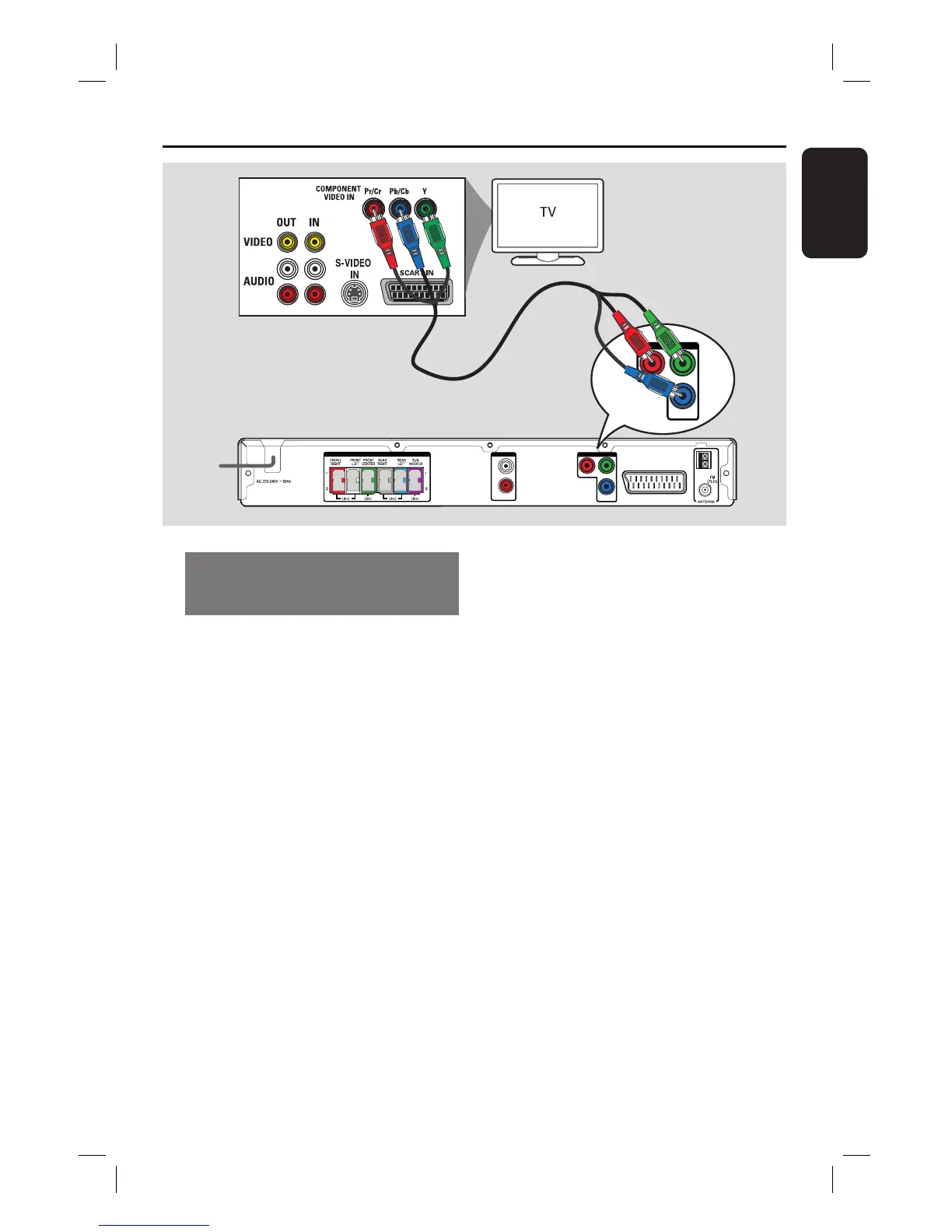
A Connect the component video cables
(red/ blue/green - not supplied) from the
Y Pb Pr sockets on the main unit to the
corresponding component video input
sockets (or labelled as Y Pb/Cb Pr/Cr or
YUV) on the TV.
B If your TV accepts progressive signals,
proceed to chapter ‘Getting Started -
Setting up Progressive Scan feature’ for
detailed progressive feature setup.
Helpful Hint:
– To route the TV’s audio to the speakers on
this unit, connect an audio cable from the
AUDIO IN-AUX sockets to the corresponding
AUDIO output sockets on the TV. Press
AUX/DI on the remote control when
watching the TV programmes.
Option 2
Main Unit (rear)













 To Next Page