7
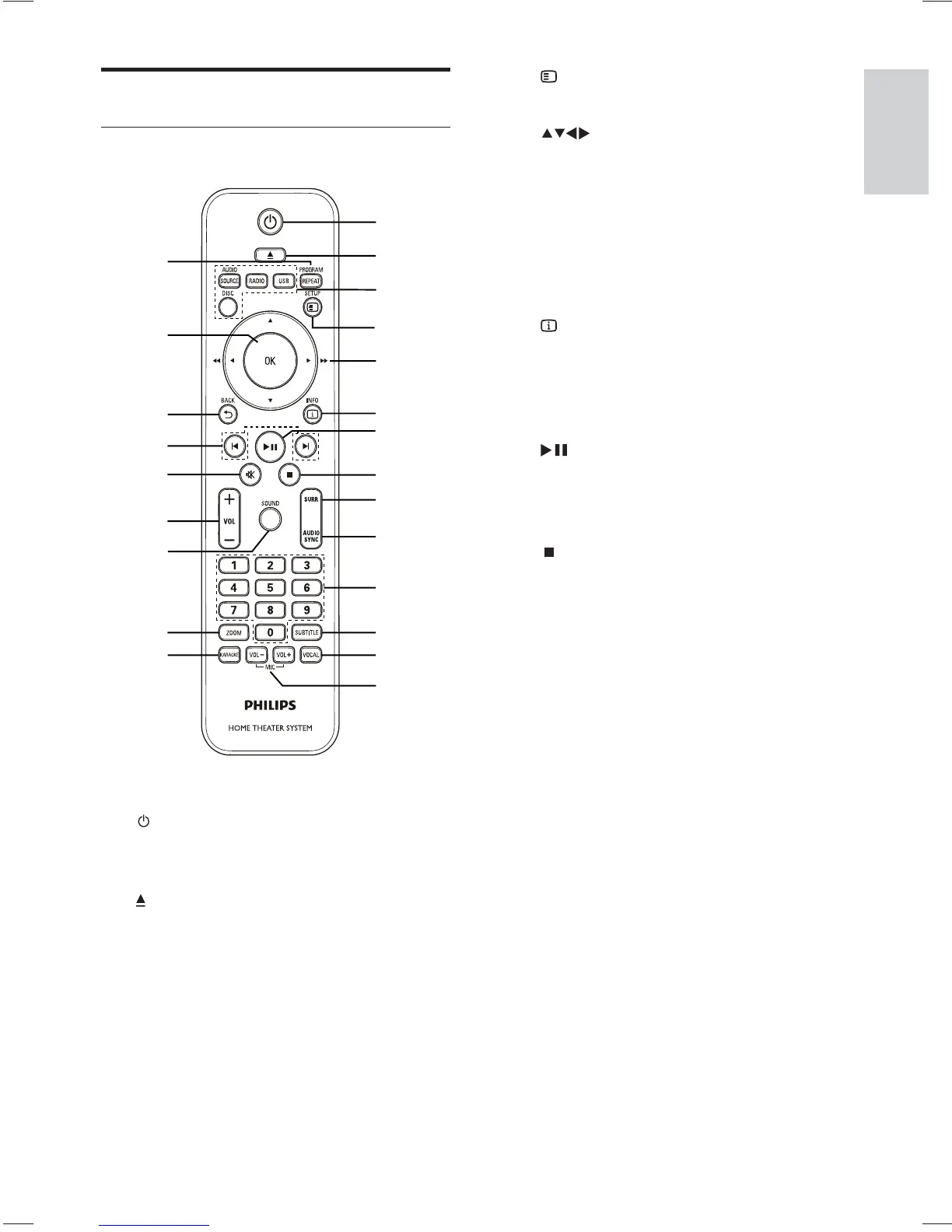
d SETUP
Accesses or exits the setup menu.•
e
( Navigation buttons )
Navigates through the menus.•
Press left and right for fast backward •
or forward search.
In radio mode, press up and down to •
tune the radio frequency.
In radio mode, press left or right to •
start auto search.
f
INFO
For discs, displays information about •
the current status or the disc.
For slideshows, displays a thumbnail •
view of photo fi les.
g
( Play/Pause )
Starts, pauses or resumes disc play.•
In radio mode, automatically tune •
radio stations during fi rst-time setup.
h
( Stop )
Stops disc play.•
In radio mode, erases the current •
preset radio station.
i SURR ( Surround Sound )
Switches to supported surround •
sound or stereo sound.
j AUDIO SYNC
Selects an audio language or channel. •
Press and hold to access the setting •
for audio sync, then press VOL +/- to
set the audio delay time.
k Numeric buttons
Selects an item to play.•
l SUBTITLE
Selects a subtitle language for video.•
m VOCAL
Changes the audio channel of a •
karaoke disc.
n MIC ( VOL +/- )
Increases or decreases microphone •
volume.
Product overview
Remote control
a ( Standby-On )
Turns on the Home Theater System •
or switches to standby mode.
b
( Open/Close )
Opens or closes the disc •
compartment.
c Source buttons
• AUDIO SOURCE : Selects an audio
input source.
• RADIO: Switches to FM radio.
• USB: Switches to the USB source.
• DISC: Switches to the disc source.
n
q
p
o
r
s
t
u
v
w
m
a
b
c
d
e
f
g
h
i
j
k
l
English
EN



 To Next Page