9
Place the product
Place the product where it cannot be •
pushed, pulled over or knocked down.
Do not place it in an enclosed cabinet.
Be sure that you have full access to the •
power cord for easy disconnection of the
product from the power supply.
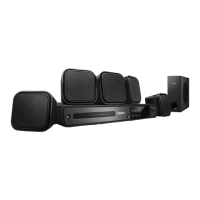
1 Place the home theater near your TV.
2 Place the speakers system at normal
listening height and parallel to your
listening area.
3 Place the subwoofer in the corner of the
room or at least 1 meter/3 feet away
from your TV.
Tip
To reduce interference or noise, place the •
home theater away from radiation devices.
FRONT
RIGHT
FRONT
LEFT
CENTER
REAR
RIGHT
REAR
LEFT
SUBWOOFER
3 Connect
Make the following connections to use your
Home Theater System.
Basic connections:
Video•
Speakers and subwoofer•
Power•
Optional connections:
Radio antenna•
Audio•
Audio from TV•
Audio from cable box/recorder/•
game console
Other devices•
USB device•
Note
Refer to the type plate at the back or bottom •
of the product for identifi cation and supply
ratings.
Before you make or change any connections,
•
ensure that all devices are disconnected from
the power outlet.
Tip
Different types of connectors can be used to •
connect this product, depending on availability
and your needs. A comprehensive interactive
guide to help you connect your product is
available at www.connectivityguide.philips.
com.
English
EN



 To Next Page