English
17
3139 115 23842
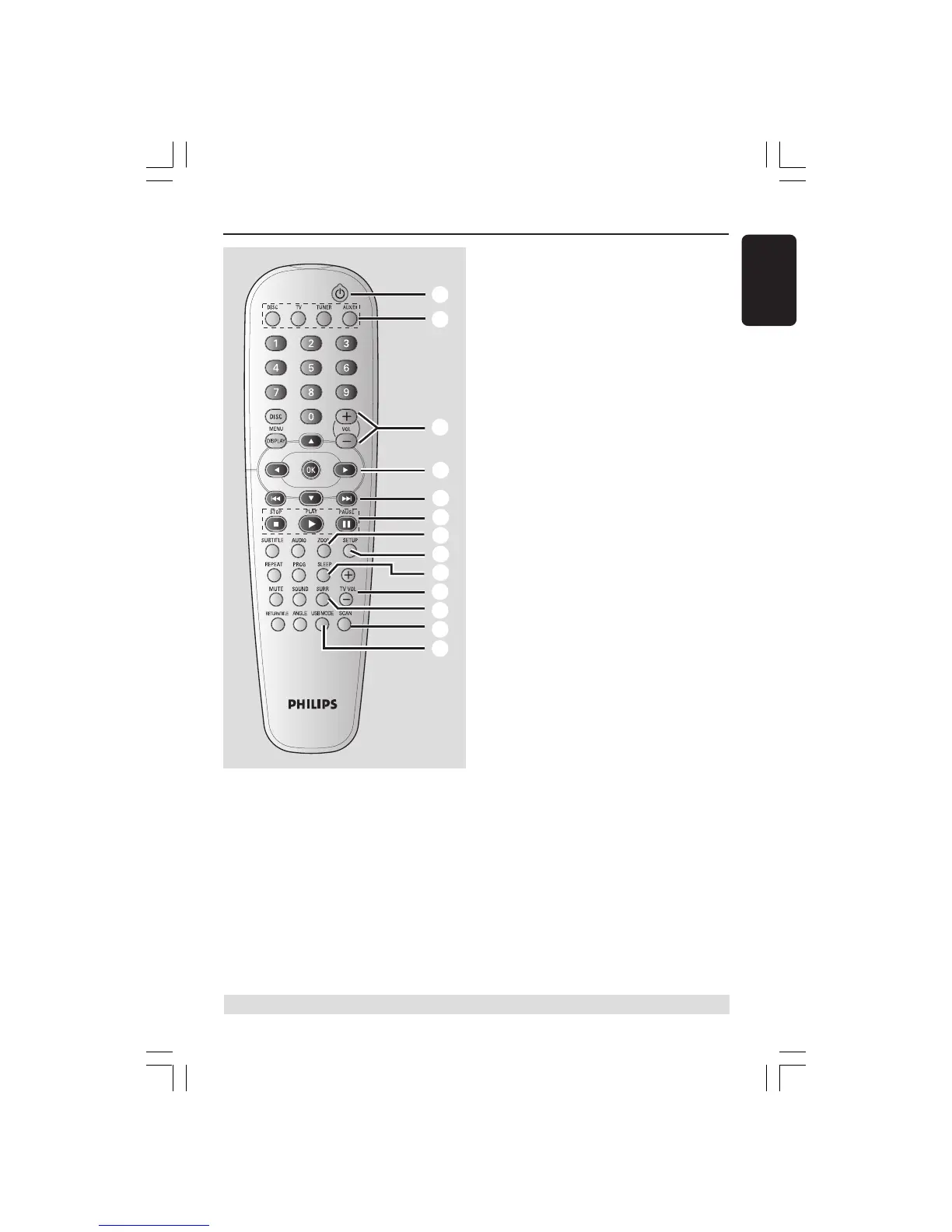
Remote Control
* = Press and hold the button for more than two seconds.
1
4
5
8
2
3
6
7
9
0
!
@
#
1 B
– Switches to Eco Power standby mode, or
turns on the system.
2 Source buttons
DISC : switches to DISC source mode.
TV: switches to TV source mode.
The sound from TV will come out
through the DVD system.
TUNER: toggles between FM and MW
band.
AUX/DI: toggles between AUX and
DIGITAL IN external source mode.
3 VOL +-
– Adjusts the volume level.
4 1 2 3 4
– DISC: selects movement direction in the
menu.
– TUNER: use 3 4 to start auto searching,
use 1 2 to tune the radio frequency up/
down.
5 S / T
– DISC: *searches backward/forward or
selects a track.
– TUNER: selects a preset radio station.
6 PAUSE Å
– DISC: pauses playback.
PLAYÉ
– DISC: starts playback.
STOPÇ
– Exits an operation.
– DISC: stops playback.
– DISC: holding down the button will open
or close the disc tray.
– TUNER: *erases a preset radio station.
7 ZOOM
– DISC: enlarges a picture on the TV screen.
8 SETUP
– DISC: enters or exits system setup menu.
9 SLEEP
– Sets the sleep timer function.
0 TV VOL +-
– Adjusts TV volume (Philips TV only).
! SURR
– Selects multichannel surround or stereo
mode.
@ SCAN
– Plays the first few seconds of each track/
chapter within a disc.
# USB MODE
– Access the contents of the connected
USB flash drive and exits from USB
mode.
001-051-hts5x-01-Eng50 17/05/05, 1:18 PM17


 To Next Page