English
19
3139 115 23842
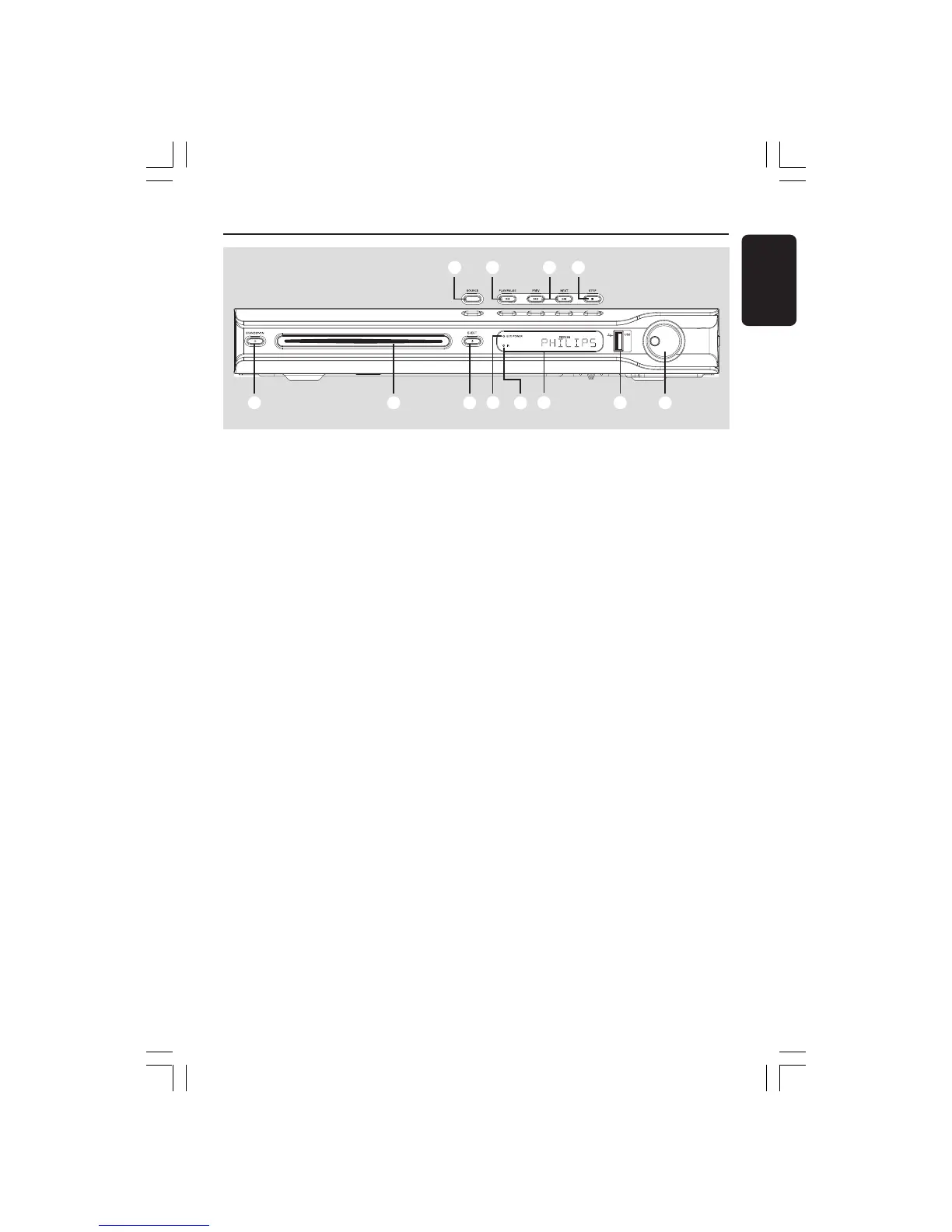
Main Unit
1 STANDBY ON (B)
– Switches to Eco Power standby mode, or
turns on the system.
2 Disc slot
3 EJECT 0
– Ejects the disc.
4 ECO POWER indicator
– Lights up when in Eco Power standby
mode.
5 iR
– Point the remote control towards this
sensor.
6 System display panel
7 USB PORT
– Input for USB flash drive.
Press USB Mode in order to view the
input source.
1
2
3
6
4
8
9 0
! @
5
7
8 VOLUME
– Adjusts the volume level.
9 SOURCE
– Selects the relevant active source mode:
DISC, TUNER (FM/MW), TV or AUX/DI.
0 ÉÅ PLAY/PAUSE
– DISC: starts/pauses playback.
– TUNER: starts preset radio station
installation in Plug & Play mode.
! S PREV / NEXT T
– DISC: *searches backward/forward or
selects a track.
– TUNER: selects a preset radio station.
@ Ç STOP
– Exits an operation.
– DISC: stops playback.
– TUNER: hold down this button to erase
the current preset radio station.
001-051-hts5x-01-Eng50 17/05/05, 1:18 PM19


 To Next Page