8
Option 3: Connect to the TV through
composite video (CVBS)
Note
The composite video cable or connector might •
be labeled AV IN, VIDEO IN, COMPOSITE or
BASEBAND.
Connect audio from TV or
other devices
Use your home theater to play audio from the TV
or other devices such as a cable box. Choose from
the following connectors.
Tip
Press • AUDIO SOURCE repeatedly to select
the audio output of your connection.
Option 1: Connect audio through a digital
coaxial cable
Note
The digital coaxial cable or connector might be •
labeled COAXIAL DIGITAL OUT or SPDIF
OUT.
(Cable not supplied)
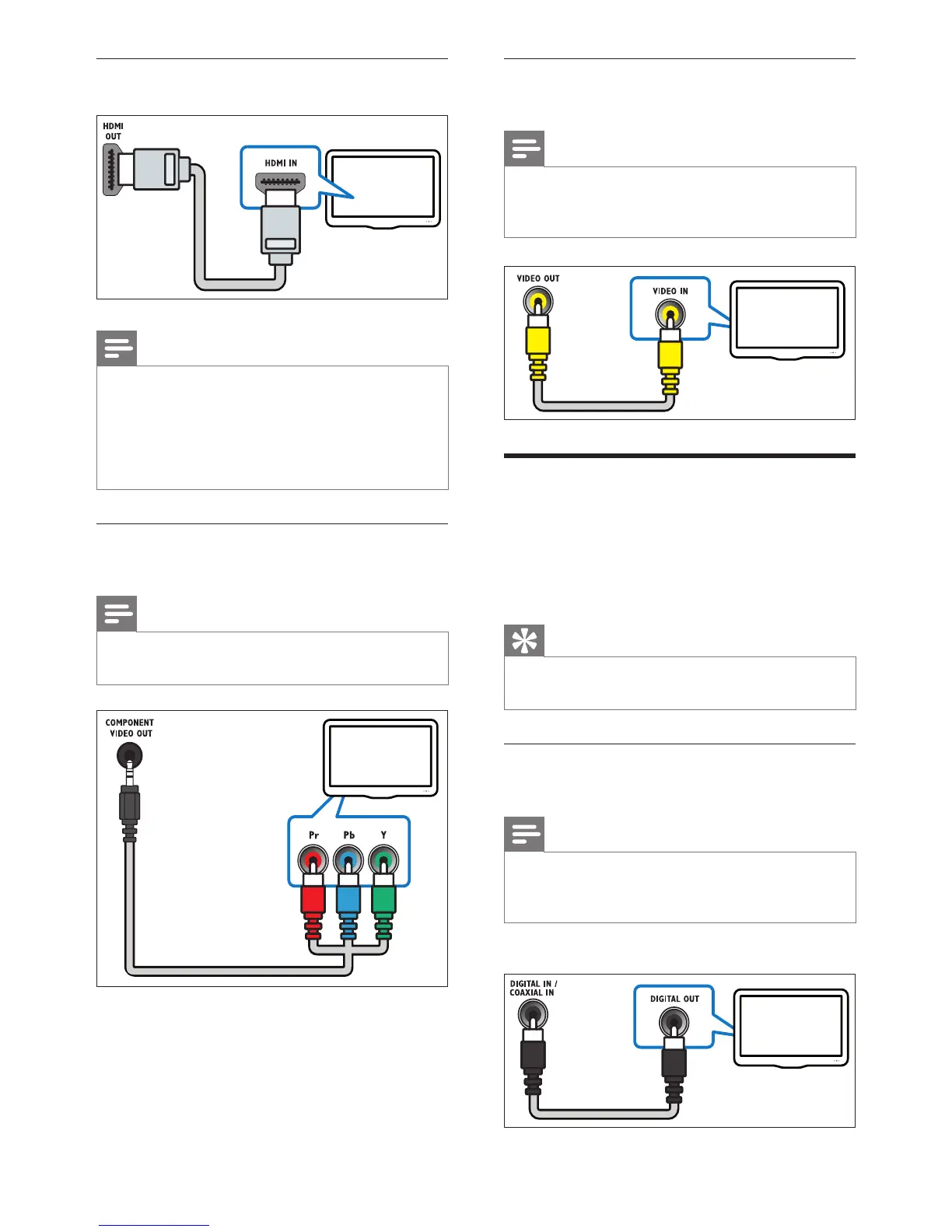
Option 1: Connect to the TV through
HDMI
Note
If the HDTV has a DVI connector, connect •
using an HDMI/DVI adapter.
If the TV supports EasyLink HDMI CEC,
•
control the home theater and TV with one
remote control (see ‘Use Philips EasyLink’ on
page 14).
Option 2: Connect to the TV through
YPbPr (component video)
Note
The component video cable or connector •
might be labeled Y Cb Cr or YUV.


 To Next Page