9
English
EN
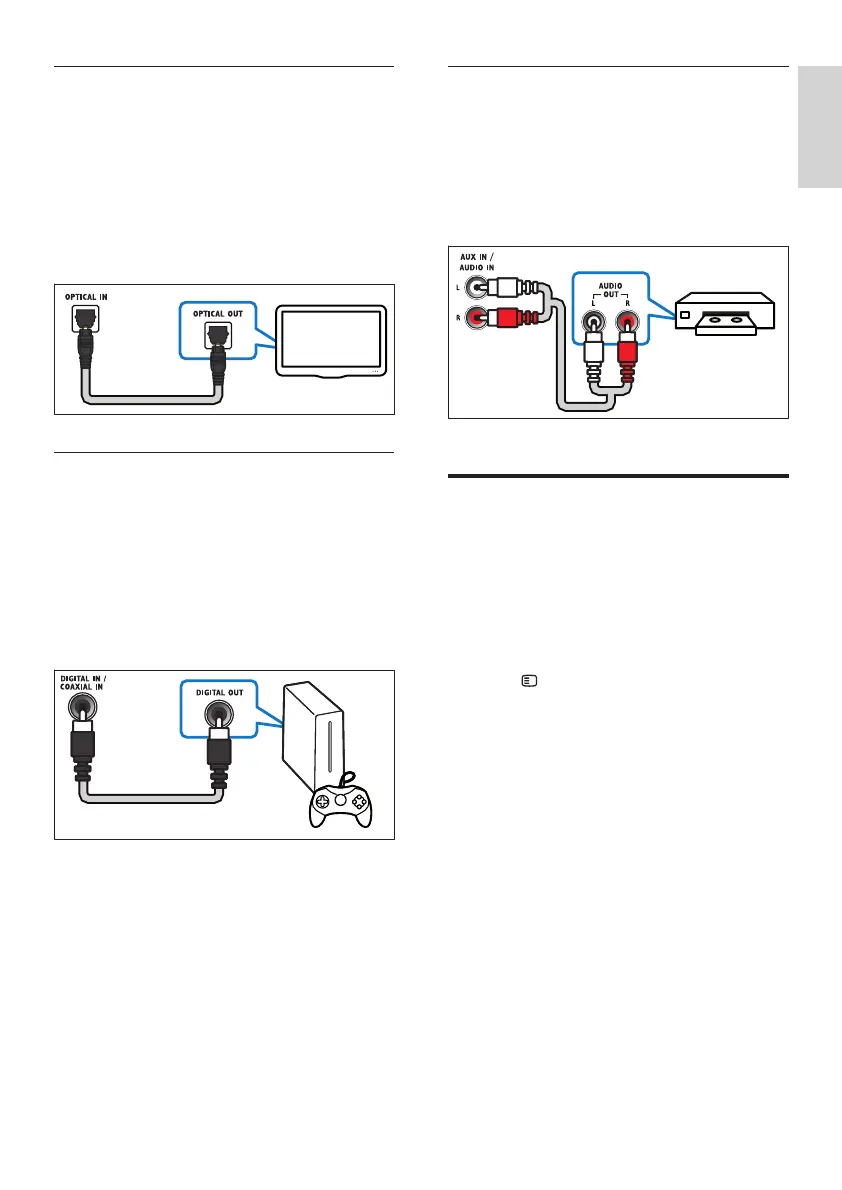
Option 1: Connect audio through a digital
optical cable
Best quality audio
1 Using an optical cable, connect the OPTICAL
connector on your home theater to the
OPTICAL OUT connector on the TV or
other device.
• The digital optical connector might be
labeled SPDIF or SPDIF OUT .
Option 2: Connect audio through a digital
coaxial cable
Good quality audio
1 Using a coaxial cable, connect the COAXIAL
connector on your home theater to the
COAXIAL/DIGITAL OUT connector on the
TV or other device.
• The digital coaxial connector might be
labeled DIGITAL AUDIO OUT .
TV
Option 3: Connect audio through analog
audio cables
Basic quality audio
1 Using an analog cable, connect the AUX
connectors on your home theater to the
AUDIO OUT connectors on the TV or other
device.
Set up speakers
Set up the speakers manually to experience
customized surround sound.
Before you start
Make the necessary connections described in the
quick start guide, and then switch the TV to the
correct source for your home theater.
1 Press SETUP on your home theater
remote control.
2 Select [Audio Setup] and then press OK .
3 Press the Navigation buttons and OK to
select and change:
• [Speakers Volume] : Set the volume level
of each speaker.
• [Speakers Delay] : Set the delay time for
speakers which are placed closer to the
seating position in order to obtain equal
audio transmission from all the speakers.
VCR
1_HTS6543-6553_94_EN1.indd 91_HTS6543-6553_94_EN1.indd 9 1/10/2012 2:58:00 PM1/10/2012 2:58:00 PM













 To Next Page