6 EN
m REPEAT / PROGRAM
• Select or turn off repeat mode.
• In radio mode, press once to access
program mode, and press again to store
the radio station.
• In radio mode, press and hold for three
seconds to reinstall the radio stations.
n REPEAT A-B
Mark two points within a chapter or track to
repeat play, or turn off the repeat mode.
o CREATE MP3 / ZOOM
• Access the create MP3 menu.
• Zoom into a video scene or picture.
Press the Navigation buttons (left/right)
to select a zoom factor.
p SCREEN FIT
Fit the picture format to the TV screen.
q SUBTITLE
Select subtitle language for video.
r AUDIO SYNC
• Select an audio language or channel.
• Press and hold to access audio delay
setting, and then press the +/- or
Navigation buttons to delay the audio to
match the video.
s SURR
Select surround sound or stereo sound.
t ( Stop )
• Stop play.
• In radio mode, press and hold to erase
the current preset radio stations.
u ( Play/Pause )
Start, pause or resume play.
v INFO
Access more play options while playing a disc
or a USB storage device.
w SETUP
Access or exit the setup menu.
x SLEEP
Switch the home theater to standby mode
after the elapsed time.
3 Connect and set up
This section helps you connect your home theater
to a TV and other devices, and then set it up.
For information about the basic connections of
your home theater and accessories, see the quick
start guide. For a comprehensive interactive guide,
visit www.connectivityguide.philips.com.
Note
•
For identifi cation and supply ratings, see the type
plate at the back or bottom of the product.
• Before you make or change any connections,
make sure that all devices are disconnected from
the power outlet.
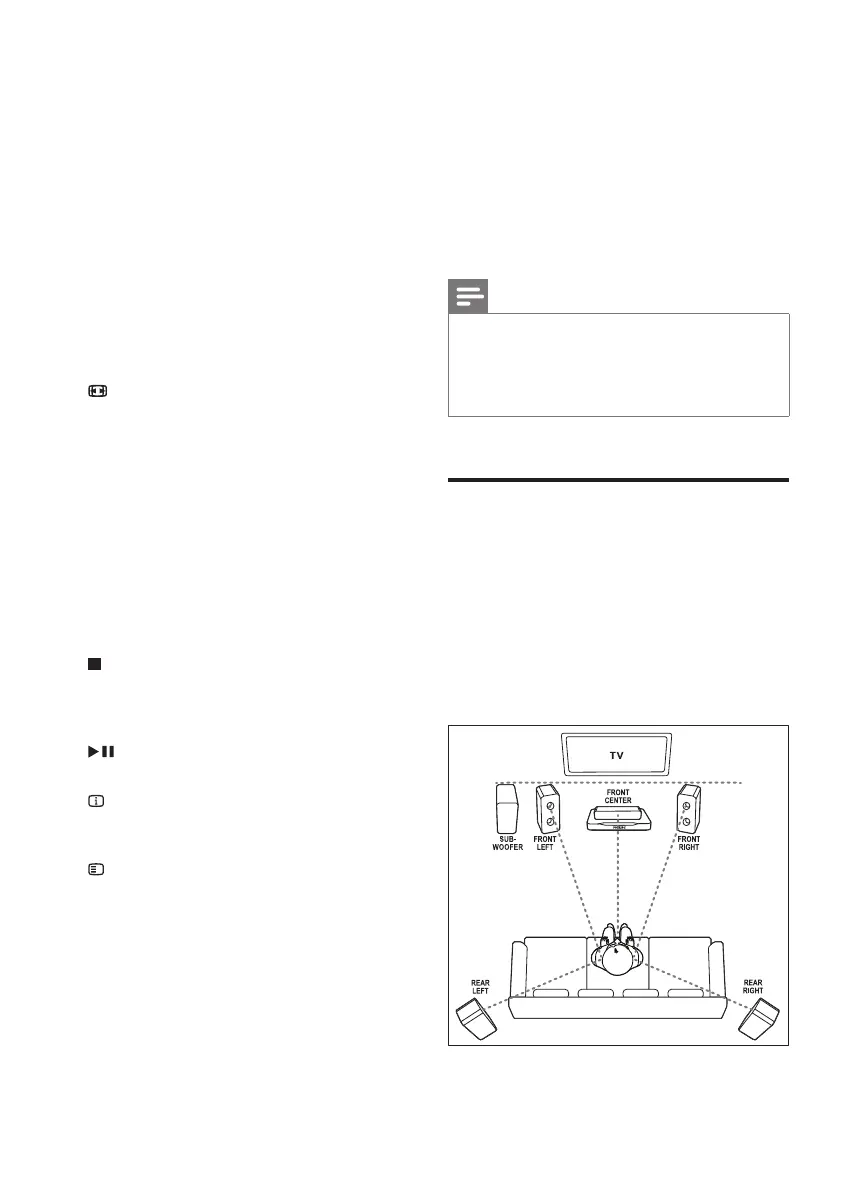
Connect speakers
The speaker cables are color-coded for easy
connection. To connect a speaker to your home
theater, match the color on the speaker cable to
the color on the connector.
Speaker position plays a critical role in setting up
a surround sound effect. For best effect, position
all the speakers towards the seating position and
place them close to your ear level (seated).
1_HTS6543-6553_94_EN1.indd 61_HTS6543-6553_94_EN1.indd 6 1/10/2012 2:57:59 PM1/10/2012 2:57:59 PM













 To Next Page