4 EN
2 Your home theater
Congratulations on your purchase, and welcome
to Philips! To fully benefi t from the support that
Philips offers, register your product at www.philips.
com/welcome.
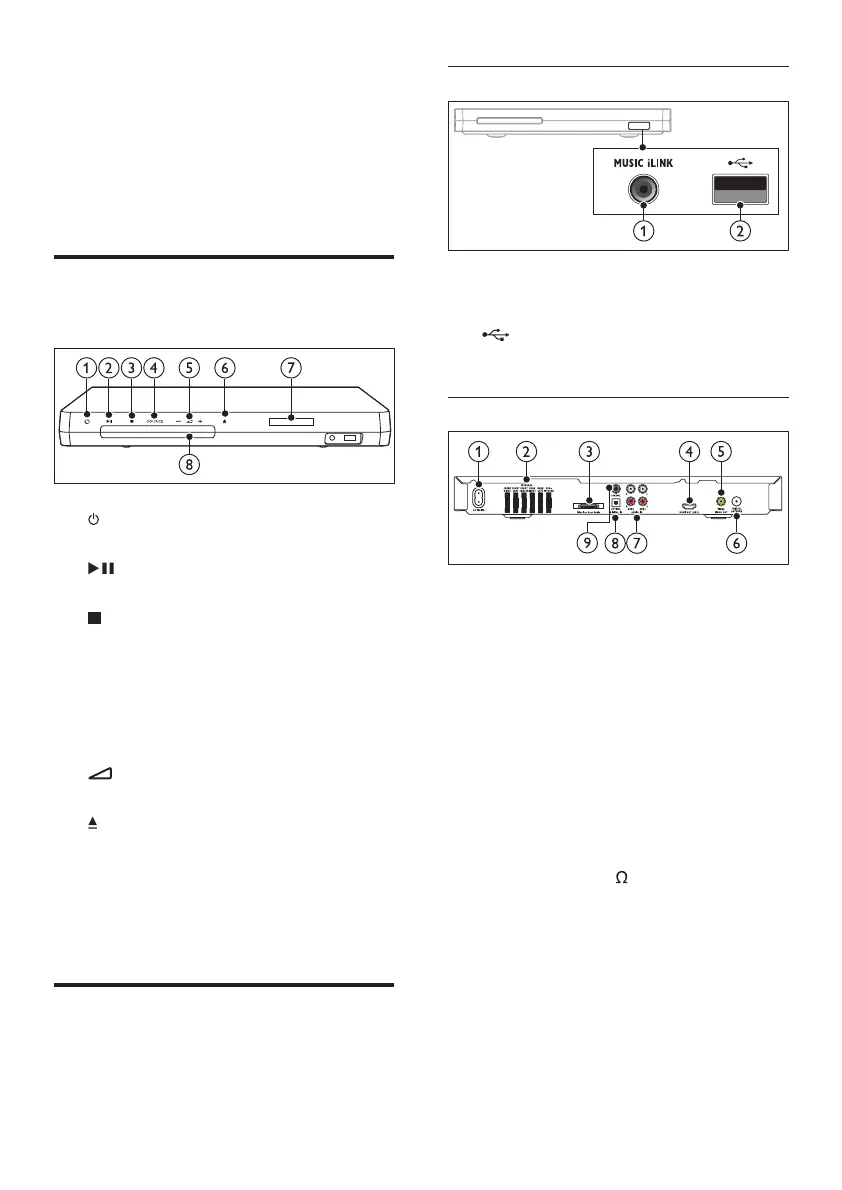
Main unit
This section includes an overview of the main unit.
a ( Standby-On )
Switch the home theater on or to standby.
b ( Play/Pause )
Start, pause or resume play.
c ( Stop )
• Stop play.
• In radio mode, press and hold to erase
the current preset radio stations.
d SOURCE
Select an audio or video source for the home
theater.
e +/-
Increase or decrease volume.
f ( Open/Close )
Open or close the disc compartment, or
eject the disc.
g Display panel
h Disc compartment
Connectors
This section includes an overview of the
connectors available on your home theater.
Front connectors
a MUSIC iLINK
Audio input from an MP3 player.
b ( USB )
Audio, video or picture input from a USB
storage device.
Rear connectors
a AC MAINS
Connect to the power supply.
b SPEAKERS
Connect to the supplied speakers and
subwoofer.
c Wireless Rear Audio
Connect to a Philips wireless module.(Model:
Philips RWSS5512, sold separately)
d HDMI OUT (ARC)
Connect to the HDMI input on the TV.
e VIDEO OUT - VIDEO
Connect to the composite video input on the TV.
f ANTENNA FM 75
Signal input from an antenna, cable or satellite.
g AUDIO IN - AUX 1 / AUX 2
Connect to an analog audio output on the TV
or an analog device.
h DIGITAL IN - OPTICAL
Connect to an optical audio output on the
TV or a digital device.
i DIGITAL IN - COAXIAL
Connect to a coaxial audio output on the TV
or a digital device.
1_HTS6543-6553_94_EN1.indd 41_HTS6543-6553_94_EN1.indd 4 1/10/2012 2:57:57 PM1/10/2012 2:57:57 PM













 To Next Page