19
English
Optional Connections
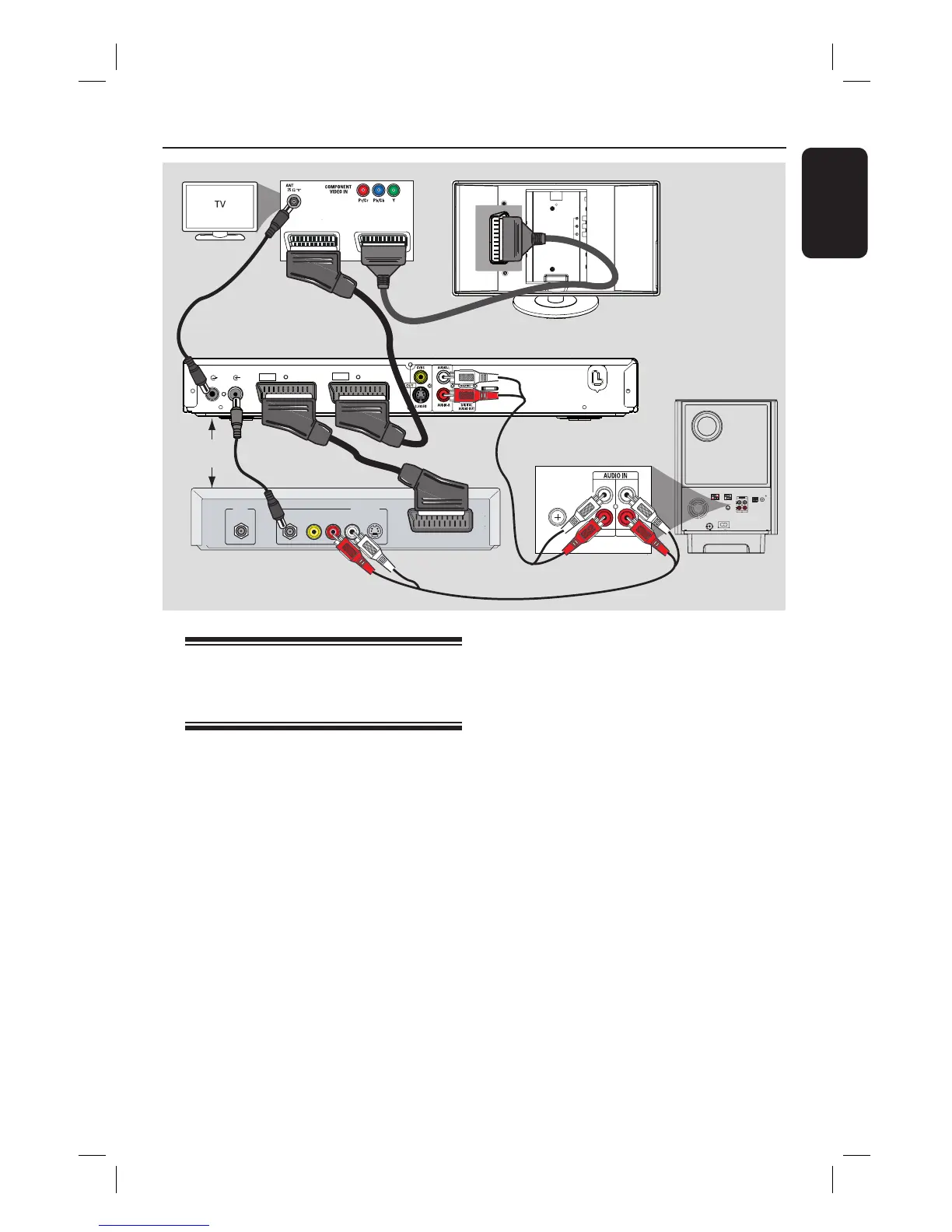
Connecting to cable box/
satellite receiver and
recorder/VCR
This unit provides analogue and digital
audio connection. You can connect the
audio output from an audio/video device
(e.g. DVD recorder, VCR, Cable/Satellite
Box) to this Home Theatre System in
order to enjoy the multi-channel
surround sound capabilities.
Note:
The above illustration is only an example
of the possible connections. It may be
varied depending on the connected
devices.
A Keep the existing connections between
your TV and other devices.
SCART OUT
(TV1)
HDMI OUT
COMPONENT
VIDEO OUT
TO SUBWOOFER
TV AUDIO IN
(TV 2)
RF
S-VIDEO
OUT
IN
AUDIO
R L
VIDEO
TO TV
A
ANTENNA-IN
TV-OUT
~
MAINS
TO TV - I/O
EXT
1
AUX - I/O
EXT
2
EXT 1EXT 2
MW
MAINS
COAXIAL
DIGITAL IN
AUX 1
AUX 2
R
L
C
B
Cable/Satellite Box
DVD Recorder/VCR
B Use the scart cable to connect this unit
to your TV.
If your TV does not have double-scart
connectors, see ‘Step 2: Connecting to
TV’ for other video connection options.
C Use an audio cable (red/white - not
supplied) to connect the AUDIO IN-
AUX1 or AUX2 sockets on the
subwoofer to the AUDIO OUT sockets
on the Cable/Satellite Box and recorder/
VCR.
Alternatively, you can use a coaxial cable
(not supplied) to connect the
COAXIAL DIGITAL IN socket on the
subwoofer to the COAXIAL output
socket of the connected device. It
provides better audio transmission.
Helpful Hint:
– Refer to the connected devices’ user
manual for other possible connections.













 To Next Page