EasyManua.ls Logo

Philips HU5930/10 - User Manual

Philips HU5930/10
94 pages
Print Icon
To Next Page IconTo Next Page
Loading...
© 2019 Koninklijke Philips N.V.
All rights reserved.
4241 210 82513
HU5930
HU5931
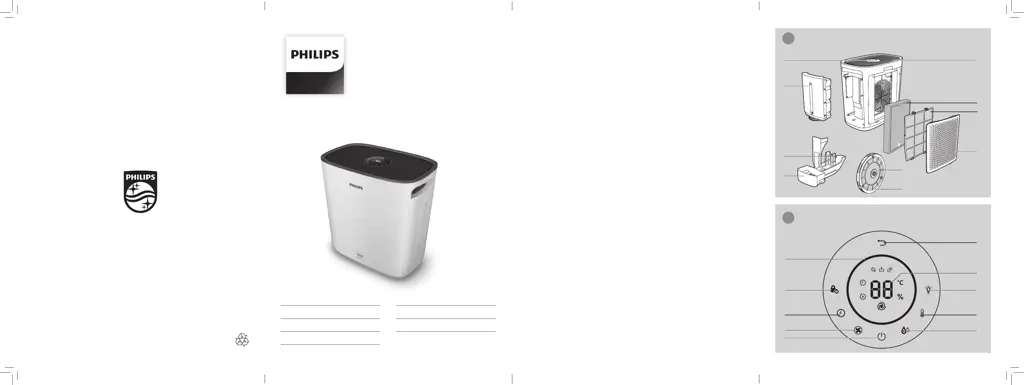
B
E
G
H
I
J
F
D
A
C
OUTLINE
K
L
M
N
R
S
Q
P
T
O
1
2
2
EN User manual 1
DE Benutzerhandbuch 18
FR Mode d’emploi 37
IT Manuale utente 56
NL Gebruiksaanwijzing 75

Table of Contents

Questions and Answers

  • J
    John RiveraSep 18, 2025
    Why does it take a long time to reach the target humidity level with my Philips HU5930/10?
    • R
      Rodney ColeSep 18, 2025
      In dry conditions, moisture from your Philips Humidifier will be absorbed by walls, furniture, and other items in the room. Ventilation of dry outside air will also increase the time it takes to reach the target humidity.
  • Q
    qweberAug 25, 2025
    How to reset filter replacement on Philips Humidifier?
    • K
      Kathryn PerezAug 25, 2025
      If your Philips Humidifier still indicates that you need to replace the filter after you already have, ensure you correctly reset the filter. Plug in the appliance, switch it on, and then touch and hold the reset button for 3 seconds.
  • M
    Michael IbarraAug 25, 2025
    What to do if my Philips HU5930/10 still indicates that I need to replace a filter after I already did?
    • R
      Raymond GibsonAug 26, 2025
      You may not have correctly reset the filter replacement indicator on your Philips Humidifier. Plug in the appliance, switch it on, and then touch and hold the reset button for 3 seconds.
  • N
    Natalie CareyAug 26, 2025
    What to do if my Philips Humidifier still indicates that I need to replace a filter, but I already did?
    • R
      rjacksonAug 27, 2025
      If your Philips Humidifier still indicates that you need to replace a filter, even after replacement, plug in the appliance, switch it on, and then touch and hold the reset button for 3 seconds.
  • D
    David StephensSep 18, 2025
    What to do if my Philips Humidifier produces a strange smell?
    • A
      Alison GomezSep 18, 2025
      The appliance may produce a plastic smell the first few times you use it; this is normal. If the appliance produces a burnt smell, contact your Philips dealer or an authorized Philips service center. An unpleasant smell may also occur if one of the filters is dirty; in this case, clean or replace the filter.
  • S
    Sheryl RodriguezSep 23, 2025
    Is my Philips HU5930/10 working if I do not see water vapor coming out of the appliance?
    • M
      Margaret SmithSep 23, 2025
      When mist is very fine, it is invisible. The appliance has NanoCloud humidification technology, which produces healthy humid air from the outlet area without formation of water mist.
  • T
    Theresa Koch PhDSep 9, 2025
    Why can't I see water vapor coming out of my Philips HU5930/10?
    • P
      Philip SanchezSep 9, 2025
      When the mist produced by your Philips Humidifier is very fine, it can be invisible.
  • J
    Jamie DavisSep 10, 2025
    What to do if my Philips Humidifier still indicates filter replacement after I replaced it?
    • M
      Maria DiazSep 10, 2025
      If your Philips Humidifier indicates that you need to replace a filter even after replacement, ensure the appliance is plugged in and switched on. Then, press and hold the reset button for 3 seconds to correctly reset the filter counter.
  • L
    Lori PayneSep 3, 2025
    What to do if my Philips Humidifier still indicates that I need to replace the filter after I already did?
    • J
      Julie Webster MDSep 3, 2025
      If your Philips Humidifier indicates that you need to replace a filter even after you've done so, ensure you correctly reset the filter indicator. Plug in the appliance, switch it on, and then touch and hold the reset button for 3 seconds.
  • D
    Daisy PerkinsSep 1, 2025
    How to clean white deposits on Philips HU5930/10 wick?
    • B
      bmanningSep 1, 2025
      The white deposits on the NanoCloud rotary humidification wick of your Philips Humidifier consist of minerals from the water. Follow the cleaning instructions in the user manual.

Philips HU5930/10 Specifications

General IconGeneral
BrandPhilips
ModelHU5930/10
CategoryHumidifier
LanguageEnglish

Related product manuals