8Your phone
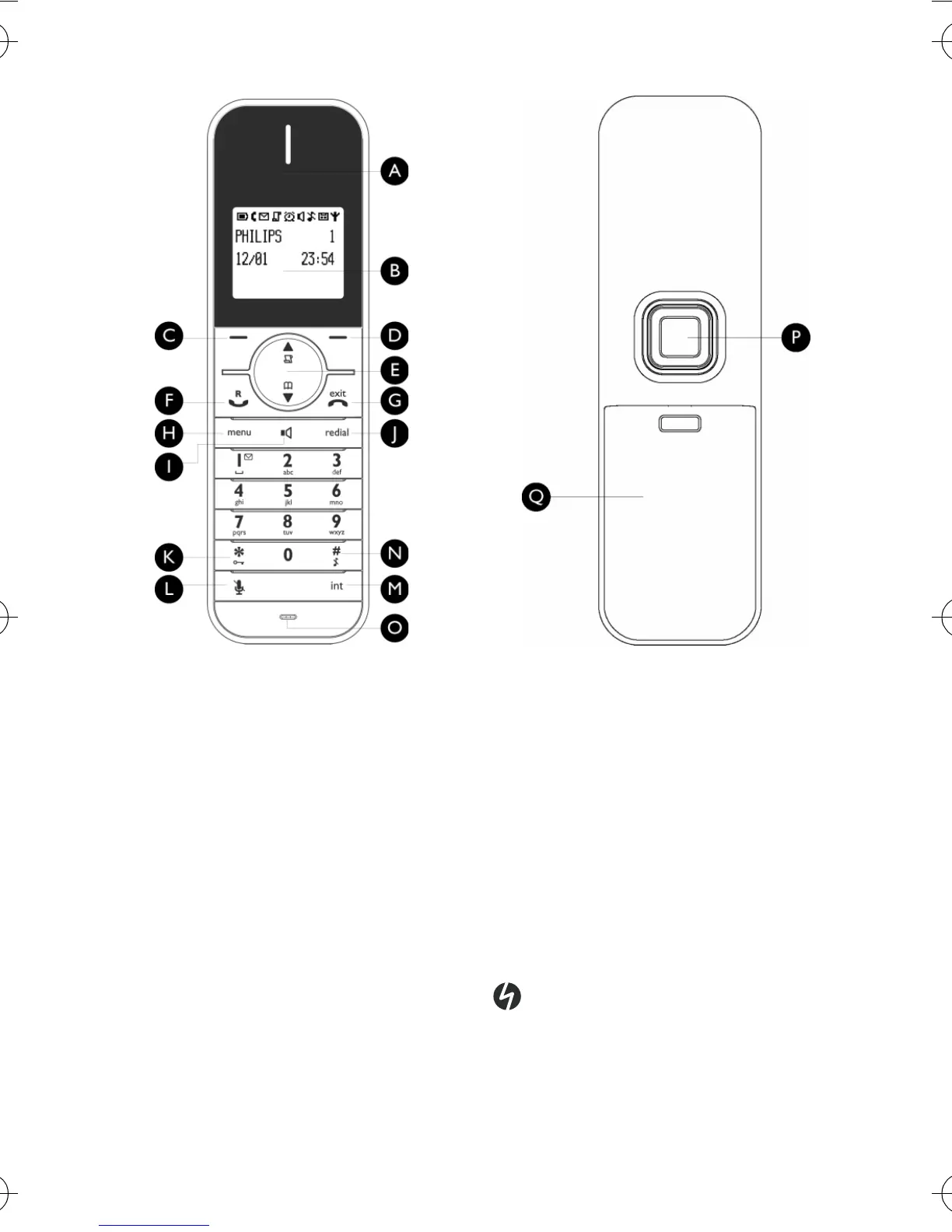
J Redial key
a
In idle mode: Access the Redial list.
K Keypad lock key
*
In idle mode: Insert *. Long press to
lock/unlock the keypad.
During a call: Insert *.
L Mute key
[
During a call: Mute/Unmute the
handset microphone.
M Call transfer key & Intercom/
Conference key
c
In idle mode: Initiate an internal call.
During a call: Hold the line and page
another handset. Long press to start a
conference between internal and
external calls.
NRinger on/off key &
Pause key
#
In idle mode: Insert #. Long press to
turn the ringer on/off.
During a call: Insert #.
When predialling: Long press to insert
a pause marked “P”.
In editing mode: Long press to switch
between upper and lower case.
OMicrophone
P Loudspeaker
Q Battery door
Danger
Handsfree activation can suddenly
increase the volume in the earpiece
to a very high level. Make sure the
handset is not too close to your ear.
ID555_IFU_GB.book Page 8 Friday, July 18, 2008 2:06 PM


 To Next Page