10 Your phone
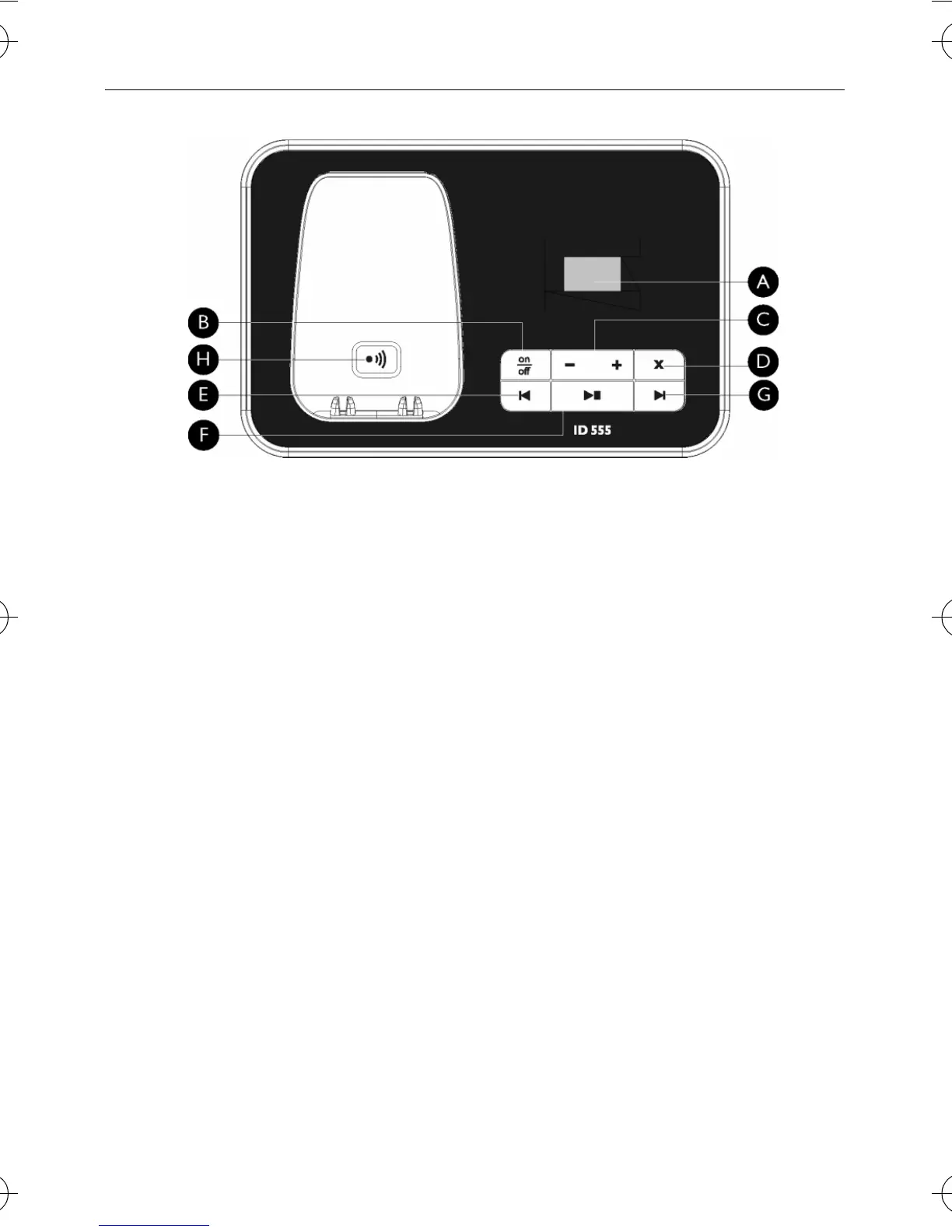
2.4 Overview of the base station
AMessage Counter
Blinking
: Indicates number of new
messages.
Steady
: Indicates number of old
messages.
2 bars flashing
: Indicates that there is
no more memory left.
Indicates the volume level (L0 - L5)
when
V is pressed.
Indicates the current message
number during playback.
B On/Off key
o
In idle mode, short press to switch on/
off the answering machine.
C Volume keys
V
Increase/Decrease speaker volume
during message playback.
There are 5 volume levels.
The call screening is activated if the
speaker volume is not set to off.
D Delete key
x
Delete current message during
message playback.
Long press to delete all messages
when the answering machine is in idle
mode (unread messages will not be
deleted).
EPrevious message/
Replay message key
l
Go to previous message if pressed
twice during message playback.
Replay current message if pressed
once during message playback.
F Play/Stop key
P
Play phone messages (the first
recorded will be played first).
Stop message playback.
G Next message key
R
Skip to the next message during
message playback.
H Paging key
C
Page handset.
Long press to start registration
procedure.
ID555_IFU_GB.book Page 10 Friday, July 18, 2008 2:06 PM


 To Next Page