1.3
1 INTRODUCTION
1.1 Unpacking
Check for the following items:
• verify the model number
• power cord
• Installation Instructions
1.2 Monitor
The LTC 2810/90 is a multi-standard color monitor housed in
a metal cabinet for rugged reliability. It has a 10-inch tube
(viewable picture area 23 cm (9")). The monitor offers simple
adjustments to meet particular requirements, with default
parameters set at the factory.
With a built-in loudspeaker and inputs able to accept NSTC
and PAL standards, the monitor offers a flexible solution for a
wide variety of surveillance application.
1.3 Power
Model No. Rated Voltage Power at Sync
Voltage range (VAC)Rated V. Format
LTC 2810/90 100/240 VAC, 90 to 260 50 W NTSC/PAL
50/60 Hz
The monitor is delivered with a 2-pole Euro cord and a 3-pole
US cord.
2 CONTROLS AND FEATURES
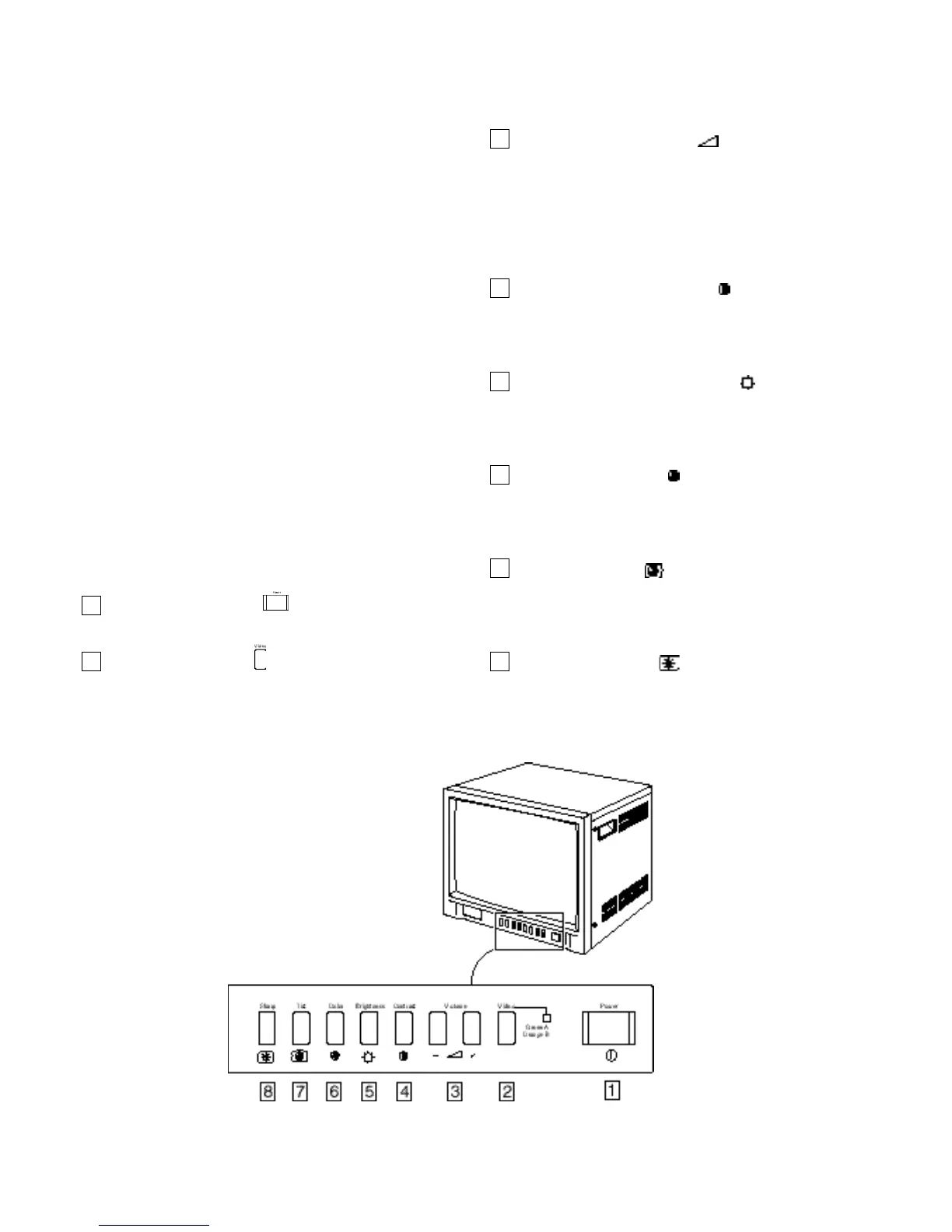
2.1 Front Panel
Power switch [POWER ]
Press this switch to turn the power ON or OFF.
Video button [VIDEO ]
Selects the composite video signal inputs to the VIDEO A
(Green LED indication) and VIDEO B (Orange LED
indication) terminal and the audio signal input to the
AUDIO A and AUDIO B terminals (RCA connector) on
the rear panel. When selected, the respective indicator
lights.
Volume buttons [VOLUME ]
These buttons have two functions:
Volume control: Press the + or - buttons as required to
adjust the speaker volume.
Data controls: When the SHARP, TINT, COLOR,
BRIGHTNESS and CONTRAST buttons are pressed,
used to change the value of the selected function.
Contrast button [CONTRAST ]
Press this button to adjust picture contrast. Adjust the value
with the VOLUMEbuttons to control the image contrast
(Default is 60).
Brightness button [BRIGHTNESS ]
Press this button to adjust picture brightness. Adjust the
value with the VOLUMEbuttons to control the image
brightness (Default is 50).
Color button [COLOR ]
Press this button to adjust the picture color intensity.
Adjust the value with the VOLUMEbuttons to control the
image color (Default is 50).
Tint button [TINT ] (NTSC only)
Press this button to control the picture color to be close to
nateral color. Adjust the value with the VOLUMEbuttons
to control the color tint (Default is 50).
Sharp button [SHARP ]
Press this button to adjust the picture image. Adjust the
value using the VOLUMEbuttons to control the sharpness
of the image (Default is 50).
8
7
6
5
4
3
2
1
Front panel









 To Next Page