1.5
3 OPERATION
3.1 Basic operation
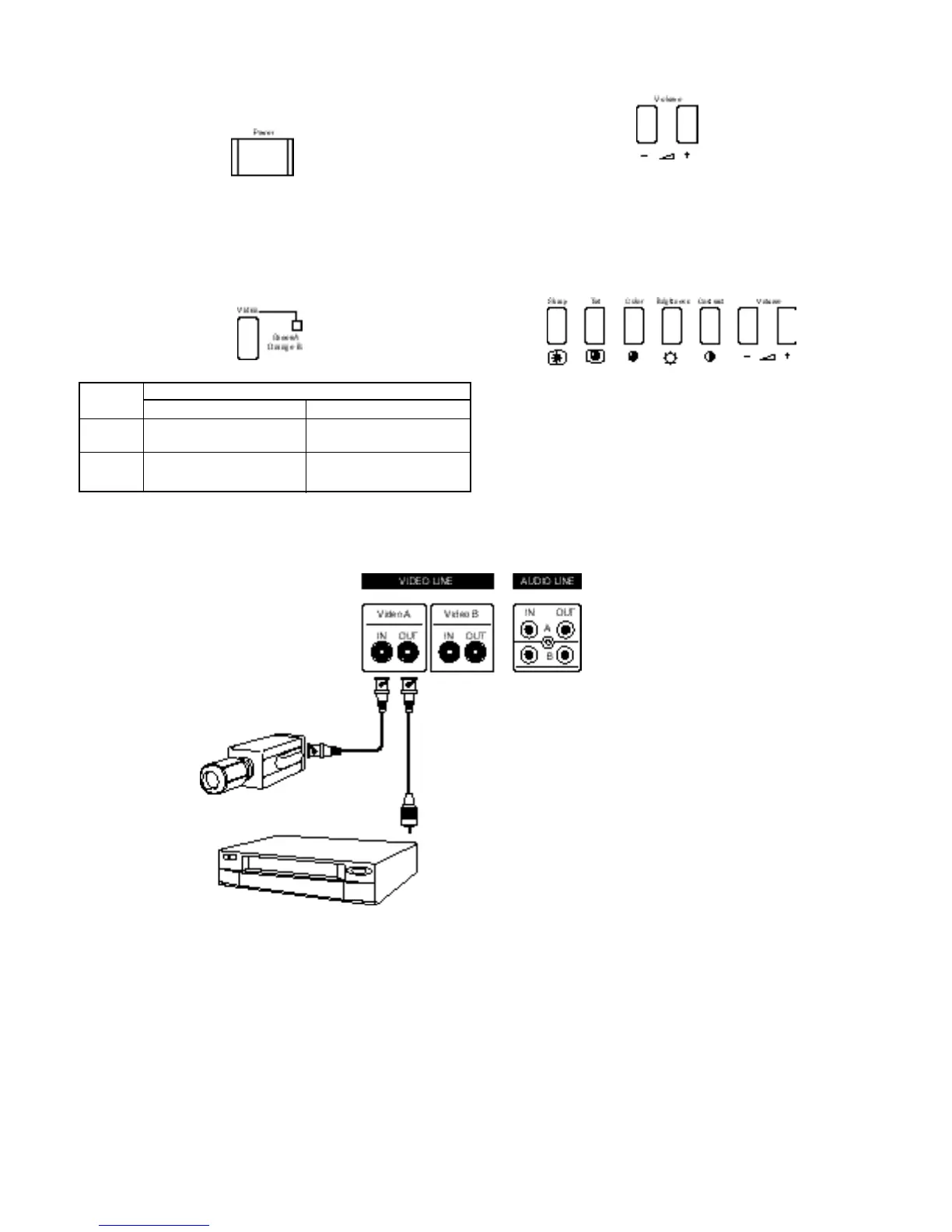
1. Press the Power switch to turn on the power.
When the power is ON, the Video Selector indicator is lit.
When the power is OFF, the Video Selector indicator is unlit.
2. Press (toggle) the Video button (A or B) to choose the input.
3. Press the VOLUME button to adjust the speaker volume.
3.2 Picture Adjustment
To adjust the picture’s Sharp, Tint, Color, Brightness or
Contrast, press the appropriate button then adjust with the
Volume button. Default for each setting is 50.
4 BASIC CONNECTION EXAMPLE
The illustration below shows the basic connection of composite
video equipment.
Button Terminals on the rear panel
Video signal input Audio signal input
A VIDEO A terminal AUDIO A terminal
(Video)
B VIDEO B terminal AUDIO B terminal
(Video)










 To Next Page