English
11
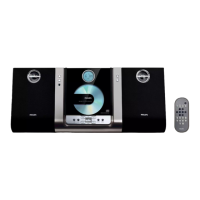
Controls (illustrations on page 3)
Controls on the system and
remote control
1 STANDBY-ON/ECO POWERB
– switches the system on or to Eco Power
standby/normal standby with clock display.
2 Display screen
– shows the status of the system.
3 OPEN • CLOSEç
– opens/closes the CD door.
4 IR
– remote sensor
5 VOLUME (3/4) (+/-)
– adjusts the volume level.
– adjusts the hours and minutes for the clock/timer
function.
6 CD Door
7 S/T
for CD/MP3-CD fast searches back and
forward within a track/disc (press
and hold).
................................. skips to the beginning of a
current/previous/subsequent
track.
8 9
– stops disc playback or erases a disc program.
9 ÉÅ
– starts or interrupts playback.
0 ALBUM 4/3
for TUNER ........ selects a preset radio station.
for MP3-CD ..... skips to the beginning of a
current/previous/subsequent
album.
! Navigation controls
PRESET3 / 4ALBUM/PRESET
for TUNER
................................. selects a preset radio station (up,
down).
for MP3-CD (on the remote only)
................................. skips to the beginning of a
current/previous/subsequent
album.
TUNE 1 / 2 (S/T)
for DAB .............. scrolls an option list.
for TUNER ........ tunes to radio stations (down/
up).
for CD/MP3-CD (on the remote only)
................................. fast searches back and forward
within a track/disc (press and
hold).
................................. skips to the beginning of a
current/previous/subsequent
track.
ENTER ............. press to select an option (DAB
only)
@ SOURCE
– selects the respective sound source for CD/DAB/
FM/AUX.
# PROGRAM
for CD/MP3-CD programs tracks and reviews
the program.
for TUNER/DAB programs radio stations.
for CLOCK ....... (on the set only) selects 12- or
24-hour clock display.
$ SMART SCAN
– autoscans for DAB frequencies.
% DAB MENU
– enables access to advanced setup options.
^ DISPLAY•ID3
for CD/MP3-CD displays disc information
during playback.
for DAB .............. to view DAB service information.
& CLOCK SET
– sets the clock function.
* TIMER
– activates/deactivates or sets the timer function.
( SLEEP
– activates/deactivates or selects the sleeper time.
) DSC (Digital Sound Control)
– selects sound characteristics: POP/ JAZZ/ROCK/
CLASSIC.
pg001-026_MCB240_22-Eng 2005.8.1, 13:3211



 To Next Page