10
English
Functional Overview
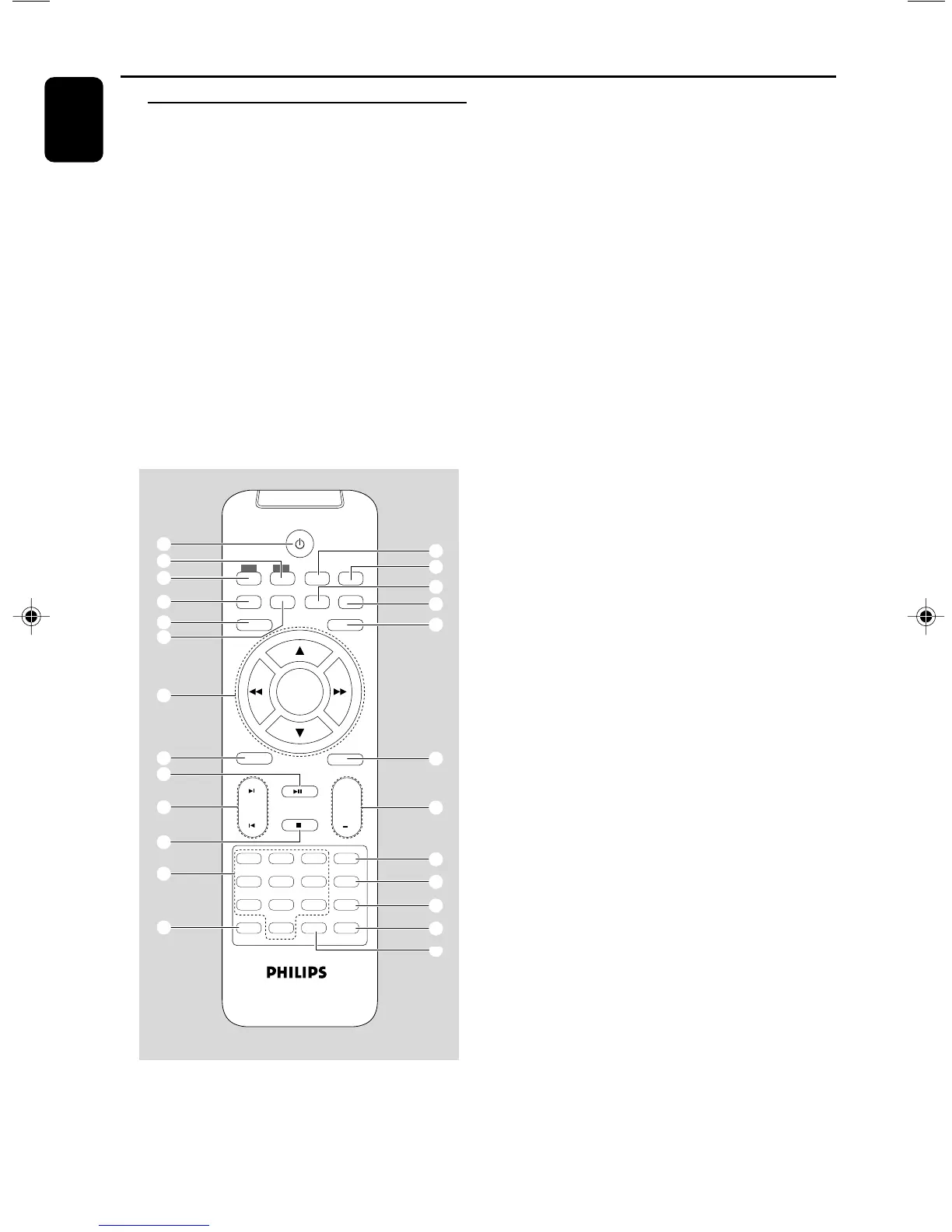
Remote control
1 B
– switches the system on/ off.
2 AUX
– selects a connected external source
3 DISC
– selects disc playing
4 SUBTITLE
– selects a subtitle language.
5 SYSTEM MENU
– enters or exits the system menu.
6 REPEAT
– selects variations of continuous playback (For
VCD with PBC feature, PBC must be turned off.)
7 OK
– confirms a selection.
4 / 3 / à / á
– selects an item in a menu.
–moves an enlarged picture down/up/left/right.
8 AUDIO
for VCD
– sets Left vocal, Right vocal, Mono left, Mono right
or Stereo sound mode.
for DVD
– selects an audio language.
9 ÉÅ
– starts or interrupts disc playback.
0 ¡ / ™
– Disc: skips to the previous/next chapter/title/
track
– For JPEG: selects different zooming rates
! 9
– stops disc playback or erases a program.
@ Numeric Keypad (0-9)
– inputs a track/title/chapter number of the disc.
# PROG
– For VCD/CD only: program the favourite tracks
$ DISPLAY (OSD)
– displays disc playback time during playback
% SLOW
– selects different slow playback modes for a VCD/
SVCD/DVD.
^ A-B
– repeats playback of a specific section within a
chapter of DVD or a track.
& SHUFFLE
– For VCD/CD only: selects to playback in random
order (For VCD with PBC feature, PBC must be
turned off.)
* DISC MENU
–DVD/VCD: enters or exits the disc contents
menu (For VCD with PBC feature, PBC must be
turned on.)
– MP3/WMA/JPEG: switches on or off the album/
picture menu.
1
4
7
2
5
8
0
3
6
9
ANGLEPROG
AUDIO MUTE
GOTO
VOL
+
ZOOM
DSC
DBB
OK
SYSTEM MENU
SUBTITLE REPEAT A-B SHUFFLE
SLOWDISPLAY
OSD
DISC MENU
DISC AUX
1
&
%
*
(
)
¡
™
£
≤
∞
$
3
4
5
7
8
0
@
#
!
9
6
2
^
pg 001-032-mcd109_98_Eng 27/4/06, 14:4510



 To Next Page