English
11
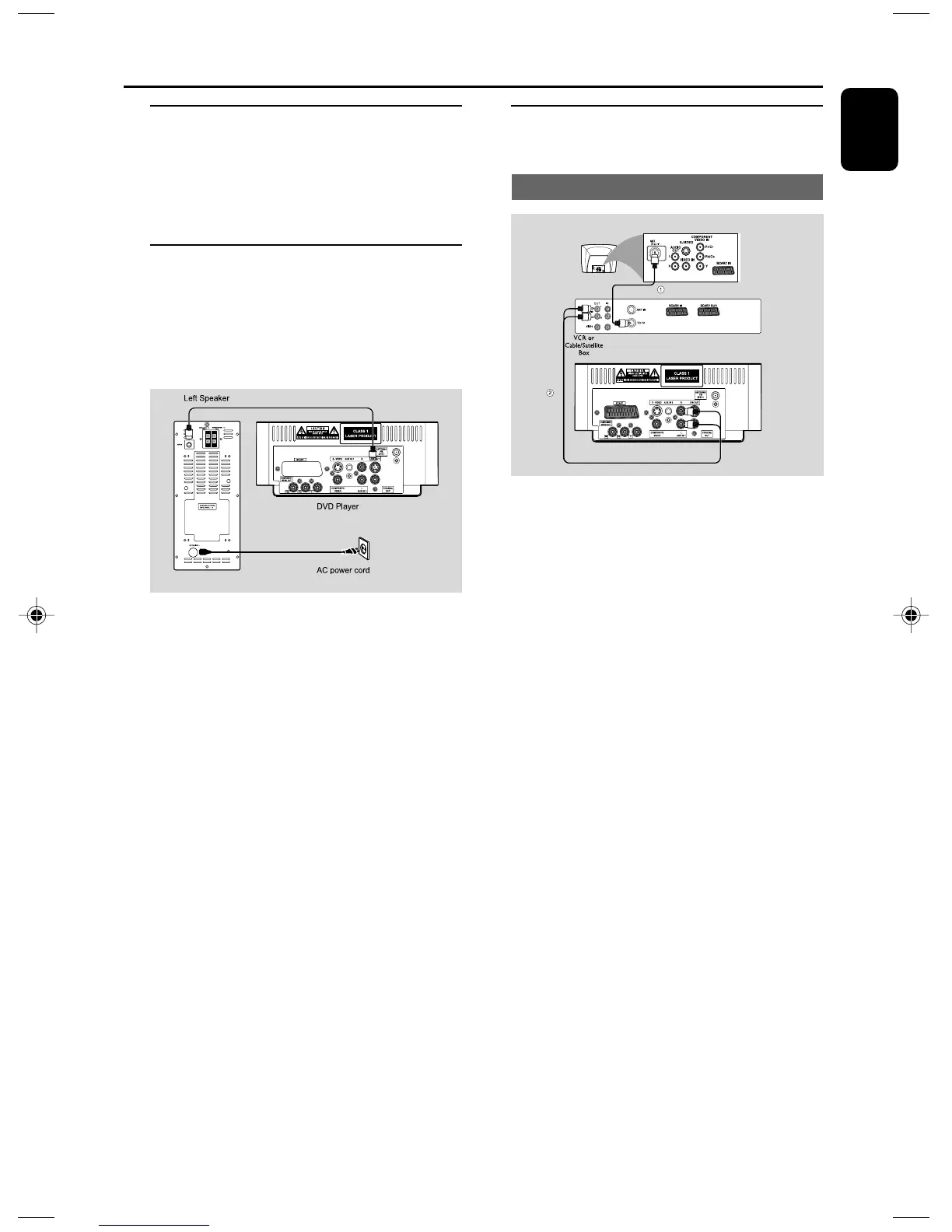
Step 6: Connecting a VCR or
cable/satellite box
Viewing and listening to playback
1 Connect the VCR or Cable/Satellite Box to the
TV system as shown.
2 Use the audio cables (red/white, not supplied) to
connect the system’s AUX IN1 (L/R) jacks to
the AUDIO OUT jacks on the VCR or Cable/
Satellite box.
Before starting operation, press AUX1/2/TV on
the remote control to select “AUX 1” in order
to activate the input source.
Step 4: Connecting the FM
antenna
● Connect the supplied FM antenna to the FM (75
Ω) jack at the back of the main unit. Extend the
FM antenna and fix its end to the wall.
Step 5: Connecting the power
cord
IMPORTANT!
– Never make or change any
connection with the power switched on.
6
8
8
● After everything is connected properly, plug in
the AC power cord to the power socket.
Connections
pg001-036_MCD139B_58_Eng 2007.5.18, 14:4511



 To Next Page