13
English
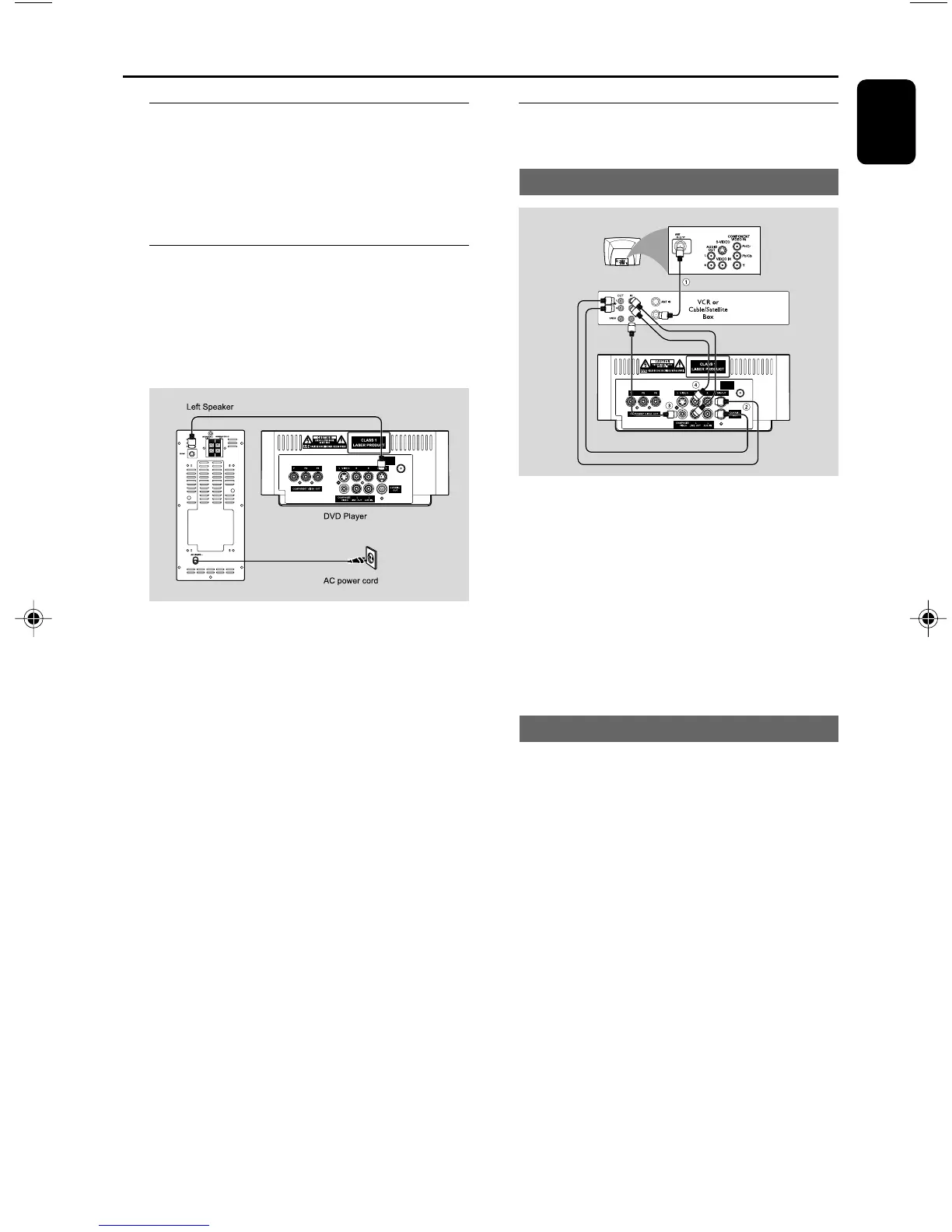
Step 6: Connecting a VCR or
cable/satellite box
Viewing and listening to playback
1 Connect the VCR or Cable/Satellite Box to the
TV system as shown.
2 Using the audio cables (red/white, not supplied)
Connect the system’s AUX IN (L/R) jacks to
the AUDIO OUT jacks on the VCR or Cable/
Satellite box.
Before starting operation, press AUX on the
remote control to select “AUX” in order to
activate the input source.
Using the VCR for recording DVDs
Some DVDs are copyright-protected. You cannot
record or dub protected discs using a VCR.
3 Connect the system’s COMPOSITE VIDEO
jack to the VIDEO IN jack on the VCR.
4 Connect the system’s LINE OUT (R/L) jacks
to the AUDIO IN jacks on the VCR. This will
allow you to make analog stereo (two channel,
right and left) recording.
To view DVD playback while recording
You must connect the system to your TV system
using the S-VIDEO (as shown above) or the
COMPONENT VIDEO OUT (Pr Pb Y)
video connection.
Step 4: Connecting the FM
antenna
● Connect the supplied FM antenna to the FM (75
Ω) jack at the back of the main unit. Extend the
FM antenna and fix its end to the wall.
Step 5: Connecting the power
cord
IMPORTANT!
– Never make or change any
connection with the power switched on.
● After everything is connected properly, plug in
the AC power cord to the power socket.
Connections
ANTENNA
FM
(75Ω)
ANTENNA
FM
(75Ω)
pg001-pg039-MCD139B_37_Eng 20/12/06, 17:2113



 To Next Page