English
13
Connections
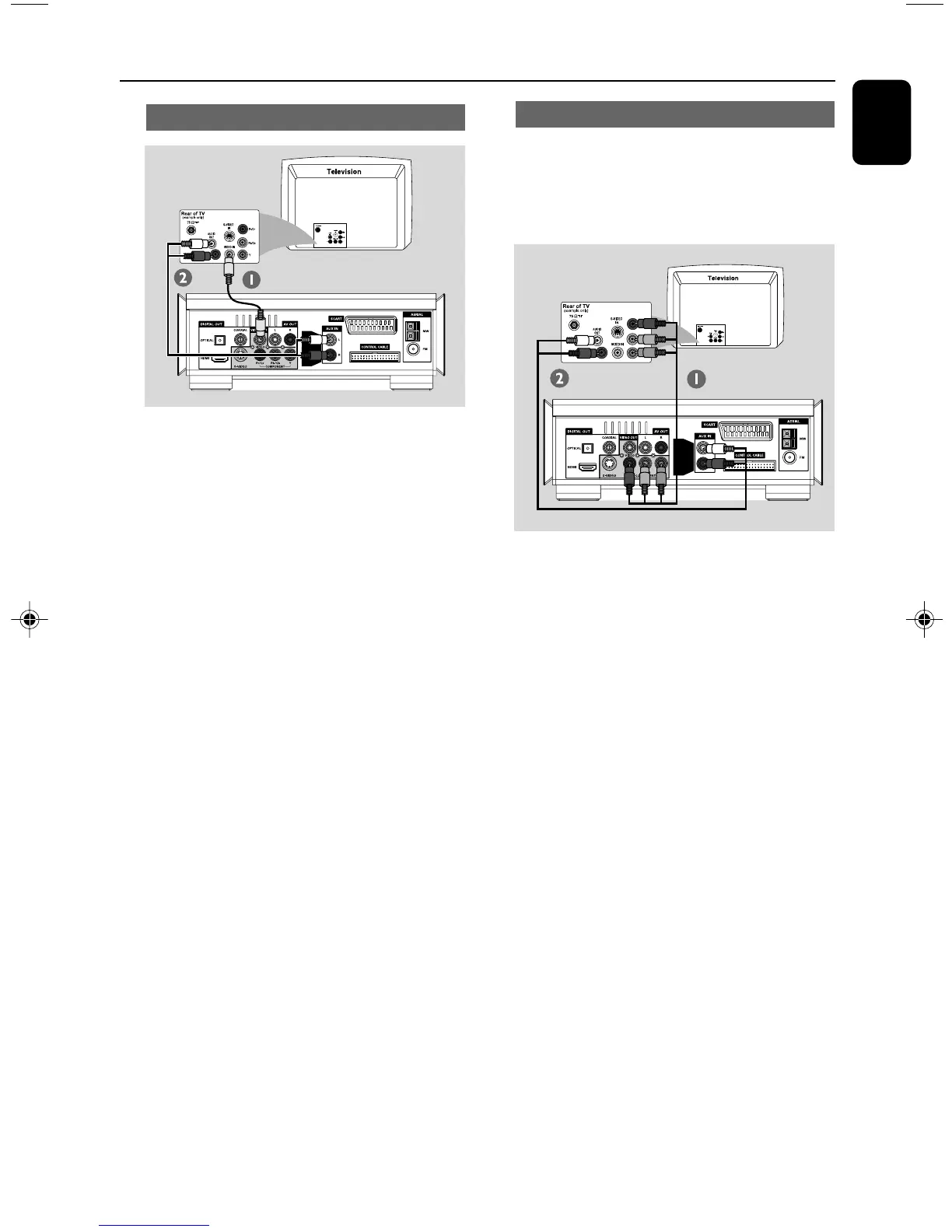
Using Composite Video jack
1 Use the composite video cable (yellow) to
connect the system's VIDEO OUT jack to the
video input jack (or labelled as A/V In, Video In,
Composite or Baseband) on the TV set.
2 To hear the TV channels through this DVD
system, use the audio cables (white/red-not
supplied) to connect AUX IN L/R jacks to the
corresponding AUDIO OUT jacks on the TV.
Using Component Video jacks (Y Pb Pr)
IMPORTANT!
– The progressive scan video quality is
only possible when using Y Pb Pr, and a
progressive scan TV is required.
1 Use component video cables (red/blue/green -
not supplied) to connect the DVD system's
COMPONENT (Pr/Cr Pb/Cb Y) jacks to
the corresponding Component video input jacks
(or labeled as Y Pb/Cb Pr/Cr or YUV) on the TV.
2 To hear the TV channels through this DVD
system, use the audio cables (white/red-not
supplied) to connect AUX IN L/R jacks to the
corresponding AUDIO OUT jacks on the TV.
3 If you are using a Progressive Scan TV (TV must
indicate Progressive Scan or ProScan capability),
to activate TV Progressive Scan, please refer to
your TV user manual. For DVD system
Progressive Scan function, see “Getting Started-
Setting up Progressive Scan feature”.
Note:
– If your TV does not support Progressive Scan,
you will not be able to view the picture.
Press SYSTEM on the remote to exit the system
menu and then DISC and “1” to exit progressive
scan.
pg 001-024_MCD908_Eng-12 2007.6.12, 16:3313


 To Next Page