12
English
Preparation
Setting the clock
After connecting MCM277 to the power supply,
set the clock first.
1 In the standby mode, press and hold DISPLAY/
CLOCK on the remote control
➜ SET CLOCK scrolls on the display
➜ 24 HR or 12 HR appears for the initial
clock setting. To select 24-hour clock or
12-hour clock,
● On the remote control, press VOL +/-
once or more (or turn VOLUME on the
set)
● On the remote control, press DISPLAY/
CLOCK to confirm
➜ The hours digits start flashing
2 Hold down or press VOL +/- repeatedly to set
the hours (or turn VOLUME on the
set)
3 Press DISPLAY/CLOCK to confirm
➜ The minutes digits start flashing
4 Hold down or press VOL +/- repeatedly to set
the minutes (or turn VOLUME on the
set)
5 Press DISPLAY/CLOCK to confirm
– To exit without storing the clock setting press
STOP 9
Helpful hints:
– The clock setting will be erased when the system
is disconnected from the power supply.
– The set will exit from the clock setting mode if
no button is pressed within 90 seconds.
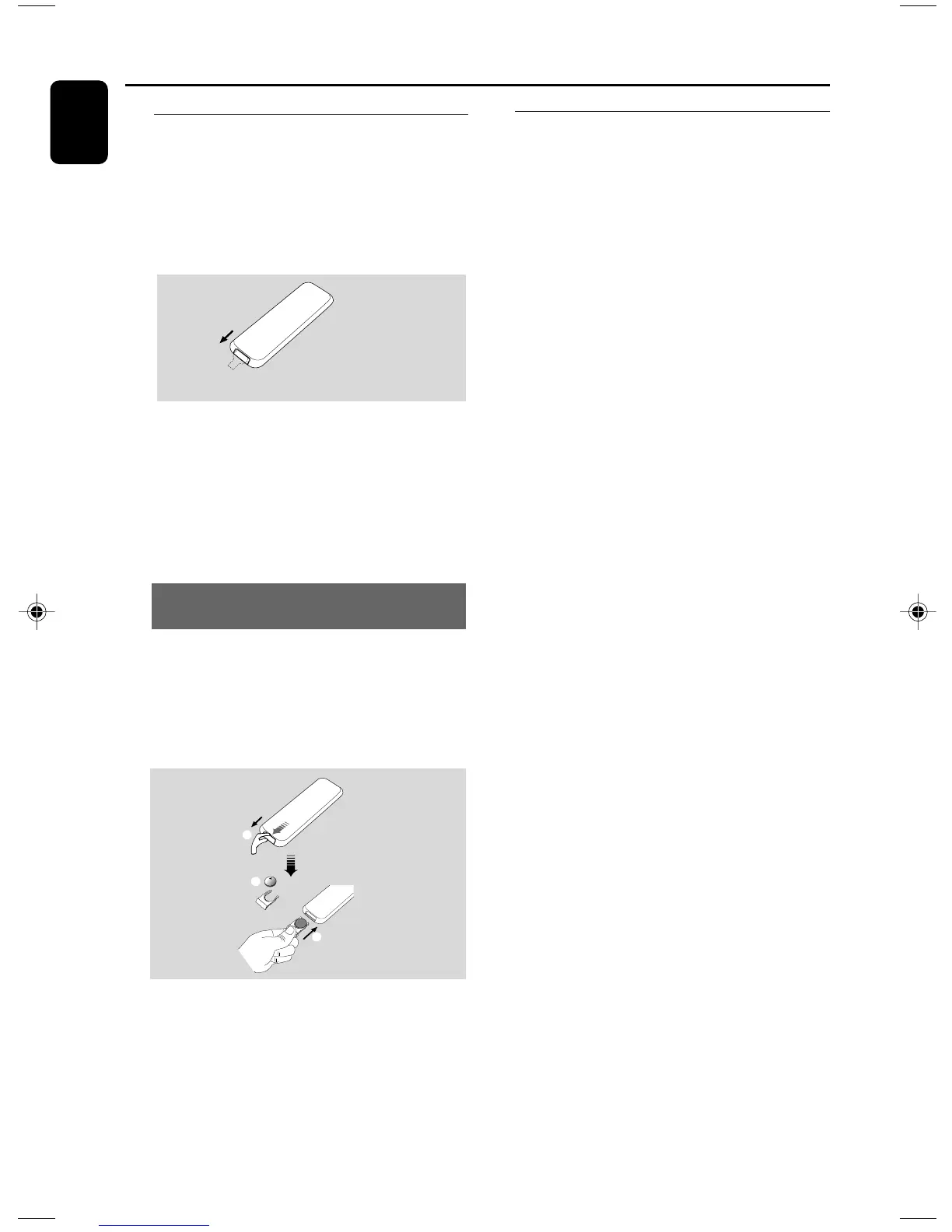
Using the remote control
IMPORTANT!
– Remove the protective plastic tab before
using the remote control.
– Always point the remote control directly
towards IR area.
Remove the plastic protective sheet
Notes for remote control:
– First select the source you wish to
control by pressing one of the source select
keys on the remote control (for example
CD, TUNER).
– Then select the desired function (for
example
ÉÅ
,
4
,
¢
).
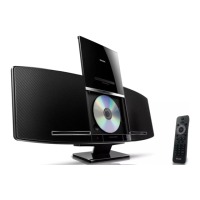
To replace the remote controls’
battery
1 Press and hold 1 as indicated.
2 Simultaneously, pull the battery tray at 4.
3 Remove the old battery and put a new CR2025
battery in place.
4 Put back the battery tray.
1
2
3
CR2025
CAUTION!
– Remove the battery if it is exhausted
or will not be used for a long time.
– Batteries contain chemical substances,
so they should be disposed of properly.
– Danger of explosion if battery is
incorrectly replaced. Replace only with
the same or equivalent type.
P001-P026_MCM277_98_Eng 2008.1.4, 15:4512


 To Next Page