Need help?
Do you have a question about the Philips MCM305 and is the answer not in the manual?
Connects the speaker cables to the main unit and speakers for audio output.
Connects the AC power cord to the wall socket for system power.
Guides on setting the system's clock, including format and time adjustment.
Instructions for playing audio discs by selecting the source and controlling playback.
Steps to play audio content from a USB device by connecting and selecting the source.
Procedure for tuning into radio stations using the tuner source and scan function.
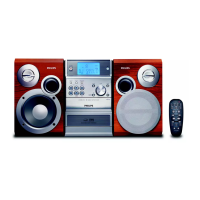
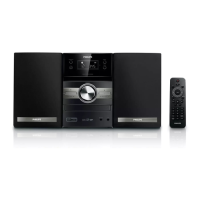
The Philips MCM305 is a compact micro system designed to provide a versatile audio experience through various playback options and user-friendly controls. This system integrates multiple audio sources, including CD playback, USB connectivity, an FM tuner, and an MP3 Link for external devices, making it a comprehensive solution for personal audio enjoyment. Its design emphasizes ease of use, with clear steps for initial setup and daily operation, ensuring that users can quickly connect, configure, and enjoy their music.
The core function of the MCM305 is to serve as a central hub for playing various audio formats. It supports traditional audio CDs, allowing users to enjoy their physical music collection. For modern digital music, the system features a USB port, enabling direct playback of audio files stored on USB flash drives. This eliminates the need for burning CDs and offers a convenient way to access large digital music libraries. The integrated FM tuner provides access to radio broadcasts, allowing users to listen to their favorite stations. Furthermore, an MP3 Link input expands the system's versatility by allowing connection of external audio devices such as smartphones, MP3 players, or tablets, effectively turning the MCM305 into an external speaker for these devices. This broad range of input options ensures that the system can cater to diverse listening preferences and media formats.
The system is designed with a focus on audio quality, incorporating features like Dynamic Bass Boost (DBB) and Digital Sound Control (DSC). DBB enhances the bass response, providing a richer and more powerful low-end sound, which can be particularly appealing for certain music genres. DSC offers various preset equalizer settings, allowing users to optimize the sound output for different types of music, such as rock, pop, jazz, or classical, ensuring a tailored listening experience. These sound enhancement features contribute to a more immersive and enjoyable audio playback.
Beyond basic playback, the MCM305 includes several practical functionalities. A clock display is integrated, which can be set to either a 12-hour or 24-hour format, adding a utility feature to the system. The standby mode is designed for energy efficiency, and the system can be woken up or put into standby with a single button press. The remote control provides convenient access to all functions from a distance, enhancing user comfort and accessibility. The system also supports basic playback controls such as play, pause, stop, skip tracks, and repeat/shuffle functions for disc and USB playback, offering full command over the music experience.
The MCM305 is designed for straightforward setup and operation. The initial connection process involves simply connecting the speaker cables to the main unit and plugging the AC power cord into a wall socket. This minimal wiring ensures that the system can be up and running quickly without complex installation procedures.
Setting the clock is an intuitive process. In standby mode, users can press and hold the CLOCK button on the main unit to initiate the clock setting. The system guides the user through setting the hour and minute using the VOLUME +/- controls, with the minute digits blinking to indicate the active setting. A final press of the CLOCK button confirms the settings. This step-by-step approach makes clock configuration simple and accessible.
Playing a disc is equally user-friendly. Users select the CD source, press the open/close button to open the disc tray, insert a disc with the printed side facing up, and then close the tray. Playback can be paused, resumed, or stopped using dedicated buttons. This familiar CD player operation ensures that users accustomed to traditional audio systems will find it easy to navigate.
For digital music playback, the USB feature is designed for convenience. Users simply flip open the USB socket cover on the front panel, insert a USB device, and then select the USB source. The system will then play the audio content from the USB device. This direct playback capability streamlines the process of enjoying digital music without the need for additional software or complex file transfers.
Tuning into radio stations is also made simple. Users select the TUNER source and can then press and hold the tuning buttons to automatically scan for stations. The system is designed to make finding and enjoying radio broadcasts an effortless experience.
The remote control is a key usage feature, providing comprehensive control over the system's functions. It includes buttons for source selection (CD, TUNER, USB, MP3 LINK), playback controls (play/pause, stop, skip), volume adjustment, sound enhancements (DBB, DSC), and clock/timer settings. This allows users to manage their audio experience without needing to interact directly with the main unit, offering flexibility and comfort, especially when relaxing or entertaining. The clear labeling of buttons on the remote further enhances its usability.
The system's display provides essential information, such as the current time, selected source, track number, and playback status, keeping the user informed about the system's operation. The compact size of the main unit and speakers makes it suitable for various spaces, from bedrooms and offices to living rooms, offering flexibility in placement.
While the manual primarily focuses on setup and usage, the design of the Philips MCM305 implies several maintenance-friendly aspects. The system's robust construction and clear interface contribute to its longevity and ease of care.
The absence of complex internal components that require regular user intervention simplifies maintenance. Users are generally not expected to perform any internal cleaning or part replacement. The focus is on external care, such as keeping the unit clean.
The user manual, which is provided alongside the quick start guide, serves as a crucial maintenance resource. It typically contains detailed information on troubleshooting common issues, which can help users resolve minor problems without needing professional assistance. This self-help aspect is a significant maintenance feature, empowering users to address basic operational glitches.
The design of the disc tray and USB port, with its protective cover, helps in preventing dust and debris from entering sensitive internal components. Regularly closing the disc tray when not in use and ensuring the USB port cover is in place can contribute to the longevity of these mechanisms.
For general cleaning, the smooth surfaces of the main unit and speakers are easy to wipe down with a soft, dry cloth. This simple routine helps maintain the aesthetic appeal of the system and prevents dust buildup, which could potentially affect performance over time. The manual would typically advise against using harsh chemicals or abrasive materials that could damage the finish.
The modular design, with separate speakers and main unit, allows for easier handling and positioning. If one component needs attention, it can be managed independently to some extent. The use of standard speaker cable connections also means that if a cable were to be damaged, it could potentially be replaced with a compatible alternative, though the manual would likely recommend using Philips-approved accessories.
Overall, the Philips MCM305 is designed to be a low-maintenance device, with most "maintenance" revolving around proper handling, regular external cleaning, and consulting the user manual for troubleshooting. Its user-centric design aims to provide a hassle-free audio experience from initial setup through long-term use.
 Sound
Sound| output power | 2 x 15 W RMS / 2 x 30 W music power |
|---|
 Loudspeakers
| speaker drivers | 4" woofer, full range |
|---|---|
| speaker types | bass reflex speaker system |
Tuner/Reception/Transmission| tuner bands | FM stereo, MW |
|---|---|
| station presets | 30 |
| antenna | FM fixed pigtail antenna, MW antenna |
Connectivity| audio/video output | Headphone (3.5mm) |
|---|---|
| MP3 link | 3.5mm stereo line in |
| USB | USB host |
 Power
Power| power supply frequency | 50 Hz |
|---|---|
| power supply voltage | 220 - 240 V |
| eco power standby | 1 W |
Dimensions| main speaker dimensions | 146 x 160 mm |
|---|---|
| gross weight | 7.7 kg |
| main speaker height | 232 mm |
| main unit depth | 287 mm |
| packaging depth | 350 mm |
| main unit height | 232 mm |
| packaging height | 275 mm |
| main unit width | 152 mm |
| packaging width | 378 mm |

 To Next Page