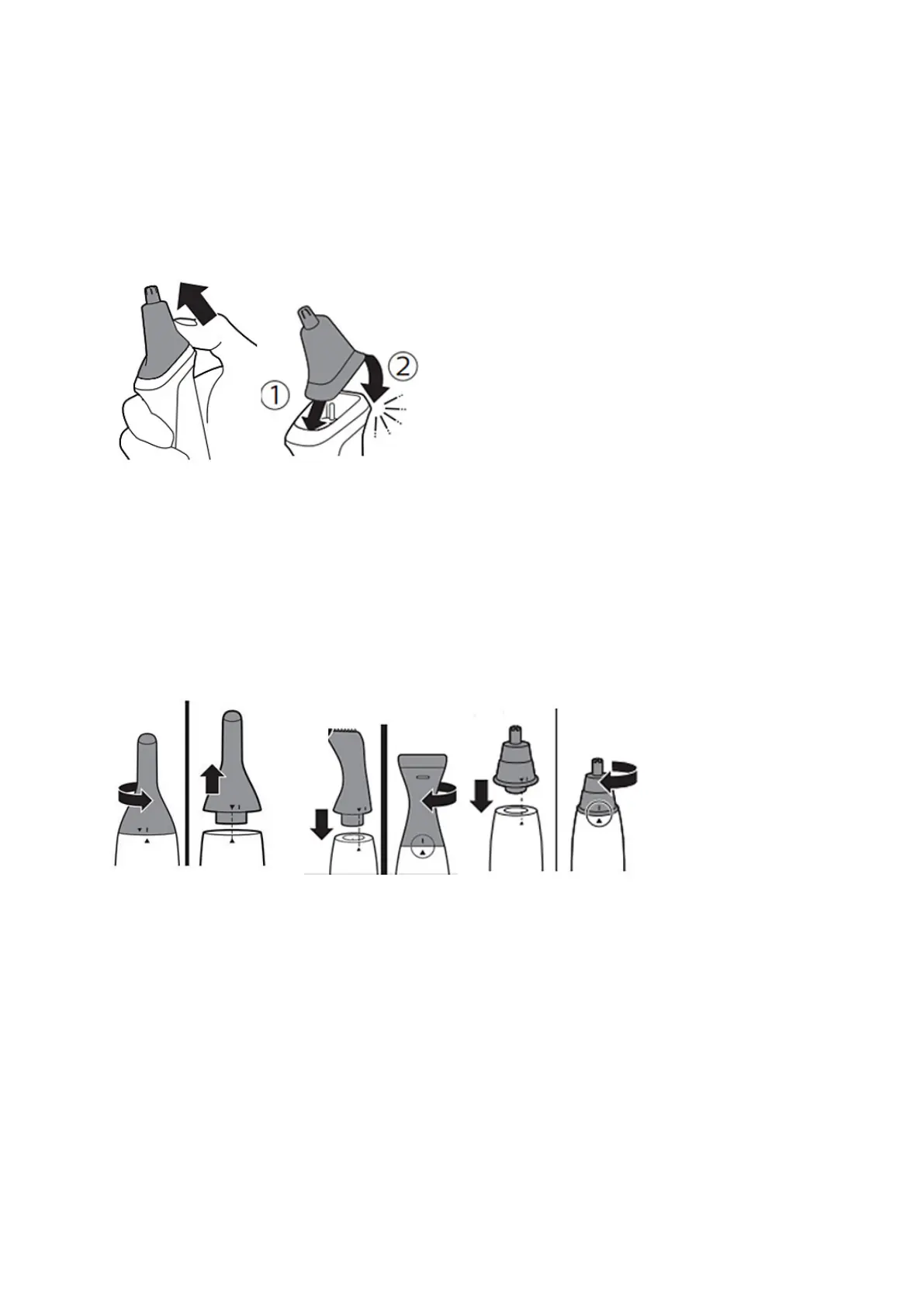
Attaching nose trimmer attachment
Philips MultiGroomers which come with a rotary nose trimmer attachment that can easily be
removed and attached.
1. To take off the nose trimmer attachment, place your finger on the back of the attachment and
push it upwards off the handle.
2. To attach the nose trimmer attachment, insert the lug of the attachment into the guiding slot at
the front and push the back of the attachment onto the product ('click').
Attaching nose trimmers
Philips Nose trimmers come with a nose trimmer, and sometimes also a detail trimmer head that can
also easily be removed and attached.
1. To take off the nose trimmer or detail trimmer head, firmly grip the handle of your device, hold
the attachment, and turn it counterclockwise, until the “^” triangle indications on the handle and
the head are aligned. Then just pull the attachment off.
2. To attach the nose trimmer or trimming head, place it on the handle aligning both triangle “^”
indications. Then turn it clockwise until the indicator triangle “^” and line “|” indication on the
body and attachment are aligned and the attachment is fixed.



 To Next Page