12
English
Connections
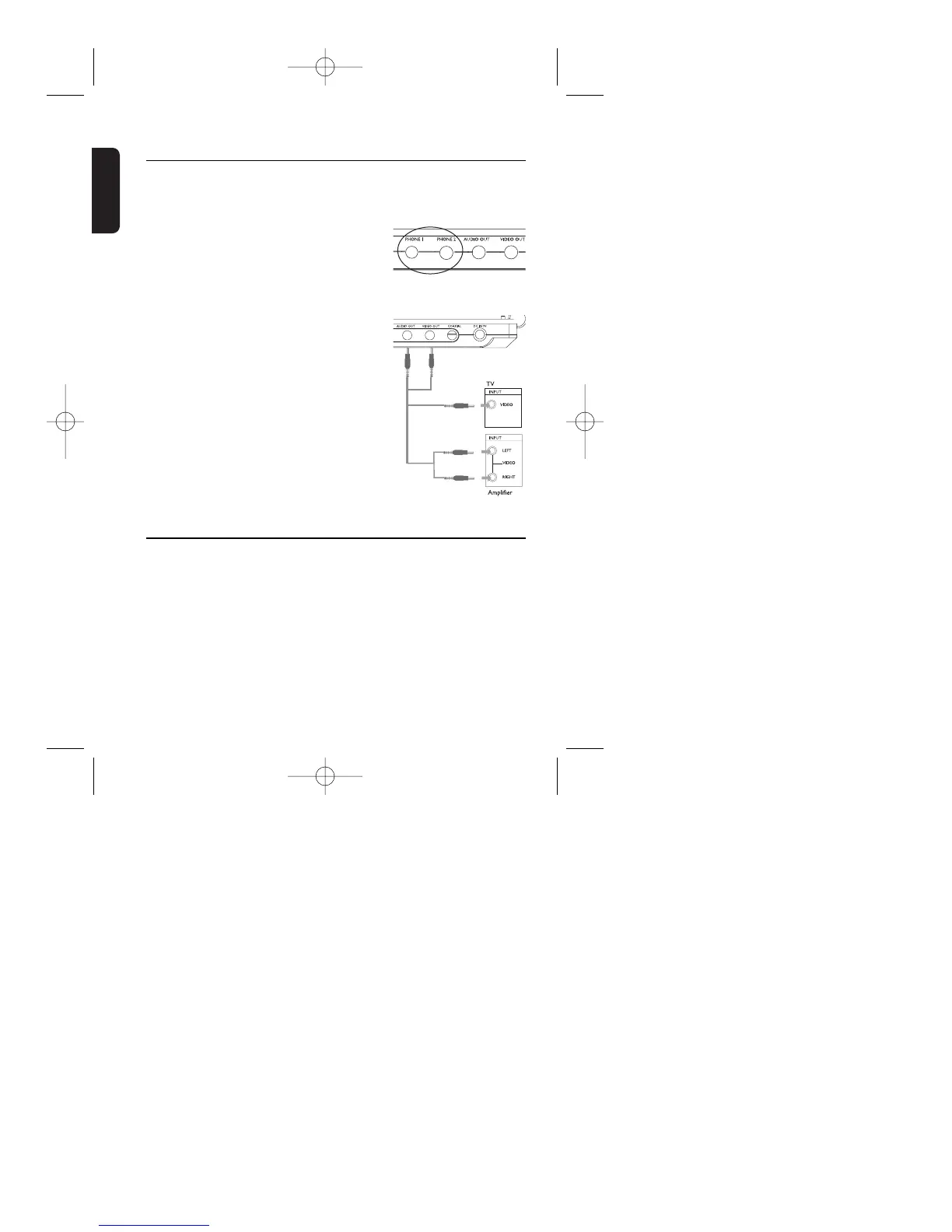
Connecting headphones
Connect the headphones into the PHONE 1
or the PHONE 2 jack of your set.
Connecting additional equipment
You can connect the player to a TV or an
amplifier to enjoy DVDs or karaoke.
1 Turn off your set before connecting to any
additional equipment.
2 Connect the output connectors (yellow /
black) of the supplied cable to the AUDIO
/ VIDEO jacks. (TV ON on the main unit
lights up)
3 Connect the input connectors (yellow,
white and red) of the supplied cable to the
additional equipment.
Connection Video Audio (Left) Audio (right)
Color Yellow White Red
➯ TIP
• You can also make use of the COAXIAL jack for digital audio output.
• Please refer to the user manuals of your additional equipment for more
information about connection.
• Players with a /17 model number only supports NTSC television sets.
Players with model numbers other than /17 support NTSC/PAL/AUTO
television sets.
Black
Yellow
White
Red
Yellow



 To Next Page