EasyManua.ls Logo

Philips PM 3266 - 3.3.8. Replacing a push-button switch

Philips PM 3266
274 pages
Print Icon
To Next Page IconTo Next Page
To Previous Page IconTo Previous Page
Loading...
144
3.3.8. Replacing
a
push-button switch
Each of the
push-button sets is fitted
to the front panel
by
means
of two clamping
devices
secured by hexagon
screws,
see
Fig.
3.19.
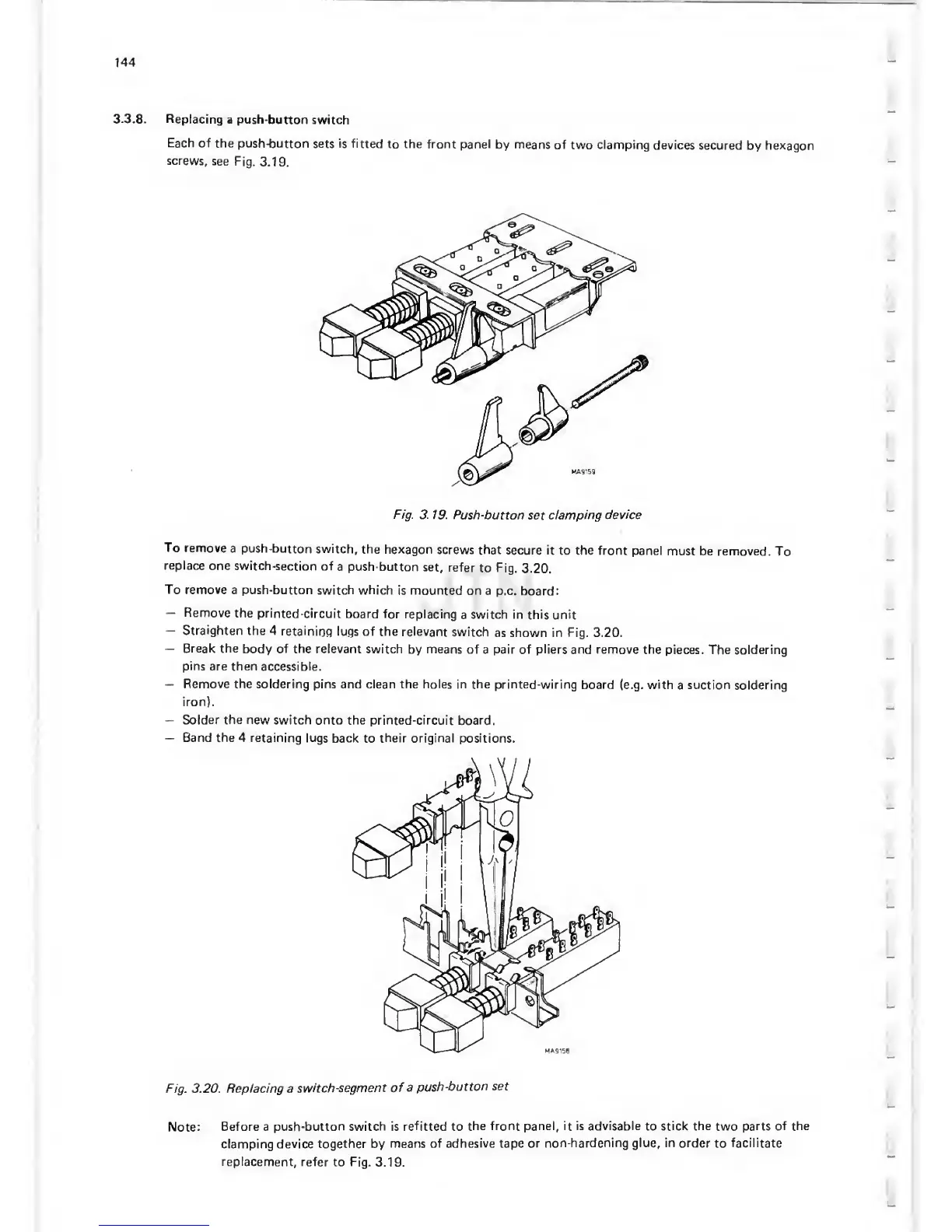
Fig.
3. 19. Push-button
set
damping
device
To
remove
a push-button
switch,
the
hexagon
screws that
secure it
to
the
front panel
must be removed.
To
replace
one
switch-section
of
a push-button
set,
refer
to
Fig.
3.20.
To remove
a push-button switch which
is mounted
on a
p.c. board:
Remove
the
printed-circuit
board for
replacing
a
switch in this
unit
Straighten
the 4
retainiop
lugs
of the
relevant
switch
as shown in
Fig.
3.20.
Break the
body of the relevant
switch
by
means of
a
pair
of pliers and remove the
pieces. The soldering
pins
are then
accessible.
Remove the
soldering pins and clean the holes in the printed-wiring
board
(e.g.
with
a
suction
soldering
iron).
Solder the new switch
onto the printed-circuit
board.
Band the 4 retaining
lugs back
to
their original positions.
Fig. 3.20. Replacing a
switch-segment
of
a
push-button
set
Note:
Before a
push-button switch is refitted
to
the front panel,
it
is advisable to stick the
two
parts of the
clamping
device
together by
means of
adhesive
tape
or
non-hardening glue, in
order
to
facilitate
replacement,
refer
to
Fig.
3.19.

Related product manuals