EasyManua.ls Logo

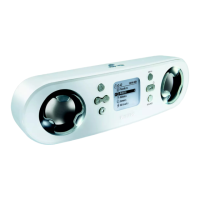
Philips PSS110/17B - User Manual

Philips PSS110/17B
34 pages
Print Icon
To Next Page IconTo Next Page
Loading...
1
We hope you enjoy your
personal sound system (pss)
Please visit www.philips.com/support
and enter your model number to view:
· FAQ, Frequently Asked Questions
· Latest user manuals
· Latest computer software downloads
· Firmware upgrade files
Register
Since it is possible for you to upgrade your product,
we recommend that you register your product on
www.philips.com/register so we can inform you as
soon as new free upgrades become available.
The typeplate is located on the back of the connections cover. Open connections cover to see.
PSS100_eng.qxd 26/1/05 10:14 Page 1
Question and Answer IconNeed help?

Do you have a question about the Philips PSS110/17B and is the answer not in the manual?

Summary

Getting Started and Basic Operation

Quick Start Guide

Step-by-step guide for initial setup and usage.

Device Controls and Connections

Detailed explanation of buttons, ports, and their functions.

Included Accessories

Lists and describes all items provided with the device.

Core Device Functions

Music Playback

How to play music files from the device.

FM Radio Mode

Instructions for tuning and listening to radio stations.

Line-in Mode

Connecting and playing external audio sources.

Using as External Storage

Using the device for file transfer with a PC.

Settings, Customization, and Alarms

Customizing Device Settings

Modifying device preferences and options.

Clock and Alarm Setup

Setting the time, date, and alarm functions.

Software, Maintenance, and Troubleshooting

Troubleshooting Common Issues

Solutions for common problems and error messages.

Safety and Maintenance

Guidelines for safe operation, care, and storage.

Musicmatch Jukebox Software

Guide to using the music management and transfer software.

Firmware Upgrade Process

How to download and install firmware updates.

Summary

Getting Started and Basic Operation

Quick Start Guide

Step-by-step guide for initial setup and usage.

Device Controls and Connections

Detailed explanation of buttons, ports, and their functions.

Included Accessories

Lists and describes all items provided with the device.

Core Device Functions

Music Playback

How to play music files from the device.

FM Radio Mode

Instructions for tuning and listening to radio stations.

Line-in Mode

Connecting and playing external audio sources.

Using as External Storage

Using the device for file transfer with a PC.

Settings, Customization, and Alarms

Customizing Device Settings

Modifying device preferences and options.

Clock and Alarm Setup

Setting the time, date, and alarm functions.

Software, Maintenance, and Troubleshooting

Troubleshooting Common Issues

Solutions for common problems and error messages.

Safety and Maintenance

Guidelines for safe operation, care, and storage.

Musicmatch Jukebox Software

Guide to using the music management and transfer software.

Firmware Upgrade Process

How to download and install firmware updates.

Philips PSS110/17B Specifications

General IconGeneral
BrandPhilips
ModelPSS110/17B
CategoryMP3 Player
Storage Capacity256 MB
Display TypeLCD
Battery LifeUp to 10 hours
Audio Formats SupportedMP3, WMA
FM RadioYes
Voice RecordingYes
Headphone Jack3.5 mm
USBUSB 2.0

Related product manuals