Replacement
Replace damaged parts immediately. Always
replace the cutting unit with the original Philips
cutting unit.
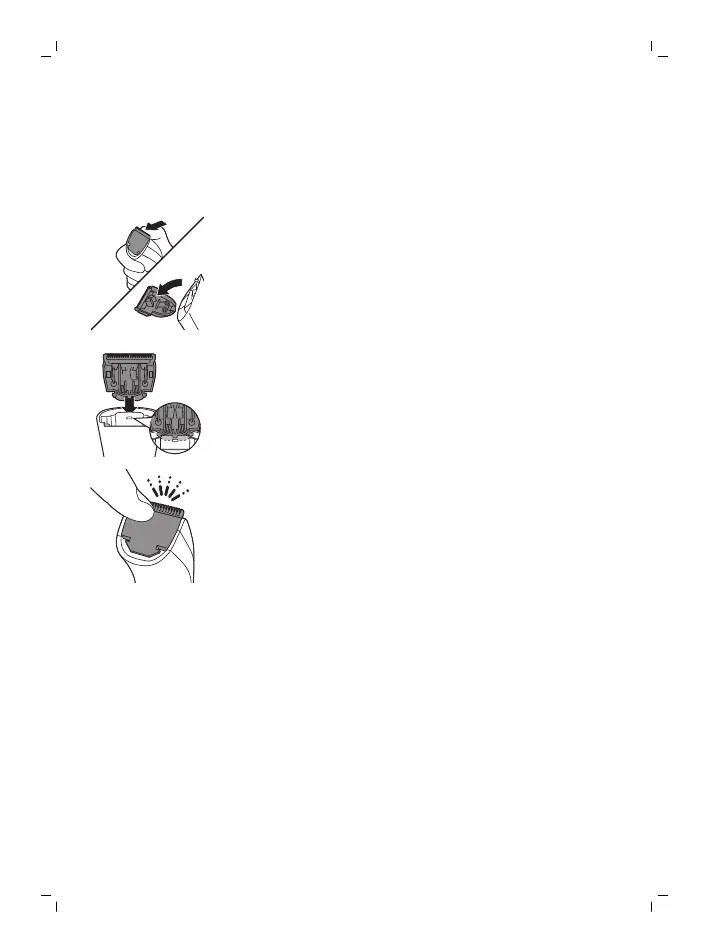
1 Push the teeth of cutting unit upwards and pull
the cutting unit off the appliance.
2 Remove the used cutting unit.
3 Insert the lug of the new cutting unit into the
guiding slot and push the cutting unit onto the
appliance ('click').
Ordering accessories
To buy accessories or spare parts, visit
www.philips.com/parts-and-accessories or go to
your Philips dealer. You can also contact the
Philips Consumer Care Center in your country (see
the international warranty leaflet for contact
details).
13
English


 To Next Page