6 Dry your face and thoroughly clean the shaver after use
(see chapter ‘Cleaning and maintenance’).
Note: Make sure you rinse all foam or shaving gel off the shaver.
Using the trimmer
moustache.
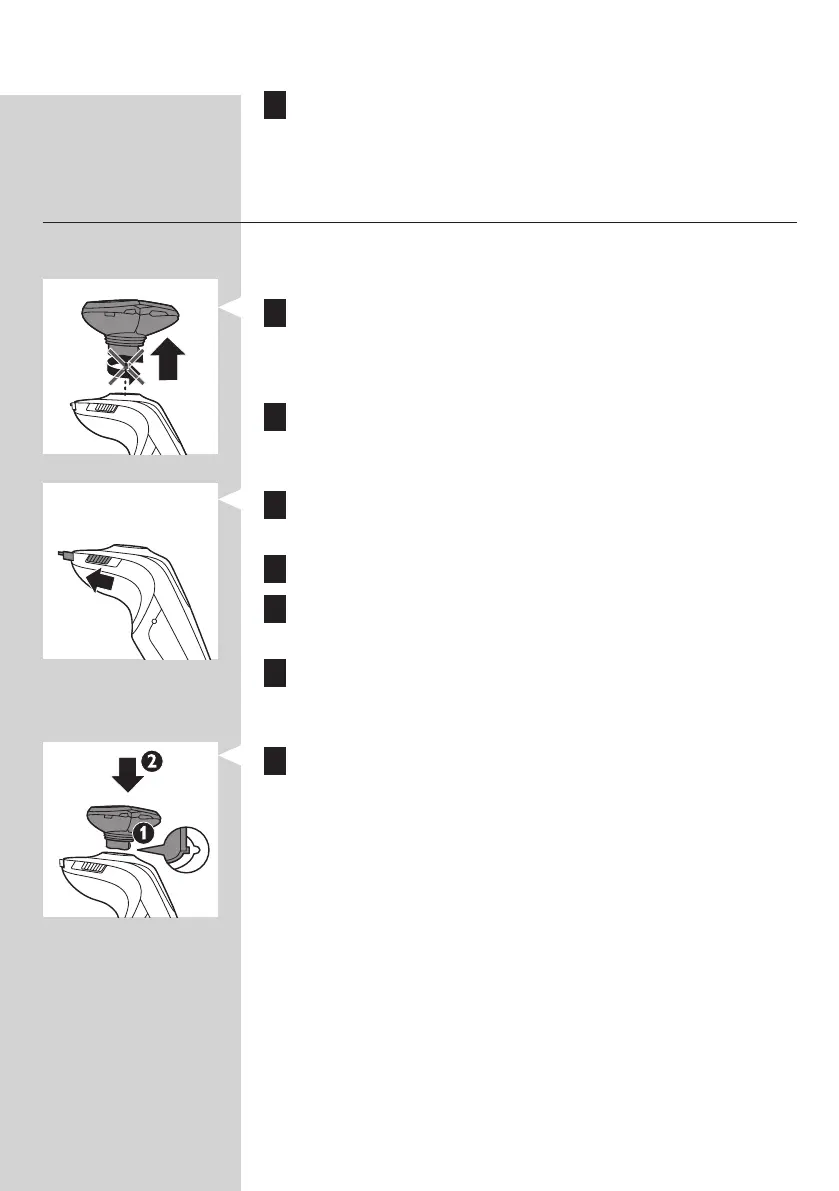
1 Pull the shaving unit straight off the shaver.
Note: Do not twist the shaving unit while you pull it off the
shaver.
2 Press the on/off button once to switch on the shaver.
, The display lights up for a few seconds.
3 Slide the trimmer slide forwards to slide out the
trimmer.
4 You can now start trimming.
5 Slide the trimmer slide backwards to retract the
trimmer.
6 Press the on/off button once to switch off the shaver.
, The display lights up for a few seconds and shows the
remaining battery capacity.
7 Insert the lug of the shaving unit into the slot in the top
of the shaver (1). Then press down the shaving unit (2)
to attach it to the shaver (‘click’).
ENGLISH48





 To Next Page