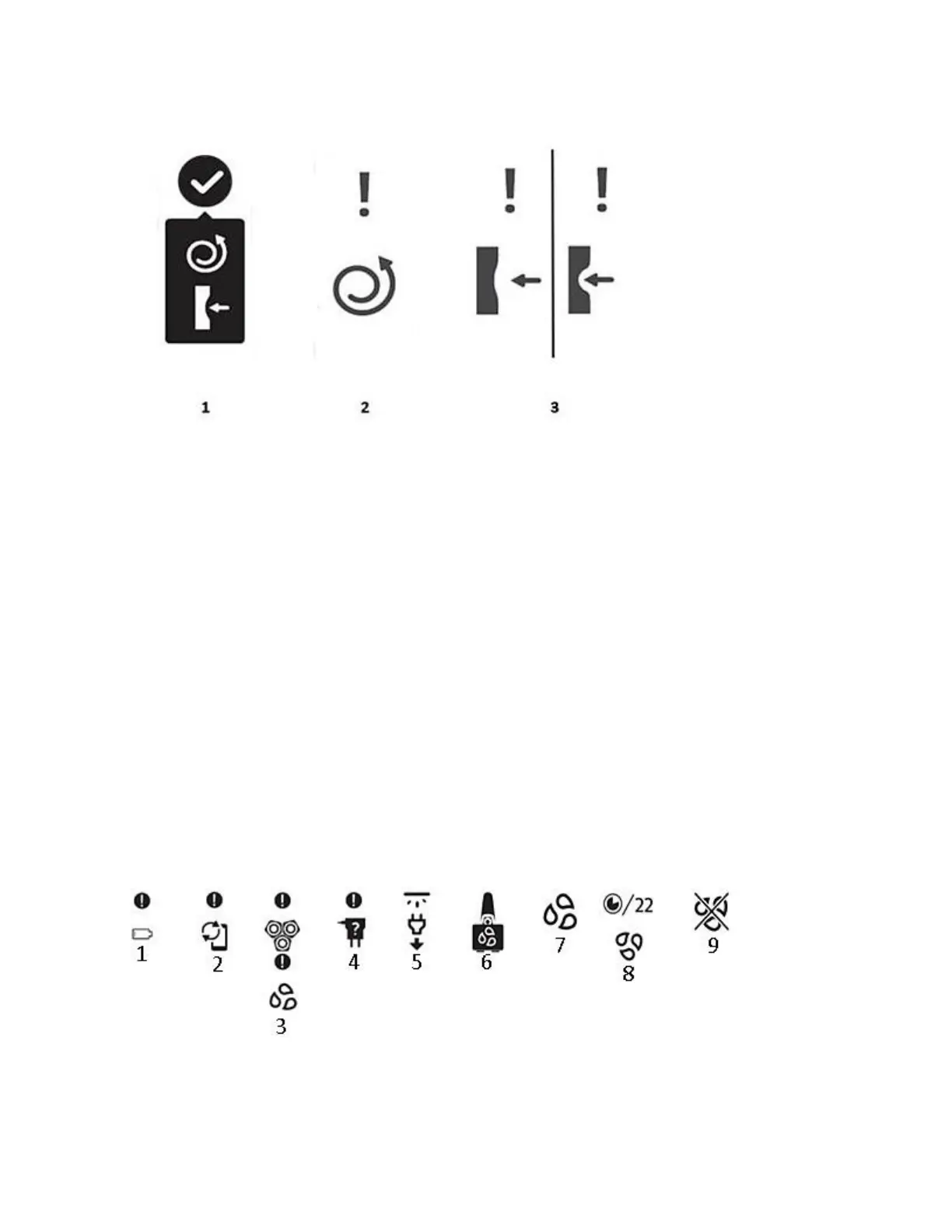
Model A/Notification and warning icons
Your shaver handle may display a notification or warning symbol from time to time, and each of
these symbols are explained below (with numbers corresponding to the illustrations provided):
1. Battery low: the battery of your shaver is running low. Please charge your shaver.
2. Memory almost full: the data storage on your shaver is nearly full. Sync your shavers
with the app to avoid data loss.
3. Thorough cleaning: the shaving unit is heavily soiled. Please thoroughly clean your
shaver in the manner indicated in the user manual before its next use.
4. Incorrect supply unit: an incorrect power cord or supply unit is inserted into the shaver.
Please use the power cord or supply unit provided with your Philips shaver.
5. Unplug before use: please unplug the shaver from the power supply before use.
6. Quick Clean Pod cleaning reminder: give your shaver a quick clean in the Quick Clean
Pod.
7. Cleaning reminder: clean the shaver under the tap in the manner indicated in the user
manual.
8. Cleaning underway: the cleaning process is in progress and the display shows the
remaining cleaning time in seconds.
9. Cleaning interrupted: the cleaning cycle has been interrupted.
Model B/Main menu






 To Next Page