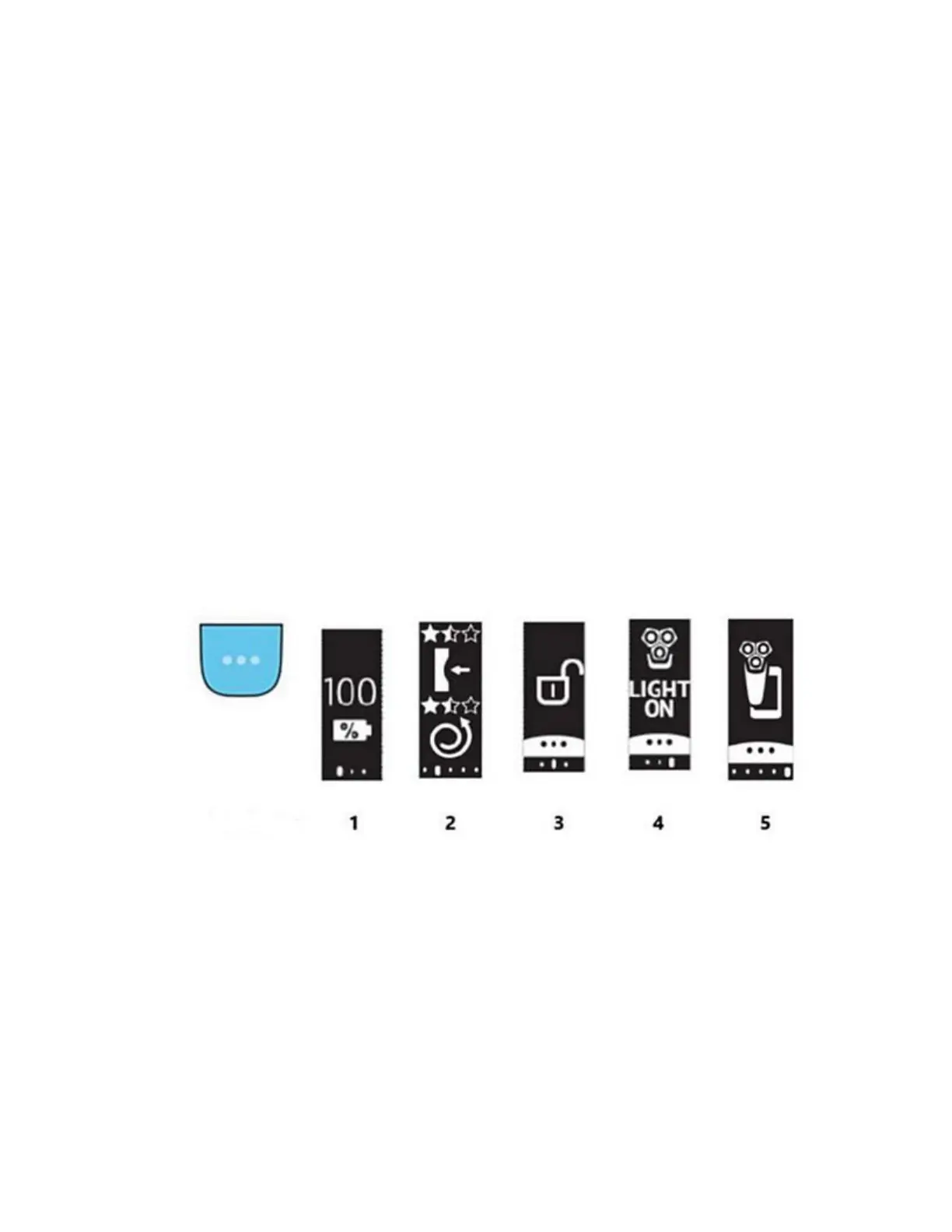
You can use the main menu button (icon with three dots) to navigate through the menu items.
You can also activate or deactivate certain features with a long press. These items are listed
below, with numbers corresponding to the illustrations provided.
1. Battery: the current battery level of your shaver is shown on the display.
2. Motion sensor: You can optimise your shaving experience by applying the right motion
and amount of pressure. This item shows the star rating of your last shave. It indicates
whether the pressure and motion you applied during the shave was good or could be
improved. Note: This menu is displayed only after you activate this feature via the
app settings.
3. Travel lock: press and hold the menu button for 3 seconds to lock or unlock your shaver.
When the travel lock is activated, Bluetooth will be switched off automatically and your
shaver will enter energy saving mode.
4. Light ring: You can deactivate or reactivate the light ring feedback in this menu. To do
it, toggle through the menu items by pressing the menu button until you reach the "Light
on" or "Light off" menu. Then, press and hold the menu button for 3 seconds until you
see "Light off" or "Light on" on the display.
5. Bluetooth: Here you can unpair your shaver and smartphone. Note: The Bluetooth
menu is only displayed when your shaver is paired to your smartphone.
Note: the icons mentioned above are only visible when the shaver is turned off.
Model B/Notification and warning icons
Your shaver handle may display a notification or warning symbol from time to time, and each of
these symbols are explained below (with numbers corresponding to the illustrations provided):
1. Battery low: your shaver's battery is running low. Please charge your shaver.
2. Memory almost full: the data storage on your shaver is nearly full. Sync your shavers
with the app to avoid data loss.
3. Thorough cleaning: the shaving unit is heavily soiled. Please thoroughly clean your
shaver in the manner indicated in the user manual before its next use.
4. Incorrect supply unit: an incorrect power cord or supply unit is inserted into the shaver.
Please use the power cord or supply unit provided with your Philips shaver.
5. Unplug before use: please unplug the shaver from the power supply before use.





 To Next Page