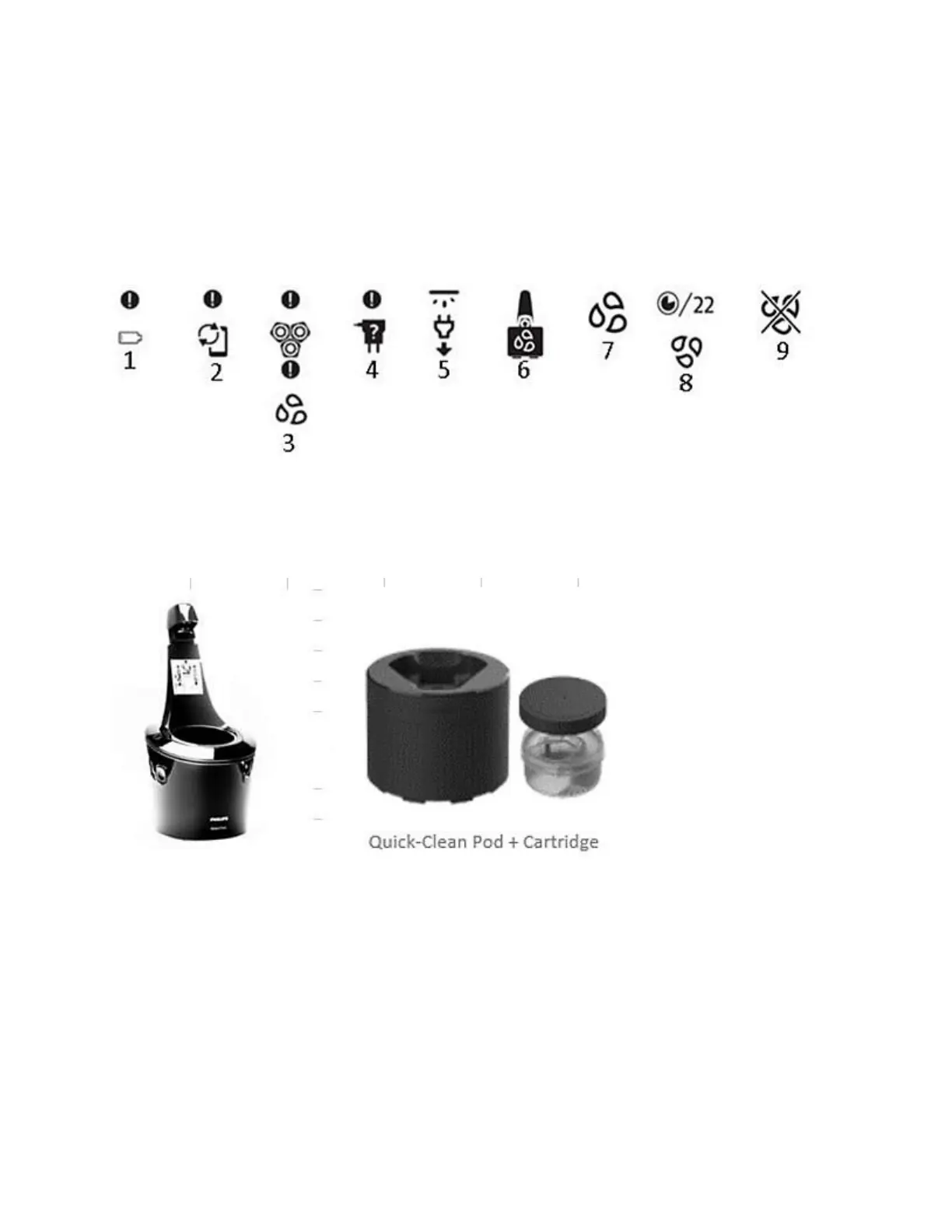
6. Quick Clean Pod cleaning reminder: give your shaver a quick clean in the Quick Clean
Pod.
7. Cleaning reminder: clean the shaver under the tap in the manner indicated in the user
manual.
8. Cleaning underway: the cleaning process is in progress and the display shows the
remaining cleaning time in seconds.
9. Cleaning interrupted: the cleaning cycle has been interrupted.
When should I replace the cartridge of my Philips cleaning station?
You can find out here when to replace the cleaning cartridge if you have a Philips Shaver
Cleaning system like the SmartClean (Image 1) or the Quick Clean Pod (Image 2).
When to replace the cleaning cartridge
We recommend replacing the cleaning cartridge of your Philips Shavers Cleaning system when
the cleaning station indicates or when you are no longer satisfied with the cleaning performance
of your cleaning system.
For the SmartClean system, you will see an arrow symbol flashing orange on the device. In the
Quick Clean Pod a small window shaped icon will appear (see image).
If you use the Cleaning system weekly, then the cleaning fluid in a cartridge should be enough
for three months. If you are a more regular user, then the cartridge will need to be replaced much
earlier, possibly within a month.





 To Next Page