For preview purpose only
SA1110/37
Technical specifications Product highlights
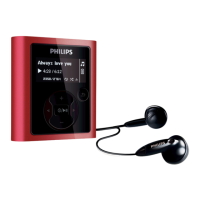
Flash audio player
1GB*
Date of issue 2006-09-18
Version: 1.0
12 NC: 9073 101 02925
UPC: 6 09585 11976 5
Specifications are subject to change without notice.
Trademarks are the property of Koninklijke Philips
Electronics N.V. or their respective owners.
© 2006 Koninklijke Philips Electronics N.V.
All Rights reserved.
www.philips.com
Picture/Display
• Backlight
• Backlight color: Green
• Lines of text: 2
• Resolution: 32 x 128
• Type: LCD
Sound
• Channel separation: 45 dB
• Frequency response: 30 - 18 000 Hz Hz
• Equalizer settings: Classic, Jazz, Pop, Rock
• Output power (RMS): 2 x 4 mW
• Signal to noise ratio: > 85 dB
Audio Playback
• Compression format: MP3, WAV, Windows
Media™ Audio
• MP3 bit rates: 8-320 kbps and VBR
• ID3 Tag support: Track title and artist name
• MP3 sample rates: 8, 11.025, 16, 22.050, 24,
32, 44.1, 48 kHz
Audio Capturing
• Audio file format: WAV
• Built-in microphone: mono
• Voice recording: ADPCM
Storage Media
• Built-in Memory Capacity: 1GB
• Built-in memory type: NAND Flash
• Music memory capacity, WMA: Up to 500
tracks *
• Mass storage class compliant
Connectivity
• Headphone: 3.5 mm
• USB: Full speed USB 2.0
Convenience
• Firmware upgradeable
• Function: Keypad lock
Accessories
• Batteries: AAA Alkaline
• Headphones: AY3809
• Printed User Guide: English, French,
German, Spanish, Dutch, Italian
• USB cable: USB extension cable
•User Guide on CD-ROM
Software
• Device manager: Firmware Manager to
restore and upgrade
Green Specifications
• Lead-free soldered product
System Requirements
•CD-ROM drive
• Internet connection: Yes (for access to
updated support documents, manuals, future
firmware and PC software upgrades)
• PC OS: 98SE, ME, 2000, XP
• USB: Free USB port
Dimensions
• Blister dimensions (WxDxH): 5.31 x 1.50 x
7.68 inch
• Product dimensions (WxDxH): 1.12 x 0.87 x
3.27 inch
• Product weight: 0.030 kg
• Packaging type: Clamshell
Power
• Batteries included
• Battery type: AAA / LR03 Alkaline
• Playtime on external battery: Up to 8 hours
•
USB mass storage device
USB mass storage devices offer a convenient way to save,
backup and move your files around. The devices connect
to your computer using a USB connection and do not
require any special software to be installed (only Windows
98 and Me need drivers). The device automatically shows
up as a removable drive in Windows Explorer allowing
you to simply drag and drop files to and from the device.
Folder Browsing
You have a lot of music on your player and you want to
find the right song, fast. Folder Browsing is a quick short-
cut to finding and playing your music. Organize your
music into folders on your PC. Give the folders any name
you like, you might use the artist's or album's name. Then
drag and drop the folders to your device in Windows
Explorer. When you're listening to your player, you can
zoom to the songs by holding the next or previous key to
see folder names scrolling across one by one. Release the
button when you see the folder you're looking for and the
first song will start to play.


 To Previous Page
 Loading...